Welcome to ROSMASTER M1 PRO repository
3.Lidar Following
LiDAR Tracking
1. Course Content
Run the example program. The robot scans the surrounding environment with the LiDAR, detects in real time the object closest to the car body, and controls the chassis to track that object.
2. Preparation
xxxxxxxxxxros2 launch yahboomcar_bringup lidar_demo.launch.py demo:=laser_Tracker
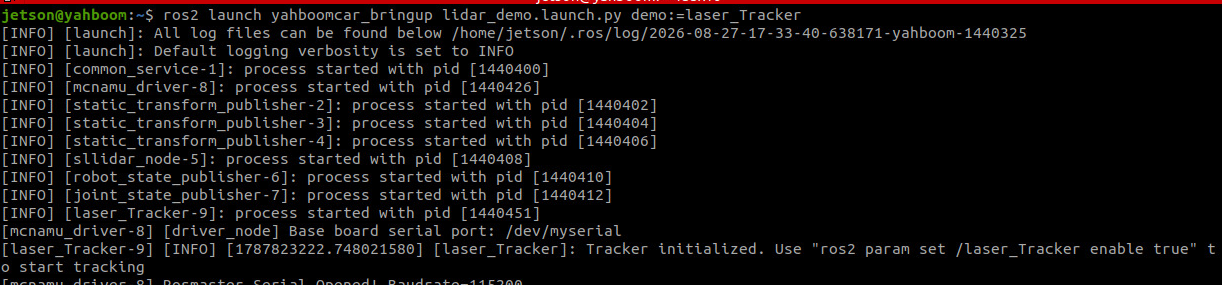
3. Case Demonstration
Place an object that can be scanned in front of the car's LiDAR, then start/stop tracking via commands
Start tracking
xxxxxxxxxxros2 param set /laser_Tracker enable true
After starting tracking, the LiDAR scans for the object closest to the car within the detection range. Slowly move that object; the program will control the chassis to move, maintaining a distance of 0.5 meters from it and aligning the front of the car with that object.
Stop tracking
xxxxxxxxxxros2 param set /laser_Tracker enable false
4. Source Code Analysis
Program code path:
xxxxxxxxxx~/yahboomcar_ros2_ws/yahboomcar_ws/src/common_demo/common_demo/lidar/laser_Tracker.py
Checks the
is_enabledparameter; when not enabled, it returns directly and the car stays stationaryAutomatically detects the LiDAR
frame_idand establishes thebase_link ← laser_framecoordinate transform chain via TFIterates through all laser points, filters out invalid values, and transforms each point from the LiDAR coordinate frame to the
base_linkcoordinate frameKeeps only the front points whose angle is within the ±
LaserAnglerange, recording the distance and coordinatesSelects the closest obstacle among the front points, obtaining its distance
minDistand anglemin_angleLinear velocity PID: uses
ResponseDistas the setpoint andminDistas the feedback, computing the forward velocity vialin_pid; the farther the distance, the faster the velocityAngular velocity PID: uses 0 (aligned) as the setpoint and
min_angleas the feedback, computing the turning velocity viaang_pidAngular velocity deadzone: when the output is less than
angular_deadzone, it is set to zero to avoid wheel jitter caused by tiny deviationsAngular velocity clamping: when it exceeds
max_angular, it is clamped to ±max_angularto prevent overly aggressive turningOutputs tracking status logs throttled by
log_interval, and finally publishes theTwistvelocity command to/cmd_vel
xxxxxxxxxx def registerScan(self, scan_data): if not isinstance(scan_data, LaserScan): return # Skip processing if not enabled if not self.is_enabled: return # Auto-detect laser frame_id if not self.laser_frame: self.laser_frame = scan_data.header.frame_id self.get_logger().info(f'Detected laser frame: {self.laser_frame}') # If TF is not ready, try to establish connection if not self.tf_ready: try: self.tf_buffer.lookup_transform( 'base_link', scan_data.header.frame_id, rclpy.time.Time(), timeout=rclpy.duration.Duration(seconds=0.1) ) self.tf_ready = True self.get_logger().info(f'TF ready: base_link <- {scan_data.header.frame_id}') except TransformException: # TF not ready, skip this scan return # Get transform from laser to base_link try: trans = self.tf_buffer.lookup_transform( 'base_link', scan_data.header.frame_id, rclpy.time.Time(), timeout=rclpy.duration.Duration(seconds=0.1) ) except TransformException: # Throttle TF error logs current_time = self.get_clock().now().nanoseconds / 1e9 if (current_time - self.last_tf_log_time) >= self.tf_log_interval: self.get_logger().warn('TF not available, skipping scan') self.last_tf_log_time = current_time return # Iterate through all laser points and find closest obstacle in front ranges = np.array(scan_data.ranges) minDistList = [] minDistBaseList = [] # Store positions in base_link frame for i in range(len(ranges)): if ranges[i] == 0.0 or ranges[i] > scan_data.range_max: continue # Calculate laser point position in laser coordinate frame angle = scan_data.angle_min + scan_data.angle_increment * i point_in_laser = PointStamped() point_in_laser.header = scan_data.header point_in_laser.point.x = ranges[i] * math.cos(angle) point_in_laser.point.y = ranges[i] * math.sin(angle) point_in_laser.point.z = 0.0 # Transform to base_link coordinate frame try: point_in_base = do_transform_point(point_in_laser, trans) x = point_in_base.point.x y = point_in_base.point.y # Only consider obstacles in front (within LaserAngle) dist = math.sqrt(x**2 + y**2) angle_to_base = math.atan2(y, x) * RAD2DEG if abs(angle_to_base) < self.LaserAngle: minDistList.append(dist) minDistBaseList.append((x, y, angle_to_base)) except TransformException: continue if len(minDistList) == 0: return # Find the closest obstacle minDist = min(minDistList) minIdx = minDistList.index(minDist) min_x, min_y, min_angle = minDistBaseList[minIdx] # PID control for tracking velocity = Twist() # Distance deadzone if abs(minDist - self.ResponseDist) < 0.1: minDist = self.ResponseDist # Linear velocity PID (maintain target distance) velocity.linear.x = -self.lin_pid.pid_compute(self.ResponseDist, minDist) # Angular velocity PID (align with obstacle) # Use angle directly in radians for better sensitivity angle_rad = math.radians(min_angle) ang_pid_compute = self.ang_pid.pid_compute(0, angle_rad) # Target is 0 (aligned), current is angle_rad velocity.angular.z = -ang_pid_compute # Reduced deadzone for better responsiveness if abs(ang_pid_compute) < self.angular_deadzone: velocity.angular.z = 0.0 # Clamp angular velocity to safe limits if abs(velocity.angular.z) > self.max_angular: velocity.angular.z = self.max_angular * (1.0 if velocity.angular.z > 0 else -1.0) # Throttle logging current_time = self.get_clock().now().nanoseconds / 1e9 if (current_time - self.last_log_time) >= self.log_interval: self.get_logger().info( f'Tracking: dist={minDist:.2f}m, angle={min_angle:.1f}deg, ' f'linear={velocity.linear.x:.2f}, angular={velocity.angular.z:.2f}' ) self.last_log_time = current_time self.pub_vel.publish(velocity)
Parameter file path
xxxxxxxxxx~/yahboomcar_ros2_ws/yahboomcar_ws/src/yahboomcar_bringup/param/common.yaml
Parameter Description:
| Parameter | Default Value | Meaning | Debugging Suggestion |
|---|---|---|---|
linear | 0.15 m/s | Maximum forward linear velocity | Upper limit for tracking velocity; increasing it speeds up tracking but easily causes overshoot |
angular | 1.0 rad/s | Maximum turning angular velocity | Upper limit for turning response speed; too large will cause swaying |
LaserAngle | 45.0° | Half-angle of the target search sector | The larger the angle, the wider the search range, but it may introduce lateral interference |
ResponseDist | 0.45 m | Tracking holding distance | The desired distance to maintain from the target; adjust according to the scene |
enable | false | Whether to enable following at startup | Disabled by default; needs to be enabled manually via ros2 param set |
lin_pid_P/I/D | 1.0/0.0/1.0 | Linear velocity PID parameters | P determines the response speed, D suppresses oscillation, I eliminates steady-state error |
ang_pid_P/I/D | 2.0/0.0/2.0 | Angular velocity PID parameters | P determines the turning response, D suppresses overshoot; it is recommended to start with P=D |
angular_deadzone | 0.1 rad/s | Angular velocity deadzone | Below this value no turning is output, avoiding jitter caused by tiny deviations |
max_angular | 2.0 rad/s | Angular velocity upper limit | Limits the maximum turning speed to prevent overly aggressive turning |
laser_Tracker ros__parameters # Basic tracking parameters linear0.15 # Default linear velocity (m/s) angular1.0 # Default angular velocity (rad/s) LaserAngle45.0 # Laser detection angle range (degrees) ResponseDist0.45 # Target tracking distance (m) enablefalse # Enable tracking (true/false) # Linear PID parameters [P, I, D] lin_pid_P1.0 # Linear PID proportional gain lin_pid_I0.0 # Linear PID integral gain lin_pid_D1.0 # Linear PID derivative gain # Angular PID parameters [P, I, D] ang_pid_P2.0 # Angular PID proportional gain ang_pid_I0.0 # Angular PID integral gain ang_pid_D2.0 # Angular PID derivative gain # Angular velocity control angular_deadzone0.1 # Angular velocity deadzone threshold max_angular2.0 # Maximum angular velocity limit (rad/s)