Welcome to ROSMASTER M1 PRO repository
5.Face detection
Face Detection
1. Course Content
Run the example program to detect faces using the mediapipe framework.
2. Program Startup
Run the face detection node in the terminal
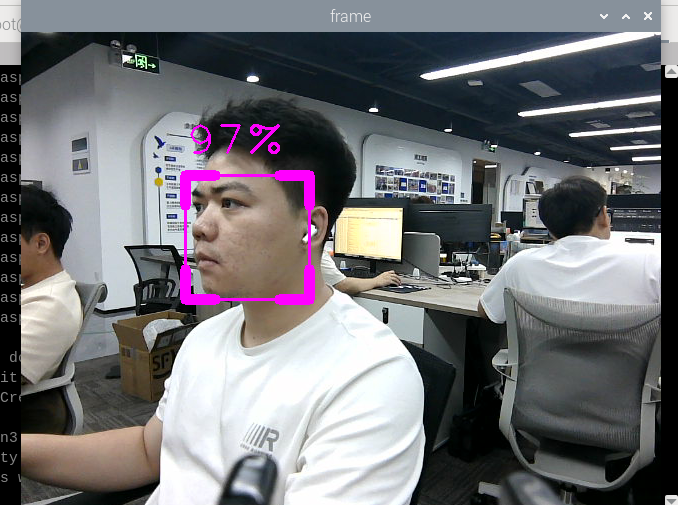
xxxxxxxxxxros2 launch yahboomcar_bringup mediapipe_demo.launch.py demo:=FaceDetectorAfter the program runs, as shown in the figure below, a detected face will be framed and the detection score will be displayed. The higher the score, the more likely it is recognized as a face.
3. Core Source Code Analysis
Program code path:
xxxxxxxxxx~/yahboomcar_ros2_ws/yahboomcar_ws/src/common_demo/common_demo/mediapipe/05_FaceDetection.py
Import the required library files
xxxxxxxxxximport timeimport cv2 as cvimport numpy as npimport rclpyfrom rclpy.node import Node#Import the mediapipe libraryimport mediapipe as mpfrom cv_bridge import CvBridgefrom sensor_msgs.msg import Imagefrom arm_msgs.msg import ArmJointsimport cv2Initialize the data and define the Publisher and Subscriber,
xdef __init__(self, name): super().__init__(name) self.minDetectionCon=0.5 #Use the class in the mediapipe library to define a face detection object self.mpFaceDetection = mp.solutions.face_detection self.mpDraw = mp.solutions.drawing_utils self.facedetection = self.mpFaceDetection.FaceDetection(min_detection_confidence=self.minDetectionCon) self.rgb_bridge = CvBridge()
#Define the Subscriber for the color image topic self.sub_rgb = self.create_subscription(Image,"/camera/color/image_raw",self.get_RGBImageCallBack,100)Color image callback function,
xxxxxxxxxxdef get_RGBImageCallBack(self,msg): #Use CvBridge to convert the color image message data into image data rgb_image = self.rgb_bridge.imgmsg_to_cv2(msg, "bgr8") #Pass the obtained image into the defined findFaces function for the face detection program frame,_ = self.findFaces(rgb_image) key = cv2.waitKey(1) cv.imshow('frame', frame)findFaces function,
xxxxxxxxxxdef findFaces(self, frame): #Convert the color space of the input image from BGR to RGB for subsequent image processing img_RGB = cv.cvtColor(frame, cv.COLOR_BGR2RGB) #Call the process function in the mediapipe library for image processing; during init, the self.facedetection object was created and initialized self.results = self.facedetection.process(img_RGB) bboxs = [] #Determine whether self.results.detections exists, that is, whether a face has been recognized if self.results.detections: #Iterate through the id and detection data for id, detection in enumerate(self.results.detections): #Obtain the bounding box coordinates bboxC = detection.location_data.relative_bounding_box ih, iw, ic = frame.shape bbox = int(bboxC.xmin * iw), int(bboxC.ymin * ih), \ int(bboxC.width * iw), int(bboxC.height * ih) #Store the detection result bboxs.append([id, bbox, detection.score]) #Call the fancyDraw function to draw the bounding box frame = self.fancyDraw(frame, bbox) #Display the face recognition score on the image cv.putText(frame, f'{int(detection.score[0] * 100)}%',(bbox[0], bbox[1] - 20), cv.FONT_HERSHEY_PLAIN,3, (255, 0, 255), 2) return frame, bboxsfancyDraw function, draws the bounding box according to the value of the detection result bbox
def fancyDraw(self, frame, bbox, l=30, t=10): x, y, w, h = bbox x1, y1 = x + w, y + h cv.rectangle(frame, (x, y),(x + w, y + h), (255, 0, 255), 2) # Top left x,y cv.line(frame, (x, y), (x + l, y), (255, 0, 255), t) cv.line(frame, (x, y), (x, y + l), (255, 0, 255), t) # Top right x1,y cv.line(frame, (x1, y), (x1 - l, y), (255, 0, 255), t) cv.line(frame, (x1, y), (x1, y + l), (255, 0, 255), t) # Bottom left x1,y1 cv.line(frame, (x, y1), (x + l, y1), (255, 0, 255), t) cv.line(frame, (x, y1), (x, y1 - l), (255, 0, 255), t) # Bottom right x1,y1 cv.line(frame, (x1, y1), (x1 - l, y1), (255, 0, 255), t) cv.line(frame, (x1, y1), (x1, y1 - l), (255, 0, 255), t) return frame