Welcome to ROSMASTER M1 PRO repository
12.OpenClaw Vector Memory
OpenClaw Vector Memory
OpenClaw Vector Memory1. Course ContentCourse OverviewWhat is Vector MemoryHow It WorksUse CasesWorkflowFeatures2. Preparation3. Memory Feature Demo Case4. Retrieving Memory via Vector Search4.1 Prerequisites4.2 Configure embeddings Model API_KEY4.3 Verify Vector Memory
1. Course Content
Course Overview
OpenClaw has powerful memory capabilities that enable the robot to remember important information during conversations and intelligently retrieve and use these memories in subsequent interactions. This section will introduce OpenClaw's Vector Memory (Semantic Memory) system, which is an intelligent memory retrieval mechanism based on semantic understanding.
What is Vector Memory
Vector Memory is OpenClaw's built-in semantic search memory system, which implements intelligent memory retrieval through the following core technologies:
Vector Embedding: Converts memory documents into high-dimensional vector representations, enabling computers to understand the semantic meaning of text
Semantic Retrieval: Matches based on the semantic similarity of queries, not just keyword matching, can understand synonyms and related concepts
How It Works
Vectorization Processing
Converts content from MEMORY.md and memory/*.md into vector representations
Supports semantic understanding, not just keyword matching
Semantic Retrieval
Based on the semantic meaning of queries, not exact keywords
Returns the most relevant text fragments and their location information
Use Cases
| Scenario | Example |
|---|---|
| Recalling Past Decisions | "The decision about sorting order before" |
| Finding Related Experience | "How to handle robotic arm grasping failure" |
| Task Context | "The project the user mentioned last week" |
| Personal Preferences | "User's preferred interaction method" |
Workflow
User Question → memory_search(Semantic Query) → Returns Relevant Fragments → memory_get(Read Specific Location) → Generate Response
Features
Intelligent Matching: Understands synonyms and related concepts
Automatic Citation: Results include file path and line number
Complementary to File Memory: Vector memory for retrieval, file memory for persistent storage
2. Preparation
First study the 【OpenClaw Skills Development】 chapter to master creating new skills
xxxxxxxxxxros2 launch yahboomcar_bringup mcp_service.launch.py use_camera:=true
If you need voice replies, you need to add the use_tts parameter:
ros2 launch yahboomcar_bringup mcp_service.launch.py use_camera:=true use_tts:=true, otherwise it can be omitted
3. Memory Feature Demo Case
Tip
This case is for demonstration reference only, you can have free conversations based on your own needs. The following is a case demonstration using WebChat as an example
When performing inspection tasks in the future, follow the order of production workshop, material warehouse, and logistics center. Remember this inspection order and follow this process for future inspections.
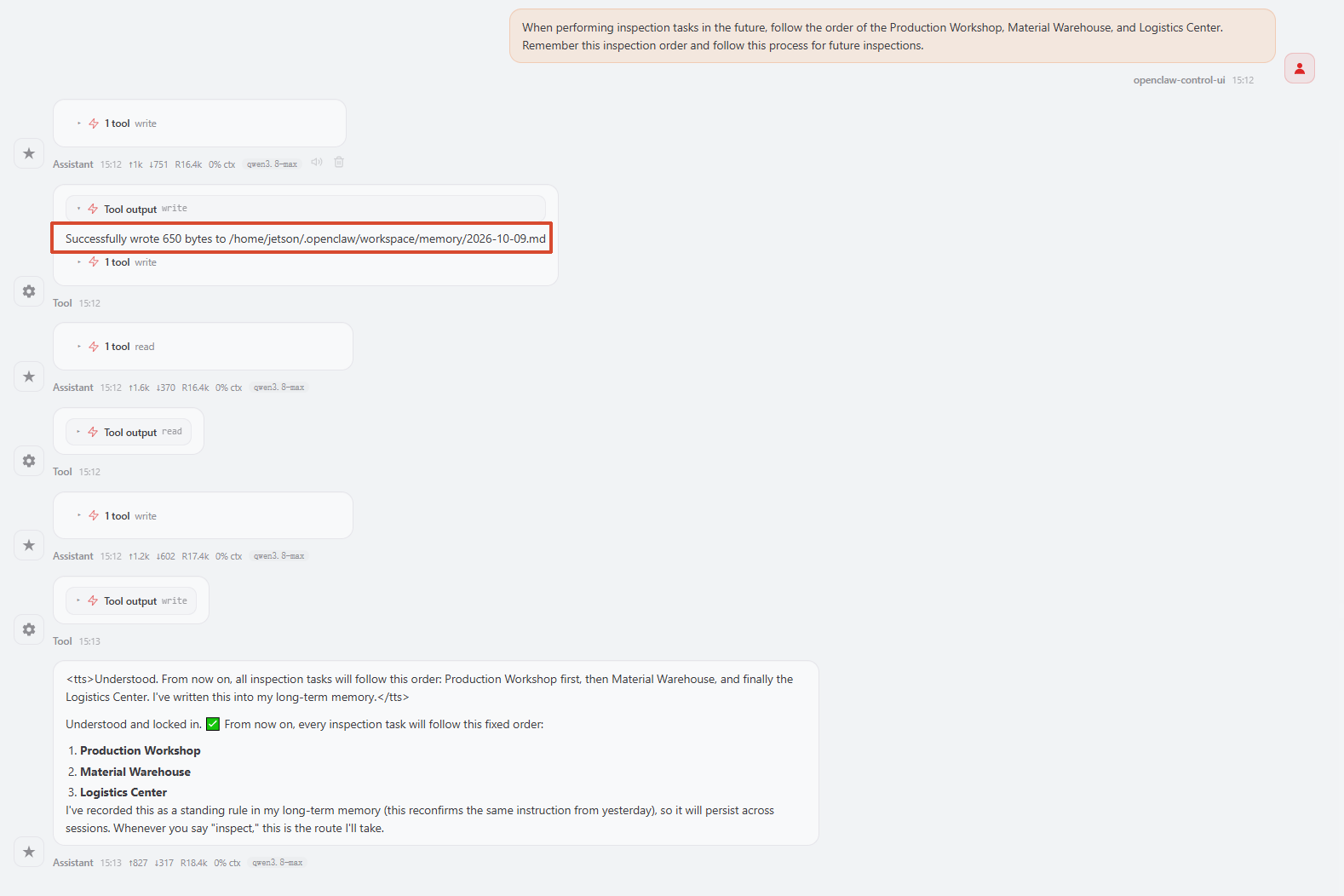
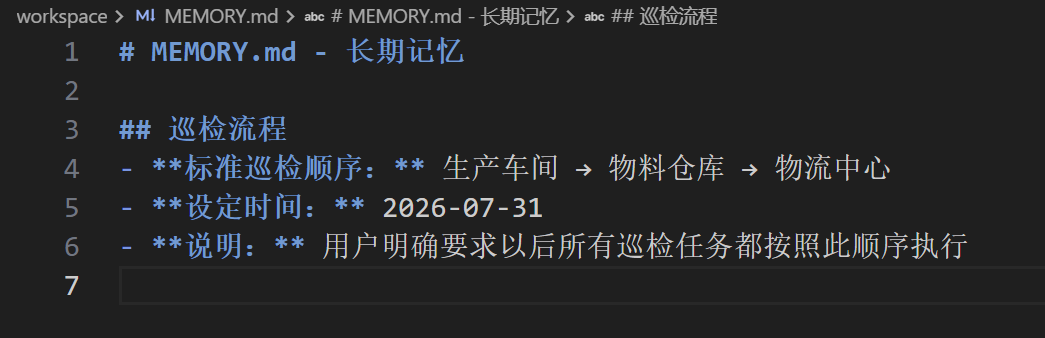
OpenClaw's memory content will be stored in files at the following path. You can view the memory content from the above case:
xxxxxxxxxxcat $HOME/.openclaw/workspace/MEMORY.md
4. Retrieving Memory via Vector Search
OpenClaw supports slicing and retrieving memory documents in vector mode, suitable for semantic retrieval of memories in large-scale memory documents
Tip
OpenClaw's built-in default mode is full-text search mode, suitable for the vast majority of use cases. If you have higher requirements for the memory feature, you can refer to the following tutorial to implement vector storage of memory documents by adding an external embeddings model
4.1 Prerequisites
You need to register an account with an embeddings model provider. The following demonstration uses the openrouter platform as an example. For account registration and API application, refer to the tutorial 【AI Model Development—Register a Model Service Provider Account—3. openrouter Platform Account】
4.2 Configure embeddings Model API_KEY
Set the model provider (openai interface protocol)
xxxxxxxxxxopenclaw config set agents.defaults.memorySearch.provider "openai"
Set the baseUrl. Here using openrouter as an example. If you are using embeddings models from other providers, replace with the actual baseUrl
xxxxxxxxxxopenclaw config set agents.defaults.memorySearch.remote.baseUrl "https://openrouter.ai/api/v1"
Set the embeddings model. Here using the
"openai/text-embedding-3-small"model as an example. If you are using other embeddings models, replace with the actual name
xxxxxxxxxxopenclaw config set agents.defaults.memorySearch.model "openai/text-embedding-3-small"
Set the API_KEY for the embeddings model
xxxxxxxxxxopenclaw config set agents.defaults.memorySearch.remote.apiKey "sk-or-v1-133949f96bec556343539a587f53d077xxxxxxxxxxxxxxxx"
Restart the OpenClaw gateway to take effect
xxxxxxxxxxopenclaw gateway restart
Configuration Parameter Description:
agents.defaults.memorySearch.provider: The model provider interface protocol for memory search. Setting it to"openai"means using an OpenAI-compatible interfaceagents.defaults.memorySearch.remote.baseUrl: The API service address of the embeddings model. Fill in the corresponding baseUrl according to the provider actually usedagents.defaults.memorySearch.model: The name of the embeddings model, used to convert memory documents into vector representations. Different providers offer different embeddings models, so fill in according to the model actually usedagents.defaults.memorySearch.remote.apiKey: The API key for the embeddings model, used for identity authentication
CLI Command Description:
openclaw memory status --deep: Views the complete status of vector memory, including the sliced file paths and vector index information, used to confirm whether the configuration is in effectopenclaw memory index --force: Forces a rebuild of the memory index. It needs to be executed manually once after initial configuration or memory document updatesopenclaw memory search "keyword": Tests semantic retrieval, returning the memory fragments most semantically relevant to the keyword along with scores. A higher score indicates higher semantic similarity (typically > 0.3 indicates good relevance)
4.3 Verify Vector Memory
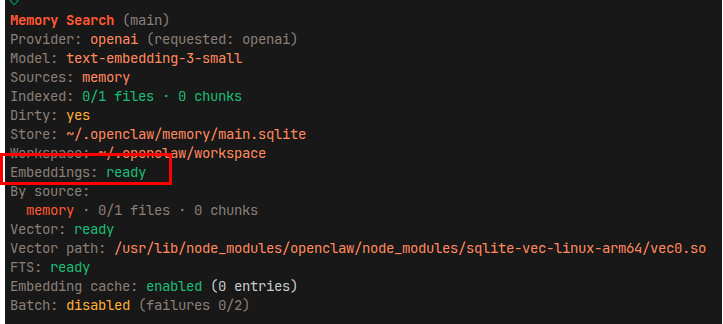
Check if vector memory is configured and active. The following output proves the configuration is successful, where Vector is the path of the sliced file
xxxxxxxxxxopenclaw memory status --deep
After initial configuration, you can manually update the index once
xxxxxxxxxxopenclaw memory index --force

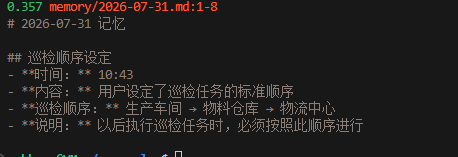
Test whether memory retrieval can find the memory fragments from the demonstration case above
xxxxxxxxxxopenclaw memory search "inspection"
Here
0.357is the semantic relevance score. A higher score indicates higher semantic similarity. Results greater than 0.3 typically have good relevance