Welcome to ROSMASTER M1 PRO repository
15.Medipipe gesture control robotic arm action group
Gesture Control Robotic Arm Action Group
Gesture Control Robotic Arm Action Group1. Course Content2. Program Startup3. Core Source Code Analysis
1. Course Content
This function implements acquiring the color image and recognizing gestures using the mediapipe framework, then making the robotic arm perform preset action groups according to the gestures.
2. Program Startup
xxxxxxxxxxros2 launch yahboomcar_bringup mediapipe_demo.launch.py demo:=GestureMovingAfter the program runs, the robotic arm will move to the gesture recognition pose. The following gestures are recognized:
Yes gesture: the robotic arm will "dance" according to the preset actions, and then return to the initial pose.
OK gesture: the robotic arm will shake its head left and right, and then return to the initial pose.
Thumb-down gesture (clench the fist, thumb pointing down): the robotic arm will assume a kneeling pose, and then return to the initial pose
One-finger gesture (only one finger is detected as straight): the robotic arm will nod, and then return to the initial pose.
Rock gesture (thumb, middle finger, and ring finger bent; index finger and pinky straight): the robotic arm extends upward and sways left and right, and then returns to the initial pose.
Five fingers (all 5 fingers straight): the robotic arm applauds, and then returns to the initial pose.
For example, the Rock gesture is shown below,
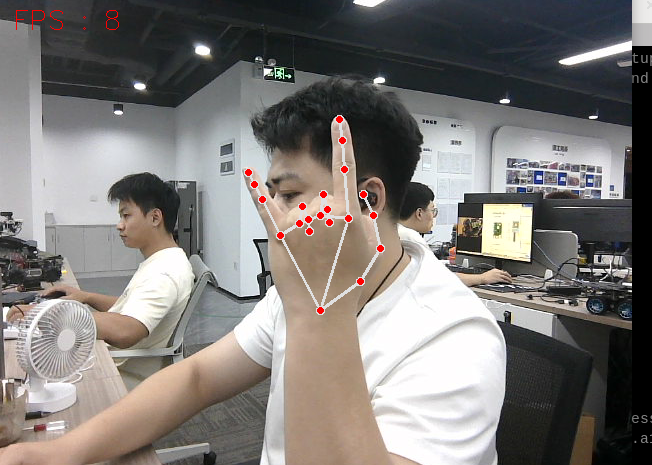
After you make the gesture, press the spacebar, and the robotic arm will perform the action group according to the recognized gesture. You need to press the spacebar for each recognition.
3. Core Source Code Analysis
Program code path:
xxxxxxxxxx~/yahboomcar_ros2_ws/yahboomcar_ws/src/common_demo/common_demo/mediapipe/18_Gesture_Moving.py
Import the necessary library files,
xxxxxxxxxximport cv2import osfrom sensor_msgs.msg import Imagefrom cv_bridge import CvBridgeimport cv2 as cvfrom arm_msgs.msg import ArmJointsfrom arm_msgs.msg import ArmJointimport time#Import the custom library, which contains mediapipe-related librariesfrom M3Pro_demo.media_library import *from rclpy.node import Nodeimport rclpyimport threadingThe program initializes and creates the Publisher and Subscriber,
xxxxxxxxxxdef __init__(self, name): super().__init__(name) self.init_joints = [90, 150, 12, 20, 90, 0] self.rgb_bridge = CvBridge() #Call the media_library library to create an object of the HandDetector class self.hand_detector = HandDetector() self.move_flag = True self.pr_time = time.time() self.pTime = self.cTime = 0 self.event = threading.Event() self.event.set() self.arm_status = False self.move = False #Define the topic Publisher for controlling a single servo, publishing the topic that controls a single servo angle self.pub_SingleTargetAngle = self.create_publisher(ArmJoint, "arm_joint", 10) #Define the topic Publisher for controlling the 6 servos, publishing the topic that controls the 6 servo angles self.TargetAngle_pub = self.create_publisher(ArmJoints, "arm6_joints", 10) #Define the Subscriber for the color image topic self.sub_rgb = self.create_subscription(Image,"/camera/color/image_raw",self.get_RGBImageCallBack,100) time.sleep(2) self.pubSix_Arm(self.init_joints)Color image callback function,
xxxxxxxxxxdef get_RGBImageCallBack(self,color_msg): #Use CvBridge to convert the color image message data into image data rgb_image = self.rgb_bridge.imgmsg_to_cv2(color_msg, "bgr8") #Pass the obtained image into the process function for gesture detection self.process(rgb_image)process function,
xxxxxxxxxxdef process(self, frame): #Call the method of the object to perform palm detection, returning the detected image plus the lmList list and the bbox list frame, lmList, bbox = self.hand_detector.findHands(frame) key = cv2.waitKey(10) if key==32: self.move = True #Determine whether a palm has been detected and whether the spacebar has been pressed; if so, start a thread to execute the gesture recognition program if len(lmList) != 0 and self.move == True: gesture = threading.Thread(target=self.Arm_Moving_threading, args=(lmList,bbox)) gesture.start() #Calculate and display the frame rate self.cTime = time.time() fps = 1 / (self.cTime - self.pTime) self.pTime = self.cTime text = "FPS : " + str(int(fps)) cv.putText(frame, text, (20, 30), cv.FONT_HERSHEY_SIMPLEX, 0.9, (0, 0, 255), 1) if cv.waitKey(1) & 0xFF == ord('q'): cv.destroyAllWindows() cv.imshow('frame', frame)Arm_Moving_threading gesture recognition thread program,
def Arm_Moving_threading(self, lmList,bbox): if self.event.is_set(): self.event.clear() #Call the function that detects straight fingers to check which fingers are straight fingers = self.hand_detector.fingersUp(lmList) self.hand_detector.draw = False #Call the gesture acquisition function to obtain the current gesture gesture = self.hand_detector.get_gesture(lmList) #According to the current gesture and the straight-finger condition, execute the corresponding custom robotic arm action group function if gesture == "Yes": self.arm_status = False self.dance() time.sleep(0.5) self.init_pose() time.sleep(1.0) self.arm_status = True elif gesture == "OK": self.arm_status = False for i in range(3): time.sleep(0.1) self.pubSix_Arm([80, 135, 0, 15, 90, 180]) time.sleep(0.5) self.pubSix_Arm([110, 135, 0, 15, 90, 90]) time.sleep(0.5) self.init_pose() sleep(1.0) self.arm_status = True elif gesture == "Thumb_down": self.arm_status = False self.pubSix_Arm([90, 0, 180, 0, 90, 180]) time.sleep(0.5) self.pubSix_Arm([90, 0, 180, 0, 90, 90]) time.sleep(1.5) self.init_pose() time.sleep(1.0) self.arm_status = True elif sum(fingers) == 1: self.arm_status = False self.arm_nod() self.init_pose() time.sleep(1.0) self.arm_status = True elif fingers[1] == fingers[4] == 1 and sum(fingers) == 2: self.arm_status = False self.shake() self.init_pose() time.sleep(1.0) self.arm_status = True elif sum(fingers) == 5: self.arm_status = False self.arm_applaud() self.init_pose() time.sleep(1.0) self.arm_status = True self.move = False self.event.set()