Welcome to ROSMASTER M1 PRO repository
4.Lidar Guard
LiDAR Guard
1. Course Content
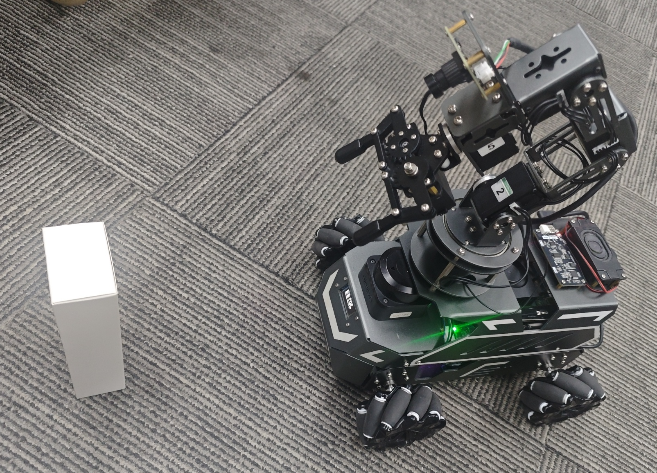
Run the example program. It will then detect in real time the object closest to the car body and control the chassis to rotate in place so that the front of the car aligns with that object. At the same time, if the distance between that object and the car is smaller than the alarm threshold, the buzzer on the car will sound an alarm.
2. Preparation
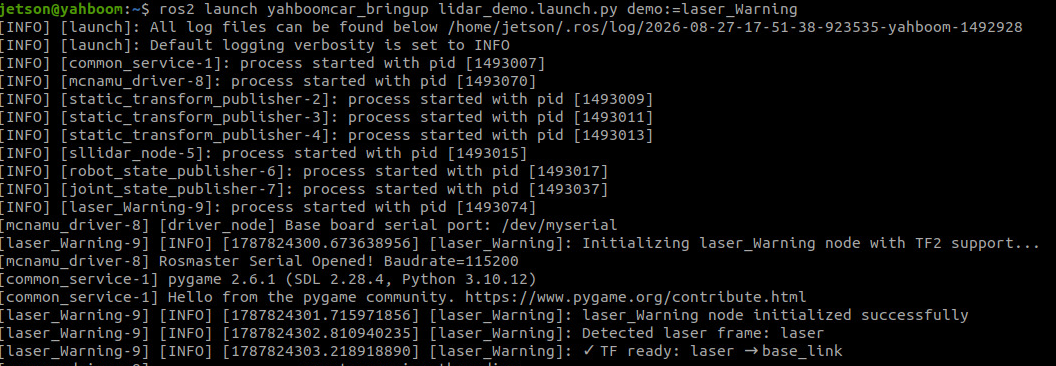
xxxxxxxxxxros2 launch yahboomcar_bringup lidar_demo.launch.py demo:=laser_Warning
3. Case Demonstration
Start tracking
xxxxxxxxxxros2 param set /laser_Warning enable true
After the program starts, the LiDAR scans for the object closest to the car within the detection range. Slowly move that object left and right; the program will control the chassis to rotate in place and track that object so that the front of the car aligns with it. If the distance between the car's base_link and that object is less than 0.37 meters, the buzzer on the car will sound.
Stop tracking
xxxxxxxxxxros2 param set /laser_Warning enable false
4. Core Source Code Analysis
Program code path:
xxxxxxxxxx~/yahboomcar_ros2_ws/yahboomcar_ws/src/common_demo/common_demo/lidar/laser_Warning.py
Automatically detects the LiDAR
frame_idand establishes thebase_link ← laser_framecoordinate transform chain via TFChecks the
is_enabledparameter; when not enabled, it returns directlyIterates through all laser points, filters out invalid values, and transforms each point from the LiDAR coordinate frame to the
base_linkcoordinate frameKeeps only the front points whose angle is within the ±
LaserAnglerange, and finds the closest obstacleWhen no obstacle is detected, stops the car and turns off the buzzer
Buzzer alarm: turns on the buzzer when the distance to the closest obstacle ≤
ResponseDist, and turns it off when the distance >ResponseDist; thebuzzer_activestate flag avoids repeated sendingAngular velocity PID: uses 0 (aligned) as the setpoint and the obstacle's angle as the feedback, computing the turning velocity via
ang_pidAngular velocity deadzone: when the output is less than
angular_deadzone, it is set to zero to avoid wheel jitter caused by tiny deviations
xxxxxxxxxx def registerScan(self, scan_data): if not isinstance(scan_data, LaserScan): return # Auto-detect laser frame_id if not self.laser_frame and scan_data.header.frame_id: self.laser_frame = scan_data.header.frame_id self.get_logger().info(f'Detected laser frame: {self.laser_frame}') # Check if TF is ready if not self.tf_ready or not self.laser_frame: return # Check if transform is still available try: trans = self.tf_buffer.lookup_transform( 'base_link', self.laser_frame, rclpy.time.Time() ) except TransformException as ex: current_time = self.get_clock().now().nanoseconds / 1e9 if (current_time - self.last_log_time) >= 3.0: self.get_logger().warn(f'TF transform error: {ex}') self.last_log_time = current_time return # Check if tracking is enabled if not self.is_enabled: return # Get laser data ranges = np.array(scan_data.ranges) # Find the nearest obstacle in front using TF2 min_dist = float('inf') nearest_x = 0.0 nearest_y = 0.0 nearest_angle = 0.0 found_obstacle = False for i in range(len(ranges)): # Skip invalid measurements if ranges[i] <= 0.0 or ranges[i] > scan_data.range_max: continue # Calculate laser point position in laser coordinate frame angle = scan_data.angle_min + scan_data.angle_increment * i point_in_laser = PointStamped() point_in_laser.header = scan_data.header point_in_laser.point.x = ranges[i] * math.cos(angle) point_in_laser.point.y = ranges[i] * math.sin(angle) point_in_laser.point.z = 0.0 # Transform to base_link coordinate frame try: point_in_base = do_transform_point(point_in_laser, trans) x = point_in_base.point.x y = point_in_base.point.y # Check if point is within LaserAngle in front dist = math.sqrt(x**2 + y**2) angle_to_base = math.atan2(y, x) * RAD2DEG if abs(angle_to_base) < self.LaserAngle: # Find nearest obstacle if dist < min_dist: min_dist = dist nearest_x = x nearest_y = y nearest_angle = angle_to_base found_obstacle = True except Exception as e: continue if not found_obstacle: # No obstacle found, stop robot velocity = Twist() self.pub_vel.publish(velocity) # Turn off buzzer if self.buzzer_active: buzzer_msg = Bool() buzzer_msg.data = False self.pub_Buzzer.publish(buzzer_msg) self.buzzer_active = False return # Log nearest obstacle info (throttled) current_time = self.get_clock().now().nanoseconds / 1e9 if (current_time - self.last_log_time) >= self.log_interval: self.get_logger().info( f'Nearest: dist={min_dist:.2f}m, ' f'x={nearest_x:.2f}m, y={nearest_y:.2f}m, ' f'angle={nearest_angle:.1f}°' ) self.last_log_time = current_time # Control buzzer based on distance if min_dist <= self.ResponseDist: if not self.buzzer_active: buzzer_msg = Bool() buzzer_msg.data = True self.pub_Buzzer.publish(buzzer_msg) self.buzzer_active = True else: if self.buzzer_active: buzzer_msg = Bool() buzzer_msg.data = False self.pub_Buzzer.publish(buzzer_msg) self.buzzer_active = False # Calculate angular velocity to track the nearest obstacle # Target angle is 0 (aligned with x-axis) angle_rad = math.radians(nearest_angle) ang_pid_compute = self.ang_pid.pid_compute(0, angle_rad) velocity = Twist() # Reverse angular velocity direction velocity.angular.z = -ang_pid_compute # Apply deadzone if abs(ang_pid_compute) < self.angular_deadzone: velocity.angular.z = 0.0 # Clamp angular velocity if abs(velocity.angular.z) > self.max_angular: velocity.angular.z = self.max_angular * (1.0 if velocity.angular.z > 0 else -1.0) # Publish velocity self.pub_vel.publish(velocity)
Parameter file path
xxxxxxxxxx~/yahboomcar_ros2_ws/yahboomcar_ws/src/yahboomcar_bringup/param/common.yaml
Parameter Description for the laser_Warning node in common.yaml:
| Parameter | Default Value | Meaning | Debugging Suggestion |
|---|---|---|---|
LaserAngle | 45.0° | Half-angle of the target search sector | The larger the angle, the wider the search range, but it may introduce lateral interference |
ResponseDist | 0.37 m | Buzzer alarm distance threshold | The buzzer alarms when the distance is less than this value; adjust according to the scene |
enable | false | Whether to enable tracking and alarming at startup | Disabled by default; needs to be enabled manually via ros2 param set |
ang_pid_P/I/D | 3.0/0.0/5.0 | Angular velocity PID parameters | P determines the turning response, D suppresses overshoot; it is recommended to start with P < D |
angular_deadzone | 0.5 rad/s | Angular velocity deadzone | Below this value no turning is output, avoiding jitter caused by tiny deviations |
max_angular | 1.2 rad/s | Angular velocity upper limit | Limits the maximum turning speed to prevent overly aggressive turning |
laser_Warning ros__parameters # Basic warning parameters linear0.15 # Default linear velocity (m/s) - not used for warning angular1.0 # Default angular velocity (rad/s) - not used for warning LaserAngle45.0 # Laser detection angle range (degrees) ResponseDist0.37 # Warning distance threshold (m) - buzzer triggers when closer enablefalse # Enable tracking and warning (true/false) # Angular PID parameters [P, I, D] ang_pid_P3.0 # Angular PID proportional gain ang_pid_I0.0 # Angular PID integral gain ang_pid_D5.0 # Angular PID derivative gain # Angular velocity control angular_deadzone0.5 # Angular velocity deadzone threshold max_angular1.2 # Maximum angular velocity limit (rad/s)