Welcome to ROSMASTER M1 PRO repository
3.OpenClaw Voice Dialogue Interaction
OpenClaw Voice Dialogue Interaction
OpenClaw Voice Dialogue Interaction1. Course ContentCourse OverviewLearning Objectives2. Enabling and Disabling the Voice Tag3. Configure the Online Voice Model API-KEY (Optional)4. Preparation5. Voice Dialogue Case Demonstration6. Function Q&A1. If I do not want OpenClaw to output the voice reply tag, how do I disable it?2. Why does OpenClaw reply with a lot of text but only a very short voice reply?3. The OpenClaw reply has no voice tag and no voice reply was given. How can I have the full content replied by voice?
1. Course Content
Course Overview
This lesson is a hands-on tutorial explaining how to use the voice dialogue interaction feature of the OpenClaw framework on the ROSMASTER-M1PRO robot.
Learning Objectives
Master how to enable and disable the OpenClaw voice reply tag
Master the steps to configure the voice model parameter file and API-KEY
Master the process of starting the MCP service and the multi_brains_pre voice node program
Master how to conduct voice dialogue using the wake-up word
2. Enabling and Disabling the Voice Tag
Note
The OpenClaw voice reply tag is disabled by default at the factory. When you need to use the voice feature, enable and disable it through RobotManager
Enable the voice tag (for the Raspberry Pi motherboard, also run it in the host computer terminal)

Restart the OpenClaw gateway to apply the configuration
openclaw gateway restart
Test the reply
Here we test on the web side. First use the
/clearcommand to clear the dialogue history to avoid interference from the previously loaded old AGENTS.md, and enter a test sentenceYou can see that the reply contains the
<tts>...</tts>tag. OpenClaw'sreply-bridgeplugin automatically parses this tag and then calls the MCP interface for speech synthesis and broadcasting

3. Configure the Online Voice Model API-KEY (Optional)
xxxxxxxxxxrobot_manage gui
The factory default uses a local offline streaming speech recognition engine and local offline speech synthesis
Tip
Configuration is only needed when using online speech recognition or online speech synthesis. For Raspberry Pi 5 (4GB) and RDK X5 motherboard users, it is recommended to prioritize online speech recognition and speech synthesis in the comprehensive feature cases involving SLAM navigation in the subsequent OpenClaw chapters, as this effectively reduces the CPU and memory pressure on the motherboard; in the single-instance OpenClaw chapters, you can still use the offline voice feature to save costs
Comparison of offline speech recognition and speech synthesis features
| Feature | Solution | Effect Comparison |
|---|---|---|
| Offline Speech Recognition (ASR) | Local streaming speech recognition engine | No extra cost, real-time streaming recognition, but it uses some of the motherboard's CPU and memory resources |
| Online Speech Recognition (ASR) | Alibaba Cloud Bailian (Chinese) / iFlytek (English) | No streaming recognition, does not use the motherboard's computing resources |
| Offline Speech Synthesis (TTS) | Local speech synthesis engine | No extra cost; the synthesized voice is mechanical with a single timbre |
| Online Speech Synthesis (TTS) | Alibaba Cloud Bailian (Chinese) / iFlytek (English) | Better voice quality, does not use the motherboard's computing resources; the timbre is lifelike and close to a real person, with multiple timbres to choose from |
Chinese Online Voice Settings
Parameters for the China region use Alibaba Cloud Bailian speech synthesis by default; fill in the Alibaba Cloud Bailian API-KEY and baseURL
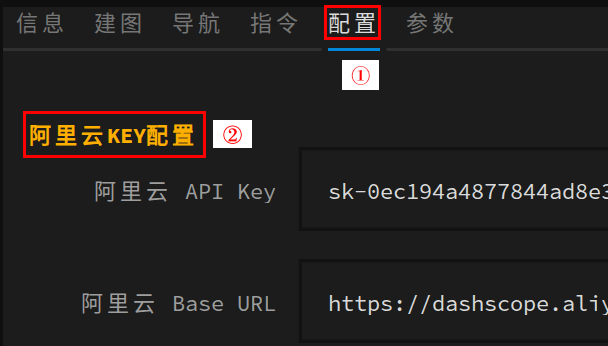

English Online Voice Settings
For international regions, the English online speech recognition and speech synthesis are provided by iFlytek; no API-KEY configuration is needed, just switch the language to English
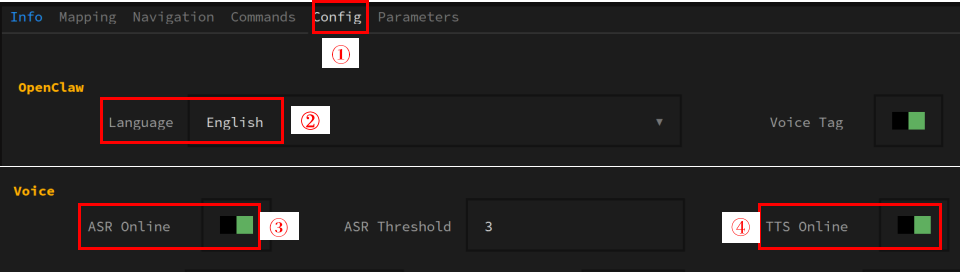
Offline Voice Settings
Turn off the online ASR and online TTS switches to switch to offline speech recognition and speech synthesis

4. Preparation
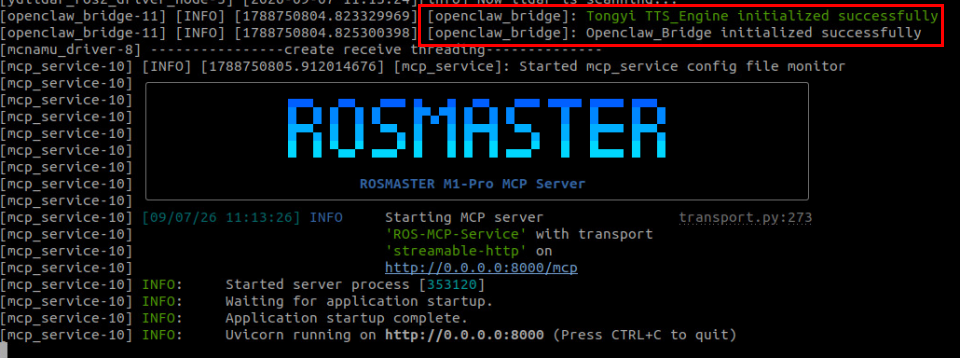
xxxxxxxxxxros2 launch yahboomcar_bringup mcp_service.launch.py use_tts:=true
Start the speech recognition node
xxxxxxxxxxros2 run multi_brains_pre asr_detectAfter startup, the log will indicate the loaded speech recognition model; the factory default uses the offline streaming speech recognition engine

Important
In the subsequent chapters, the voice playback feature is enabled through
use_tts:=true, and the robot-side speech recognition requires starting the asr_detect node, started as needed. If you do not need the robot-side voice feature, you can omit the use_tts parameter and not start the voice node. This will not be repeated in the subsequent OpenClaw chapter lessons.
5. Voice Dialogue Case Demonstration
Wake up the robot with the wake-up word "Hi Yahboom", and you can start the conversation
If the local speech recognition engine is used, streaming speech recognition is performed

The openclaw_bridge node displays OpenClaw's text reply and performs speech synthesis and broadcasting of the content within the voice tag

6. Function Q&A
1. If I do not want OpenClaw to output the voice reply tag, how do I disable it?
Answer: Disable the voice reply tag, restart the OpenClaw gateway, and ask OpenClaw in the conversation not to reply with voice:

2. Why does OpenClaw reply with a lot of text but only a very short voice reply?
Answer: The voice reply is a condensed version of the text, replying only with the key information. The robot only broadcasts the text within the <tts>...</tts> tag. The design reasons are as follows:
Reduces the time needed for speech synthesis; overly long text greatly increases the time required for speech synthesis
Overly long speech synthesis increases the token consumption cost of the voice model
In most scenarios only a short voice reply is needed, and the text reply is already detailed enough
3. The OpenClaw reply has no voice tag and no voice reply was given. How can I have the full content replied by voice?
You can require OpenClaw to always reply with voice during the conversation
If you need the entire full content replied by voice, you can ask OpenClaw to do so during the conversation