Welcome to ROSMASTER M1 PRO repository
4.OpenClaw Waste Sorting
OpenClaw Waste Sorting
OpenClaw Waste Sorting1. Course ContentLearning Objectives2. Preparation3. Robotic Arm Waste Sorting Case4. yolov26-OBB Waste Recognition Node5. Source Code Analysis5.1 GetWasteRecognitionResults — Obtain waste recognition results5.2 GraspWaste — Grasp the target waste5.3 PlaceWaste — Place the waste5.4 waste_classify Detection Node — YOLO Inference Thread6. Parameter Debugging6.1 Waste Sorting Grasping Parameters6.2 YOLO Model Detection Parameters7. Function Q&A
1. Course Content
Important
This lesson can only be used with the depth camera configuration. USB monocular camera users can skip this lesson.
Learning Objectives
Understand the application and configuration method of the yolov26-OBB model in waste detection.
Learn to use the GetWasteRecognitionResults, GraspWaste, and PlaceWaste tools to complete the waste sorting task.
Master the adjustment methods of key parameters such as waste_grasp_offset and waste_grasp_distance to optimize grasping precision.
2. Preparation
Demonstration props
3 * 3 * 3 cm waste label blocks
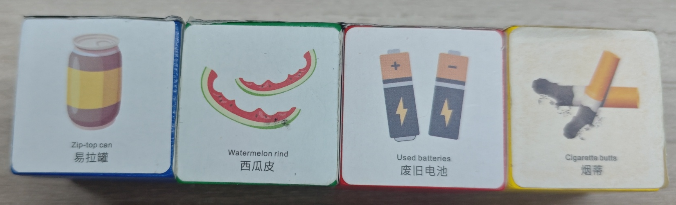
Start the MCP service. If you need voice replies, you must add the use_tts parameter:
use_tts:=true, otherwise it can be omitted.
ros2 launch yahboomcar_bringup mcp_service.launch.py use_camera:=true use_waste_classify:=true
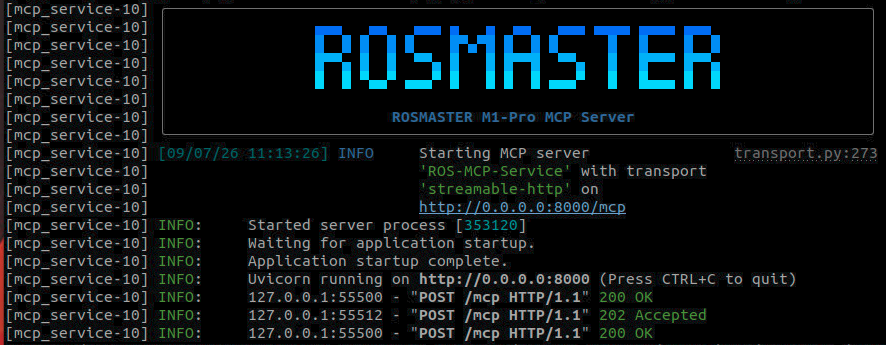
3. Robotic Arm Waste Sorting Case
Tip
You can write the command yourself according to your needs. The following is a case demonstration. Just choose any one of the interaction methods. The demonstration here uses the web-based WebChat as an example.
| Tool | Parameter | Function |
|---|---|---|
| GetWasteRecognitionResults | None | Obtain the waste recognition results of the YOLO model |
| GraspWaste | --waste-name | Grasp a waste object |
| PlaceWaste | None | Place a waste object |
Grasp the recyclable waste in front of you (you can also directly specify a certain piece of waste to grasp)
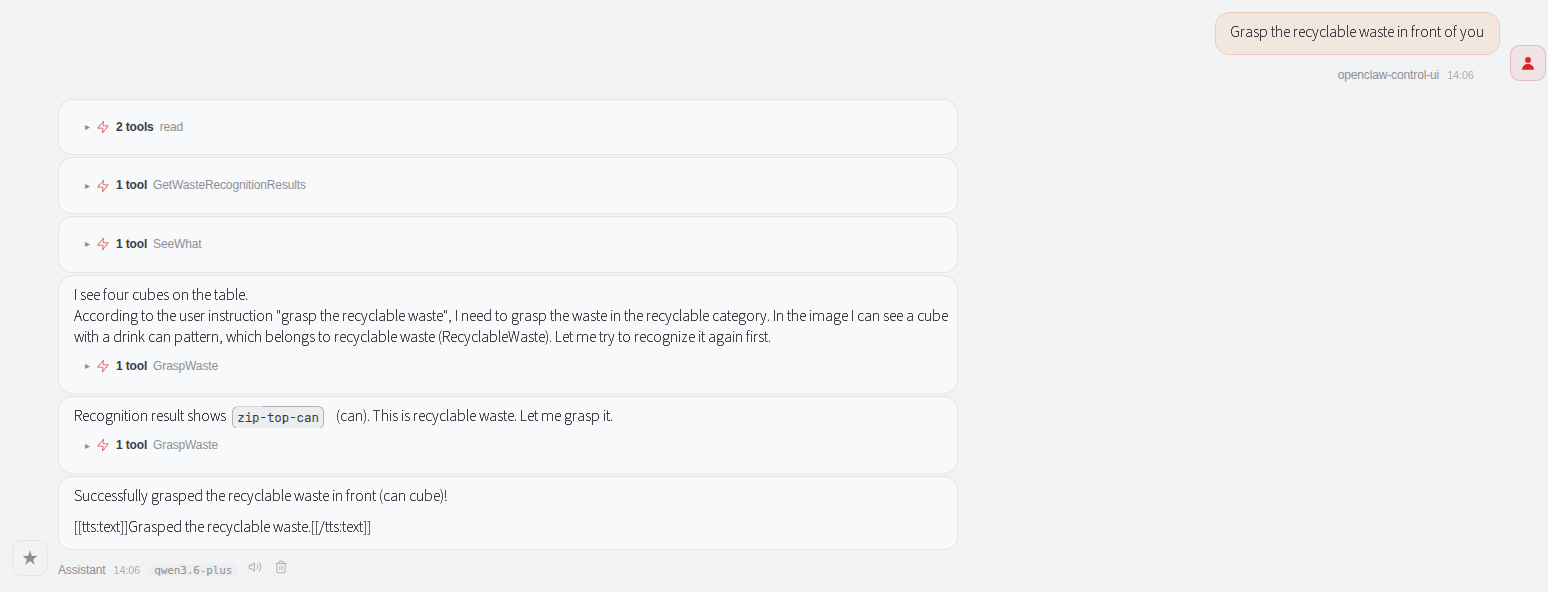
Here, waste recognition is performed using the yolov26-OBB model for recognition and detection. There will be a cold start delay on the first launch, as the YOLO model needs to be loaded first.
The model is automatically unloaded 240 seconds after it is loaded and running, to save memory and CPU resources (the startup duration can be configured).

After the model is loaded, the waste detection window automatically starts, displaying the waste recognition results.
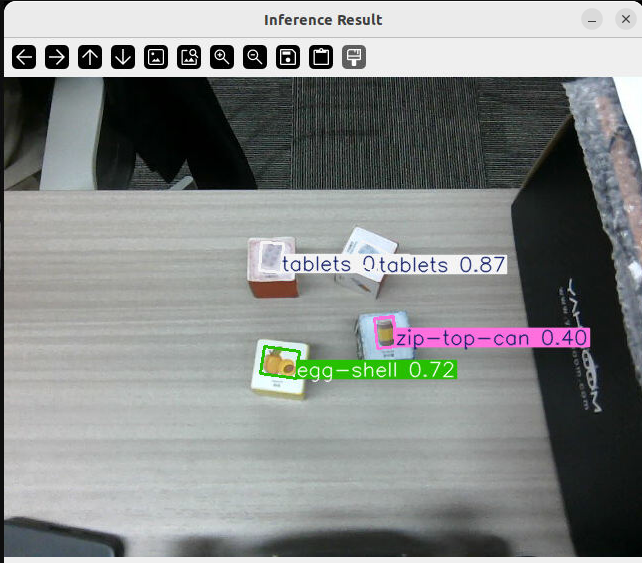
OpenClaw first obtains the YOLO waste recognition results through GetWasteRecognitionResults. When obtaining the results, the image of the recognition frame is automatically saved to the path:
xxxxxxxxxx~/yahboomcar_ros2_ws/yahboomcar_ws/cache/yolo_detect.png
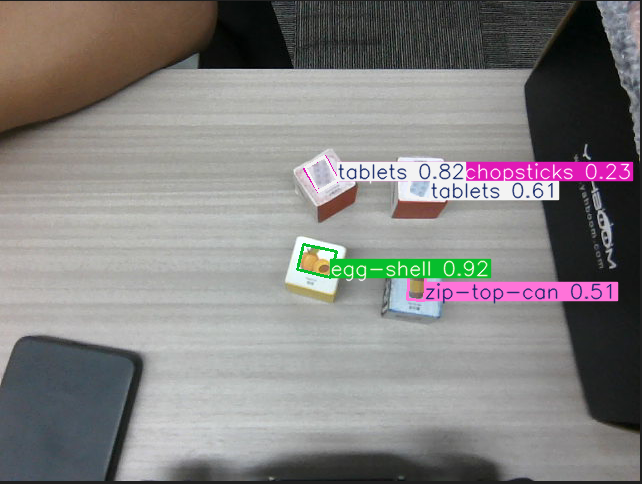
We can also directly obtain and view the waste detection results through the robot-control CLI (suitable for debugging).
xxxxxxxxxxrobot_control call-tool GetWasteRecognitionResults
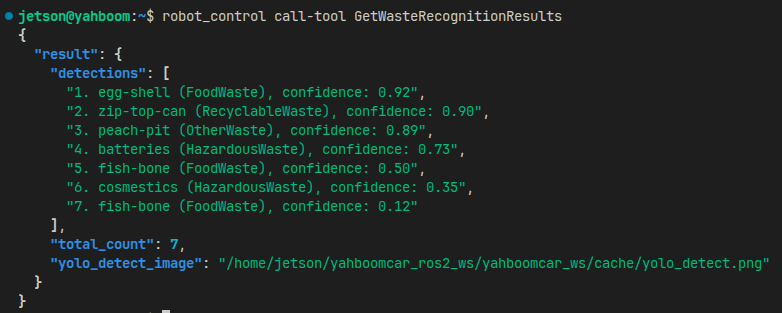
OpenClaw then calls the GraspWaste tool to grasp the target waste block.
xxxxxxxxxx┌──────────────────────┐│Get waste recognition ││ results │└──────────┬───────────┘│▼┌──────────────────────┐│Get target coordinates│└──────────┬───────────┘│▼┌──────────────────────┐│ Grasp target waste │└──────────────────────┘
Target grasping skills
OpenClaw controls the robot to grasp the target object. It will first read the robotic arm grasping and waste sorting skills and carry out the operation by referring to the SOP process.
For the skill, refer to: [OpenClaw Skills Development]
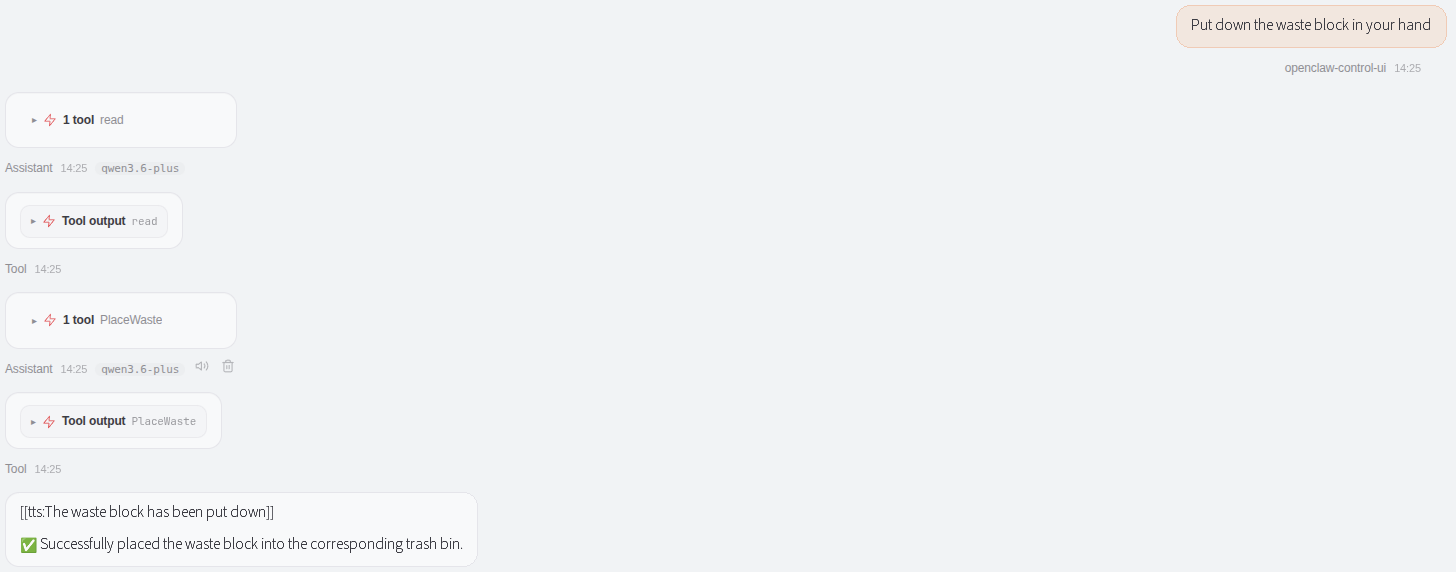
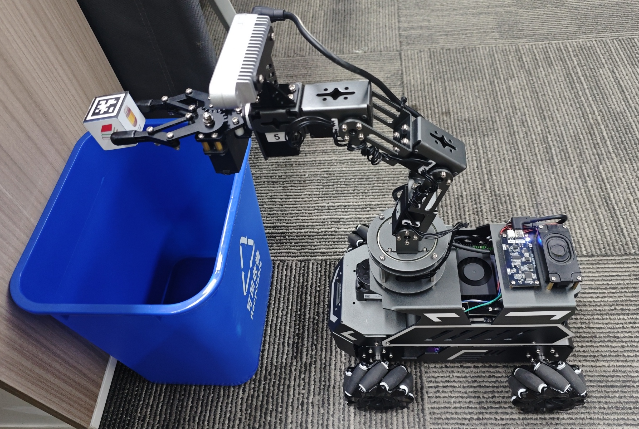
For waste placement, in order to adapt to different waste bins, the waste placement tool completes the placement action through action groups (the placement pose can be customized through configuration parameters to adapt to different waste bins).
4. yolov26-OBB Waste Recognition Node
Waste detection is an independent program node. When starting the MCP service, the waste detection node is automatically started through the following code. To reduce CPU and memory usage, the detection enable is turned off by default at startup.
xxxxxxxxxx def start_waste_classify(context, *args, **kwargs): #find waste classify model according to different machine success, waste_model_path = GetWasteModelPath("waste_detect") if not success: raise Exception(f'[WARN] GetWasteModelPath failed: {waste_model_path}') success, device = GetYoloInferDevice() if not success: raise Exception(f'[WARN] GetWasteInferDevice failed: {device}') rgb_topic = GetCameraRgbTopic() if rgb_topic is None: raise Exception(f'[WARN] GetCameraRgbTopic failed: {rgb_topic}') return [Node( package="waste_classify", executable="waste_detect", name="waste_detect", parameters=[commom_param_file, {'image_save_path': file_manager.GetFilePath("yolo_detect_image")}, {'model_path': waste_model_path}, {'show_image': True}, {'detect_enable': False}, {'device': device} ], remappings=[('/camera/color/image_raw', rgb_topic)], emulate_tty=True, additional_env={'PYTHONPATH': venv_pythonpath + os.pathsep + original_pythonpath }, output='screen')]
After the MCP service node starts, we can manually control the start and stop of the detection function through the ros service (suitable for debugging). The waste_classify node provides the following three services.
Query the current status (operation=0)
xxxxxxxxxxros2 service call /waste_enable_srv waste_classify_msg/srv/WasteEnable "{operation: 0}"

Enable waste detection (operation=1)
xxxxxxxxxxros2 service call /waste_enable_srv waste_classify_msg/srv/WasteEnable "{operation: 1}"

When detecting, the waste_classify node publishes the detection results to the /waste_detections topic. You can view the topic data with the following command.
xxxxxxxxxxros2 topic echo /waste_detections --onceSample topic data is as follows
xxxxxxxxxxheader:stamp:sec: 1778052123nanosec: 473421724frame_id: ''waste_detections:- class_name: peach-pitclassification: OtherWasteconfidence: 0.8850700259208679center_x: 390.0876770019531center_y: 314.08135986328125width: 32.05992126464844height: 25.9763240814209angle: -0.02274312824010849points:- x: 406.40887451171875y: 326.7016296386719- x: 405.818115234375y: 300.7320251464844- x: 373.7664794921875y: 301.4610900878906- x: 374.35723876953125y: 327.4306945800781
Topic Data Meaning Description:
| Field | Type | Meaning |
|---|---|---|
header.stamp | time | Timestamp of the detection result (sec: seconds, nanosec: nanoseconds) |
waste_detections | WasteItem[] | List of detected waste objects (may contain multiple targets) |
class_name | string | Specific category name of the waste (e.g., peach-pit, banana-peel, etc.) |
classification | string | Waste classification type (Recyclable, KitchenWaste, OtherWaste, HazardousWaste) |
confidence | float | Detection confidence (0.0~1.0); the higher the value, the more certain the model is about the detection result |
center_x | float | X coordinate of the center point of the detection box (in pixels, relative to the top-left corner of the image) |
center_y | float | Y coordinate of the center point of the detection box (in pixels, relative to the top-left corner of the image) |
width | float | Width of the detection box (in pixels) |
height | float | Height of the detection box (in pixels) |
angle | float | Rotation angle of the detection box (in radians), a parameter unique to the OBB model, representing the orientation of the object |
points | Point2D[] | Coordinates of the 4 vertices of the rotated box (in clockwise or counter-clockwise order), used to precisely describe the object boundary |
Key Concept Description:
OBB (Oriented Bounding Box) rotated box: Unlike a traditional rectangular box, an OBB can rotate to better fit the actual shape of an object, making it especially suitable for irregular objects.
angle: Represents the rotation angle of the object relative to the horizontal direction. When grasping, the robotic arm adjusts the gripper direction according to this angle, ensuring the grasp is made from the optimal angle.
points vertex coordinates: The 4 vertices precisely describe the boundary of the rotated box and can be used to calculate the actual size and position of the object.
Disable detection (operation=2)
xxxxxxxxxxros2 service call /waste_enable_srv waste_classify_msg/srv/WasteEnable "{operation: 2}"

5. Source Code Analysis
Source code path
xxxxxxxxxx~/yahboomcar_ros2_ws/yahboomcar_ws/src/multi_brains_pre/multi_brains_pre/action_controller.py
5.1 GetWasteRecognitionResults — Obtain waste recognition results
Function Description: Call the YOLO model to perform waste detection and obtain the recognition results of all waste in the current field of view, including category, confidence, position, and other information.
Code Explanation:
GetWasteRecognitionResults: Obtain the YOLO recognition results of all waste in the current field of view.waste_enable_client.wait_for_service/get_waste_client.wait_for_service: Wait for the two services, detection control and result acquisition, to come online and be available, with an 8-second timeout._pubSix_Arm([90,90,50,-30,90,0]): Move the robotic arm to the predefined detection pose to avoid the depth camera's blind spot, and wait 3 seconds to stabilize.WasteEnable.Request(operation=0): Query the current detection status.detect_enablereturns whether it is currently enabled.WasteEnable.Request(operation=1): Enable waste detection. After enabling, wait 10 seconds to ensure the first inference is complete.get_waste_client.call(GetWaste.Request()): Call the detection service to obtain the recognition results of all waste in the current field of view.response.waste_detections: The list of detection results, each element containing fields such asclass_name(category name),classification(waste classification), andconfidence(confidence).waste_recognition_result(...): Encapsulates a structured return result, containing the detection list, the total count, and the recognition frame image path.
xdef GetWasteRecognitionResults(self) -> list: '''Get YOLO waste recognition results''' from multi_brains_pre.message.mcp_message import waste_recognition_result if not self.waste_enable_client.wait_for_service(timeout_sec=8.0) or not self.get_waste_client.wait_for_service(timeout_sec=8.0): msg = "GetWaste service not available" self.get_logger().error(Fore.YELLOW + msg + Fore.RESET) return [False, msg]
self._pubSix_Arm([90,90,50,-30,90,0]) time.sleep(3.0) #TODO: waste detection causes high CPU usage; enable detection only when needed, and disable after getting results response:WasteEnable.Response = self.waste_enable_client.call(WasteEnable.Request(operation=0)) if not response.detect_enable: response:WasteEnable.Response = self.waste_enable_client.call(WasteEnable.Request(operation=1)) #enable waste detection if not response.success: msg = "Failed to enable waste detection" self.get_logger().error(Fore.RED + msg + Fore.RESET) return [False, msg] time.sleep(10.0)#wait for first waste detect response:GetWaste.Response=self.get_waste_client.call(GetWaste.Request()) if not response.success: msg = response.message self.get_logger().error(Fore.RED + msg + Fore.RESET) return [False, msg]
if len(response.waste_detections) == 0: msg = "No waste detected" self.get_logger().warn(Fore.YELLOW + msg + Fore.RESET) return [False, msg] result_lines = [] for i, item in enumerate(response.waste_detections, 1): result_lines.append( f"{i}. {item.class_name} ({item.classification}), " f"confidence: {item.confidence:.2f}") result = waste_recognition_result( detections=result_lines, total_count=len(response.waste_detections), yolo_detect_image=response.image_path) return [True, result]Process Description:
Service check: Wait for the
waste_enable_srvandget_waste_srvservices to be available (8-second timeout).Adjust the detection pose: Call
_pubSix_Arm([90,90,50,-30,90,0])to move the robotic arm to the predefined detection pose, and wait 3 seconds to stabilize.Start/stop detection:
Query the current detection status (operation=0).
If not started, enable detection (operation=1) and wait 10 seconds to ensure the first detection is complete.
Obtain results: Call the
get_waste_srvservice to obtain the detection results.Result processing: Iterate over all detected waste and format the output (category, classification, confidence).
Return result: Return a structured result containing the detection list, total count, and recognition image path.
Notes:
⚠️ Running the YOLO waste detection model increases CPU and memory usage, so an "on-demand start/stop" strategy is used; YOLO detection is automatically turned off a period of time after being enabled. ⚠️ After enabling detection, you need to wait a sufficient amount of time (10 seconds) to ensure the model completes the first inference. ⚠️ The robotic arm must first move to the detection pose (avoiding the depth camera's depth blind spot) before accurate recognition results can be obtained.
5.2 GraspWaste — Grasp the target waste
Code Explanation:
GraspWaste: Grasp the waste object with the specified name, executing the process of detection → localization → chassis adjustment → grasping → retreat._pubSix_Arm(self.waste_detect_pose): Move the robotic arm to the predefined waste detection pose._get_target_pose(waste_name, max_attempts=5): Obtain the 3D pose of the target waste, retrying up to 5 times, and returning aPoseand aWasteItem.target_pose.position.x > self.waste_grasp_distance[0]: Determine whether the target X coordinate exceeds the grasping distance; if so, move the chassis forward throughmove_by_odom.abs(target_pose.position.y) > self.waste_grasp_distance[1]: Determine whether the target Y coordinate exceeds the lateral grasping distance; if so, move the chassis left or right.move_by_odom(distance, direction): Control the chassis through odometry to move the specified distance, and wait 4 seconds after moving to ensure the camera is stable.adjusted_flag: The chassis adjustment flag. If the chassis has moved, call_get_target_poseagain to obtain the updated 3D coordinates.math.degrees(target_item.angle): Convert the rotation angle (radians) of the OBB detection box into a degree value.arm_joint5_angle = 90 + math.degrees(target_item.angle): Calculate the wrist joint J5 angle according to the object orientation (90° is the neutral position); when the absolute value of the angle is ≤ 5°, keep it neutral._waste_grasp(...): Execute the actual grasping action, passing in the target 3D coordinates, the J5 angle, and the grasping pitch angle.self.auto_back_dist: The automatic retreat distance after grasping is complete, to avoid collisions.
xxxxxxxxxxdef GraspWaste(self, waste_name: str) -> list[bool, str]:    '''Grasp waste object by name'''    self._pubSix_Arm(self.waste_detect_pose)    time.sleep(3.0)    result = self._get_target_pose(waste_name, max_attempts=5)    if not result[0]:        return [False, result[1]]
    target_pose: Pose = result[1]    target_item: WasteItem = result[2]
    # Adjust robot position if needed    adjusted_flag = False    if target_pose.position.x > self.waste_grasp_distance[0]:        adjusted_flag = True        delta_x = target_pose.position.x - self.waste_grasp_distance[0]        self.move_by_odom(distance=abs(delta_x), direction='forward')        self.get_logger().info("adjust x position finish")        time.sleep(4.0) #wait for camera to stabilize after movement
    if abs(target_pose.position.y) > self.waste_grasp_distance[1]:        adjusted_flag = True        delta_y = target_pose.position.y        direction = 'left' if delta_y > 0 else 'right'        self.move_by_odom(distance=abs(delta_y), direction=direction)        self.get_logger().info("adjust y position finish")        time.sleep(4.0) #wait for camera to stabilize after movement
    #  Re-acquire target pose after adjustment    if adjusted_flag:        result = self._get_target_pose(waste_name, max_attempts=5)        if not result[0]:            return [False, result[1]]
        target_pose = result[1]        target_item: WasteItem = result[2]
    item_rotation_angle=math.degrees(target_item.angle)    self.get_logger().debug(f"target_item_angle: {item_rotation_angle}")    if abs(item_rotation_angle) > 5:        #TODO: 90 degrees is the neutral position of the end effector.        arm_joint5_angle = 90+math.degrees(target_item.angle)    else:        arm_joint5_angle=90
    self._waste_grasp(grasp_x=target_pose.position.x,                      grasp_y=target_pose.position.y,                      grasp_z=target_pose.position.z,                      joint_5_angle=arm_joint5_angle,                      grasp_pitch=self.waste_grasp_offset[3])
    self.move_by_odom(direction='backward', distance=self.auto_back_dist)    return [True, "Grasp waste successfully"]
Process Description:
Move to the detection pose: Call
_pubSix_Arm(self.waste_detect_pose)to move the robotic arm to the predefined detection pose and wait 3 seconds.Obtain the target 3D pose: Call
_get_target_pose()to obtain the 3D coordinates of the target waste, retrying up to 5 times.Chassis position adjustment:
If the target X coordinate exceeds
waste_grasp_distance[0], move the chassis forward/backward.If the target Y coordinate exceeds
waste_grasp_distance[1], move the chassis left/right.After each movement, wait 4 seconds to ensure the camera is stable.
Re-obtain the pose: If the chassis has moved, call
_get_target_pose()again to obtain the updated 3D coordinates.Calculate the gripper rotation angle:
Calculate the adjustment angle of joint5 (wrist yaw) according to the
angleof the detection box.If the absolute value of the angle is > 5°, then
arm_joint5_angle = 90 + angle(90° is the neutral position).Otherwise keep the neutral position (90°).
Execute grasping: Call
_waste_grasp()to execute the actual grasping action, passing in the 3D coordinates and joint angles.Automatic retreat: After grasping is complete, retreat by the
auto_back_distdistance.
Key Technical Points:
Angle compensation: Adjust the gripper direction according to the rotation angle of the OBB detection box, ensuring the grasp of irregular objects is made from the optimal angle.
Chassis coordination: Automatically adjust the chassis position when the target exceeds the working range, ensuring the robotic arm can reach it.
Multiple retries: Retry up to 5 times when obtaining the pose, improving the success rate.
5.3 PlaceWaste — Place the waste
Code Explanation:
PlaceWaste: Place the grasped waste into the waste bin, completing the placement through a step-by-step action group.SingleJoint_pub.publish(ArmJoint(id=2, joint=135, time=1200)): First move the J2 shoulder joint to 135° to raise the robotic arm.SingleJoint_pub.publish(ArmJoint(id=4, joint=50, time=1200)): Move the J4 elbow joint to 50°, forming the placement pose together._pubSix_Arm(self.waste_place_pose): Move to the complete 6-joint placement pose and wait 3 seconds to ensure the motion is complete.SingleJoint_pub.publish(ArmJoint(id=6, joint=0, time=1500)): Open the J6 gripper to 0° to release the waste object._pubSix_Arm(self.init_arm_pose): After placement is complete, restore the robotic arm to its initial safe pose.move_by_odom(direction='backward', distance=self.auto_back_dist): The chassis automatically retreats, to avoid collisions and entering the costmap restricted area.
xxxxxxxxxxdef PlaceWaste(self):    '''Place the grasped waste into the bin'''    self.SingleJoint_pub.publish(ArmJoint(id=2, joint=135 , time=1200))    self.SingleJoint_pub.publish(ArmJoint(id=4, joint=50 , time=1200))    time.sleep(2.0)    self._pubSix_Arm(self.waste_place_pose)    time.sleep(3.0)    self.SingleJoint_pub.publish(ArmJoint(id=6, joint=0 , time=1500))    time.sleep(2.0)    self._pubSix_Arm(self.init_arm_pose)
    self.move_by_odom(direction='backward', distance=self.auto_back_dist)    return True
Process Description:
Adjust the shoulder joint: Move joint2 to 135° to raise the robotic arm, and wait 1.2 seconds.
Adjust the elbow joint: Move joint4 to 50° to prepare the placement pose, and wait 1.2 seconds.
Move to the placement pose: Call
_pubSix_Arm(self.waste_place_pose)to move to the complete placement pose and wait 3 seconds.Release the object: Open joint6 (the gripper) to 0° to release the waste, and wait 1.5 seconds.
Restore the initial pose: Call
_pubSix_Arm(self.init_arm_pose)to restore the robotic arm to the safe position.Automatic retreat: After placement is complete, retreat by the
auto_back_distdistance.
Action Group Design:
The placement process uses a step-by-step action group, to prevent the object from dropping or collision caused by rapid movement of the robotic arm.
A waiting time is set after each joint movement to ensure the motion completes smoothly.
5.4 waste_classify Detection Node — YOLO Inference Thread
Source code path:
xxxxxxxxxx~/yahboomcar_ros2_ws/yahboomcar_ws/src/waste_classify/waste_classify/waste_classify.py
Waste recognition detection thread inference_worker
xxxxxxxxxxdef inference_worker(model_config:Model_Configure,                     frame_shm_name,                     control_queue,                     result_queue,                     frame_shape,                     ready_event,                     show_image=False):    """Inference subprocess"""    from ultralytics import YOLO    from ultralytics.engine.results import Results    try:        yolo_model = YOLO(model_config.model_path,task="obb")    except Exception as e:        print(Fore.RED+f"YOLO Model initialization error :{e} "+Fore.RESET)        return False
    frame_shm = shared_memory.SharedMemory(name=frame_shm_name)    frame_array = np.ndarray(frame_shape, dtype=np.uint8, buffer=frame_shm.buf)    print(Fore.GREEN+'Subprocess: model loaded, waiting for inference commands...'+Fore.RESET)    ready_event.set()
    while True:        try:            cmd = control_queue.get(timeout=0.1)            if cmd == 'exit':                print(Fore.YELLOW+'Subprocess: exit command received'+Fore.RESET)                break            elif cmd == 'infer':                frame = frame_array.copy()                results:list[Results] = yolo_model(frame,                                     conf=model_config.conf,                                     rect=model_config.rect,                                     vid_stride=model_config.vid_stride,                                     max_det=model_config.max_det,                                     half=model_config.half,                                     augment=model_config.augment,                                     verbose=model_config.verbose,                                     classes=model_config.classes,                                     device=model_config.device                                     )                waste_items = []                annotated_frame = frame                for result in results:                    if result.obb is None or len(result.obb) == 0:                        continue                    annotated_frame = result.plot()
                    xywhr = result.obb.xywhr                    xyxyxyxy = result.obb.xyxyxyxy                    names = [result.names[cls.item()] for cls in result.obb.cls.int()]                    confs = result.obb.conf
                    for i in range(len(names)):                        item = {                            'class_name': names[i],                            'confidence': float(confs[i]),                            'center_x': float(xywhr[i][0]),                            'center_y': float(xywhr[i][1]),                            'width': float(xywhr[i][2]),                            'height': float(xywhr[i][3]),                            'angle': float(xywhr[i][4]),                            'points': xyxyxyxy[i].tolist()                        }                        waste_items.append(item)
                if show_image:                    cv2.imshow('Inference Result', annotated_frame)                    cv2.waitKey(1)
                # Always put result to queue, even if empty                result_queue.put((waste_items, annotated_frame))        except:            pass    cv2.destroyAllWindows()    frame_shm.close()
Code Explanation:
Model loading: Use the ultralytics library to load the YOLO OBB model (
task="obb").Shared memory: Share the camera image with the main process through
shared_memory, avoiding data copying.Inference loop:
Receive control commands from
control_queue('exit' to exit, 'infer' to infer).After receiving the 'infer' command, perform inference on the current frame.
Result parsing:
Extract the
xywhrof the OBB detection box (center point, width, height, angle).Extract the 4 vertex coordinates
xyxyxyxy.Extract the category name and confidence.
Result return: Put the detection results and the annotated frame into
result_queue.
YOLO Inference Parameters:
| Parameter | Description | Default value |
|---|---|---|
conf | Confidence threshold; detection results below this value are filtered out | 0.1 |
rect | Whether to use rectangular input (improves speed) | True |
vid_stride | Video frame skip stride (1 means detect every frame) | 1 |
max_det | Maximum number of detection targets | 20 |
half | Whether to use half-precision FP16 inference (improves speed) | True |
augment | Whether to use test-time augmentation (improves accuracy) | True |
classes | List of detection classes (0-15 correspond to 16 waste categories) | [0,1,2,...,15] |
device | Inference device (cuda:0 indicates GPU) | "cuda:0" |
6. Parameter Debugging
Parameter file path:
xxxxxxxxxx~/yahboomcar_ros2_ws/yahboomcar_ws/src/yahboomcar_bringup/param/common.yaml
6.1 Waste Sorting Grasping Parameters
xxxxxxxxxxmcp_service ros__parameters waste_grasp_offset0.03-0.010.01580.0 # waste sorting grasping offset waste_grasp_distance0.10 0.0 # chassis alignment distance to the target x, y before waste sorting grasping waste_place_pose90 50 90 50 90 140 # waste sorting placement pose waste_detect_pose90 90 50 -30 90 0 # waste sorting detection poseDetailed Parameter Description:
| Parameter | Type | Meaning |
|---|---|---|
waste_grasp_offset | [x, y, z, angle] | Grasp position offset, used to fine-tune the grasp coordinates and gripper angle |
waste_grasp_distance[0] | float | Alignment distance in the X direction before grasping |
waste_grasp_distance[1] | float | Alignment distance in the Y direction before grasping |
waste_place_pose | [j1, j2, j3, j4, j5, j6] | The 6-joint target angles (degrees) when placing waste |
waste_detect_pose | [j1, j2, j3, j4, j5, j6] | The 6-joint target angles (degrees) during waste detection |
waste_grasp_offset Adjustment Principles:
Unlike ordinary grasping logic, waste sorting grasping needs to take the rotation angle of the object into account:
X-axis offset (front-back direction): Usually 0.0; the distance is ensured by the chassis adjustment.
Y-axis offset (left-right direction): Default 0.015m, to compensate for the lateral offset between the camera and the gripper.
Z-axis offset (up-down direction): Default -0.02m, slightly lowering the grasp height to ensure the object is gripped.
Grasp angle (the 4th parameter): Default 1.57 radians (90°), meaning the gripper is perpendicular to the table.
6.2 YOLO Model Detection Parameters
xxxxxxxxxxwaste_detect ros__parameters detect_enableFalse # detection is off by default at startup model_path'' # YOLO model path conf0.1 # confidence threshold vid_stride1 # frame skip stride max_det20 # maximum number of detections rectTrue # rectangular input halfTrue # half-precision inference augmentTrue # test-time augmentation verboseFalse # verbose log classes012...15 # detection classes (16 waste categories) show_imageTrue # show the detection window image_save_path'' # recognition image save path auto_shutdown_time240.0 # automatic shutdown time (seconds) always_onFalse # whether to always stay startedDetailed Parameter Description:
| Parameter | Type | Meaning | Default value | Adjustment suggestion |
|---|---|---|---|---|
detect_enable | bool | Whether to enable detection at startup | False | False is recommended; start on demand to save resources |
conf | float | Confidence threshold (0.0~1.0) | 0.1 | Increasing it can reduce false detections, but may cause missed detections |
max_det | int | Maximum number of targets per detection | 20 | Adjust according to the actual scenario |
half | bool | Whether to use FP16 half precision | True | Recommended to enable for GPU inference, improves speed |
augment | bool | Test-time data augmentation | True | Improves accuracy but reduces speed; can be turned off for speed |
classes | list | List of detection class IDs | [0-15] | Can be narrowed to speed up |
device | string | Inference device | "cuda:0" | Change to "cpu" when there is no GPU |
auto_shutdown_time | float | Automatic shutdown time after no operation (seconds) | 240.0 | Adjust according to usage frequency |
show_image | bool | Whether to show the detection window | True | Can be turned off during remote debugging |
Performance Optimization Suggestions:
If there are too many false detections, you can raise
confto 0.2~0.3.If there are too many missed detections, you can lower
confto 0.05~0.08, or enableaugment.
7. Function Q&A
When there is a grasping error, how to correct the systematic error caused by camera measurement, servo backlash, etc.
Modify the grasping offset of the corresponding waste sorting field in common.yaml.
xxxxxxxxxxrobot_manage gui
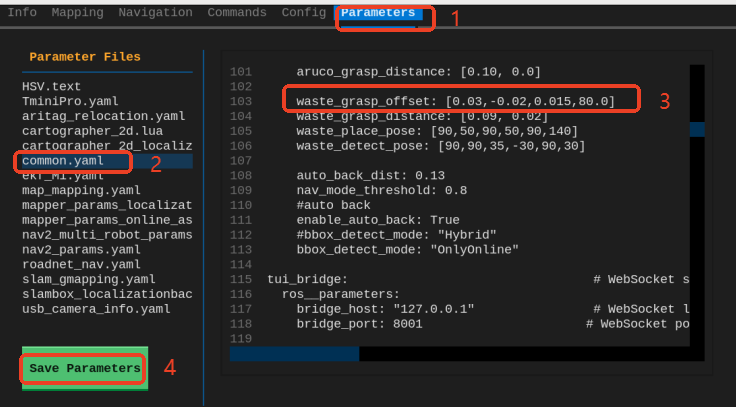
After clicking to save the parameters, they take effect immediately without restarting the program. You can then quickly verify and test again through the robot_control command.
xxxxxxxxxxrobot_control call-tool GetWasteRecognitionResultsrobot_control call-tool GraspWaste --waste_name <waste_name>