Welcome to ROSMASTER M1 PRO repository
10.Palm target positioning
Palm Target Positioning
1. Course Content
This lesson implements acquiring the color image, detecting the palm using the mediapipe framework, and outputting the palm coordinates.
2. Program Startup
Run the program in the terminal
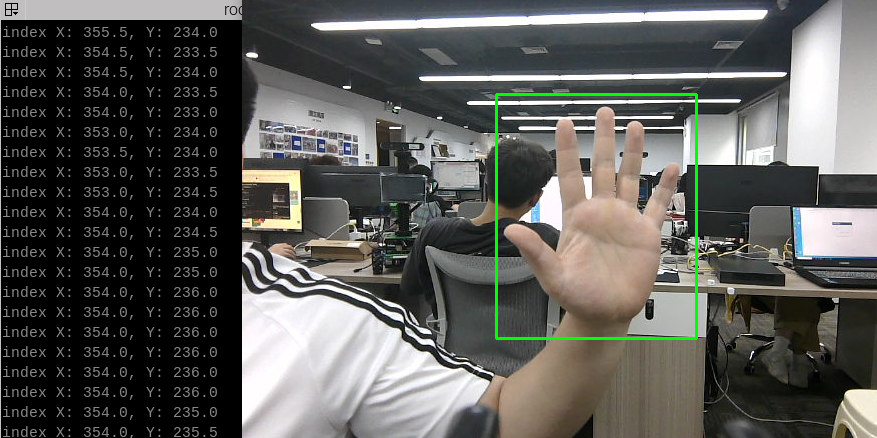
xxxxxxxxxxros2 launch yahboomcar_bringup mediapipe_demo.launch.py demo:=FindHandAfter the program starts, as shown in the figure below, when a palm is detected, it will be framed with a green box in the image, and the center coordinates of the palm will be output in the terminal.
3. Core Source Code Analysis
Program code path:
xxxxxxxxxx~/yahboomcar_ros2_ws/yahboomcar_ws/src/common_demo/common_demo/mediapipe/10_FindHand.py
Import the required library files,
xxxxxxxxxximport rclpyfrom rclpy.node import Nodefrom M3Pro_demo.media_library import *import cv2 as cvimport numpy as npimport timeimport osimport threadingfrom cv_bridge import CvBridgefrom sensor_msgs.msg import Imagefrom arm_msgs.msg import ArmJointsimport cv2Initialize the data and define the Publisher and Subscriber,
xxxxxxxxxxdef __init__(self,name, mode=False, maxHands=2, detectorCon=0.5, trackCon=0.5): super().__init__(name) #Call the media_library library to create an object of the HandDetector class self.hand_detector = HandDetector() #create a publisher self.rgb_bridge = CvBridge() #Define the Subscriber for the color image topic self.sub_rgb = self.create_subscription(Image,"/camera/color/image_raw",self.get_RGBImageCallBack,1)Color image callback function,
xxxxxxxxxxdef get_RGBImageCallBack(self,msg): #Use CvBridge to convert the color image message data into image data rgb_image = self.rgb_bridge.imgmsg_to_cv2(msg, "bgr8") #Pass the obtained image into the process function for palm detection frame = self.process(rgb_image) key = cv2.waitKey(1) cv.imshow('dist', frame)process function,
def process(self, frame): #Call the method of the object to perform palm detection, returning the detected image plus the lmList list and the bbox list frame, lmList, bbox = self.hand_detector.findHands(frame) self.hand_detector.draw = True #If the lmList list is not empty, it means a palm has been detected if len(lmList) != 0: hand = self.hand_detector.fingersUp(lmList) #Obtain the xy coordinates of the palm; bbox stores the xy coordinates of the top-left and bottom-right corners of the palm indexX = (bbox[0] + bbox[2]) / 2 indexY = (bbox[1] + bbox[3]) / 2 print("index X: %.1f, Y: %.1f" % (indexX, indexY)) return frame