Welcome to ROSMASTER M1 PRO repository
13.Gesture grabbing and releasing objects
Gesture Grabbing and Releasing Objects
Gesture Grabbing and Releasing Objects1. Course Content2. Program Startup3. Core Source Code Analysis
1. Course Content
This function implements acquiring the color image and detecting gestures using the mediapipe framework, and controls the robotic arm to grasp objects according to the gestures.
2. Program Startup
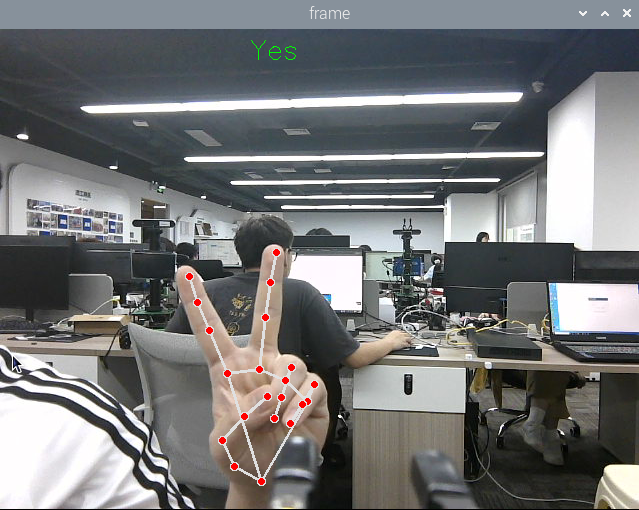
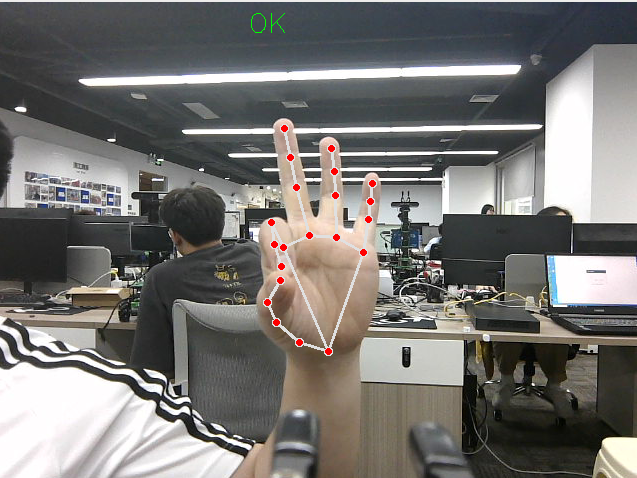
xxxxxxxxxxros2 launch yahboomcar_bringup mediapipe_demo.launch.py demo:=GestureGraspAfter the program starts, when there is a Yes gesture in the camera image, the robotic arm will go to a specific place to grasp an object; when there is an OK gesture in the camera image, the robotic arm will put the object in a specific place. The recognizable gestures are: [Yes, OK], a total of 2 categories.
At this point, put your hand into the camera view and make the Yes gesture, and the robotic arm will go to the front to grasp an object.
After grasping the object, when the OK gesture is recognized, the object will be placed at the upper-left position.
Press Ctrl+c in the terminal to exit the program.
3. Core Source Code Analysis
Program code path:
xxxxxxxxxx~/yahboomcar_ros2_ws/yahboomcar_ws/src/common_demo/common_demo/mediapipe/16_GestureGrasp.py
Import the required library files,
xxxxxxxxxximport mathimport timeimport cv2 as cvimport numpy as npimport rclpyfrom rclpy.node import Nodefrom cv_bridge import CvBridgefrom sensor_msgs.msg import Imagefrom arm_msgs.msg import ArmJoints,ArmJointimport cv2from M3Pro_demo.media_library import *import threadingInitialize the data and define the Publisher and Subscriber,
xxxxxxxxxxdef __init__(self,name): super().__init__(name) self.drawing = mp.solutions.drawing_utils self.timer = time.time() self.move_state = False self.points = [] self.start_count = 0 self.no_finger_timestamp = time.time() self.gc_stamp = time.time() #Call the media_library library to create an object of the HandDetector class self.hand_detector = HandDetector() self.pTime = 0 # Define the grasping state of the blocks self.one_grabbed = 0 self.two_grabbed = 0 self.three_grabbed = 0 self.four_grabbed = 0 self.block_num = 0 # Define the number of gesture recognitions self.Count_One = 0 self.Count_Two = 0 self.Count_Three = 0 self.Count_Four = 0 self.Count_Five = 0 self.rgb_bridge = CvBridge() #Define the topic for controlling the 6 servos and publish the detected pose self.TargetAngle_pub = self.create_publisher(ArmJoints, "arm6_joints", 10) #Define the topic for controlling a single servo and publish single-servo control topic data self.pub_SingleTargetAngle = self.create_publisher(ArmJoint, "arm_joint", 10) self.init_joints = [90, 164, 18, 0, 90, 30] self.pubSix_Arm(self.init_joints) #Define the Subscriber for the color image topic self.sub_rgb = self.create_subscription(Image,"/camera/color/image_raw",self.get_RGBImageCallBack,100)
xxxxxxxxxxdef get_RGBImageCallBack(self,msg):    #Use CvBridge to convert the color image message data into image data    rgb_image = self.rgb_bridge.imgmsg_to_cv2(msg, "bgr8")    #Call the findHands method of the class to detect the palm, returning the joint list    frame, lmList,_ = self.hand_detector.findHands(rgb_image)    #print("lmList: ",lmList)    #Determine whether the joint list is 0, that is, whether a palm has been detected    if len(lmList) != 0:        #Call the get_gesture method of the class, which returns the recognized gesture based on the joint point list        gesture = self.hand_detector.get_gesture(lmList)        #print("gesture = {}".format(gesture))        #According to the returned gesture, determine whether it is Yes or OK        if gesture == 'Yes':            cv.putText(frame, gesture, (250, 30), cv.FONT_HERSHEY_SIMPLEX, 0.9, (0, 255, 0), 1)            self.Count_One = self.Count_One + 1            self.Count_Two = 0            self.Count_Three = 0            self.Count_Four = 0            self.Count_Five = 0            #Count the value of self.Count_One; if it is greater than 5 and self.move_state is False, execute the robotic arm grasping thread function            if self.Count_One >= 5 and self.move_state == False:                self.move_state = True                self.Count_One = 0                print("start arm_ctrl_threading = {}".format(gesture))                task = threading.Thread(target=self.arm_ctrl_threading, name="arm_ctrl_threading", args=(gesture, ))                task.setDaemon(True)                task.start()

        elif gesture == 'OK':            cv.putText(frame, gesture, (250, 30), cv.FONT_HERSHEY_SIMPLEX, 0.9, (0, 255, 0), 1)            self.Count_Five = self.Count_Five + 1            self.Count_One = 0            self.Count_Two = 0            self.Count_Three = 0            self.Count_Four = 0            if self.Count_Five >= 5 and self.move_state == False:                self.move_state = True                self.Count_Five = 0                print("start arm_ctrl_threading = {}".format(gesture))                task = threading.Thread(target=self.arm_ctrl_threading, name="arm_ctrl_threading", args=(gesture, ))                task.setDaemon(True)                task.start()    key = cv2.waitKey(1)                cv.imshow('frame', frame)
arm_ctrl_threading robotic arm grasping thread function, the parameter passed in is the gesture,
xdef arm_ctrl_threading(self, gesture): if gesture == 'OK': #The placement position; can be modified according to actual needs move_joints = [163, 111, 0, 53, 90, 135] self.pubSix_Arm(move_joints) time.sleep(2.0) #Control servo No. 6, release the gripper self.pubSingleArm(6,30) time.sleep(2.0) #Return to the initial pose move_joints = [90, 164, 18, 0, 90, 135] self.pubSix_Arm(move_joints) time.sleep(2.0)
elif gesture == 'Yes': #The position for lowering the gripper; can be modified according to actual needs move_joints = [90, 15, 65, 20, 90, 30] # #Control servo No. 6, release the gripper self.pubSingleArm(6,30) time.sleep(2.0) # Move to object position self.pubSix_Arm(move_joints) time.sleep(2.0) #Control servo No. 6, tighten the gripper self.pubSingleArm(6,135) time.sleep(2.0) move_joints = [90, 164, 18, 0, 90, 135] self.pubSix_Arm(move_joints) time.sleep(2.0) self.move_state = False