Welcome to ROSMASTER M1 PRO repository
4.Depth Pseudo Color Image (Depth Camera Only)
Depth Pseudo Color Image
1. Course Content
Run the example program; by subscribing to the depth color image topic and using opencv image processing, convert the black-and-white depth image into a pseudo color image.
Important
This section is for reference only for the depth camera.
2. Case Demonstration
xxxxxxxxxxros2 launch yahboomcar_bringup camera_demo.launch.py demo:=GetDepthColorAfter startup, as shown in the figure below:
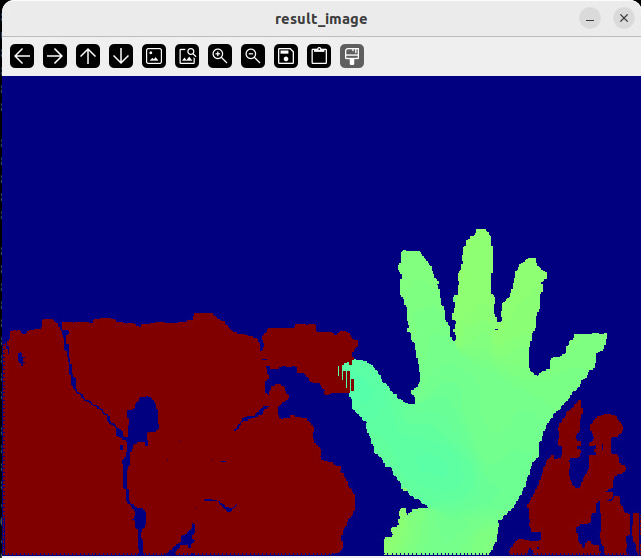
Different colors indicate differences in depth information.
3. Source Code Analysis
Source code path:
xxxxxxxxxx~/yahboomcar_ros2_ws/yahboomcar_ws/src/common_demo/common_demo/camera/GetDepthColor.py
Import the required library files
xxxxxxxxxxfrom cv_bridge import CvBridgeimport cv2from rclpy.node import Nodeimport rclpyfrom sensor_msgs.msg import ImageDefine the depth image decoding format
xxxxxxxxxxencoding = ['16UC1', '32FC1']Define the subscriber to subscribe to the depth image topic
xxxxxxxxxxself.sub_depth = self.create_subscription(Image,"/camera/depth/image_raw",self.get_DepthImgCallBack,100)Define
self.depth_bridgeto convert the message format into an image format that opencv can process
xxxxxxxxxxself.depth_bridge = CvBridge()Convert the image data message into an image
xxxxxxxxxxdepth_image = self.depth_bridge.imgmsg_to_cv2(depth_frame, encoding[1])Call the opencv image processing function
cv2.applyColorMapto convert the depth image
xxxxxxxxxxdepth_to_color_image = cv2.applyColorMap(cv2.convertScaleAbs(depth_image, alpha=1.0), cv2.COLORMAP_JET)
cv2.convertScaleAbs: performs a linear transformation on the image data and converts it to the 8-bit unsigned integer (uint8) format, with scaling factor as the scaling factor.
cv2.applyColorMap: a function that converts a single-channel grayscale image into a pseudo-color image, enhancing the visualization effect through color mapping. This parameter has two variables: the first is a single-channel 8-bit or floating-point image (grayscale image), and the second is the color map, which can be one of the following values,
cv2.COLORMAP_AUTUMN #Red-Orange-Yellowcv2.COLORMAP_BONE #Black-White (grayscale with a bluish tint)cv2.COLORMAP_HSV #HSV color spacecv2.COLORMAP_JET #Blue-Cyan-Yellow-Red (classic heatmap)cv2.COLORMAP_WINTER #Blue-Greencv2.COLORMAP_RAINBOW #Rainbow colors (Red-Purple)cv2.COLORMAP_OCEAN #Dark blue-Light bluecv2.COLORMAP_SUMMER #Green-Yellowcv2.COLORMAP_SPRING #Magenta-Yellowcv2.COLORMAP_COOL #Cyan-Magentacv2.COLORMAP_HSV #HSV color space loopcv2.COLORMAP_PINK #Pink tonescv2.COLORMAP_PARULA #MATLAB Parula stylecv2.COLORMAP_VIRIDIS #Modern scientific color scale (Green-Purple)cv2.COLORMAP_INFERNO #Black-Red-Yellow-White (high contrast)cv2.COLORMAP_PLASMA #Purple-Red-Yellowcv2.COLORMAP_MAGMA #Black-Red-Whitecv2.COLORMAP_TWILIGHT #Blue-Pink-White gradient