Welcome to ROSMASTER M1 PRO repository
1.Hand detection
Hand Detection
1. Content Description
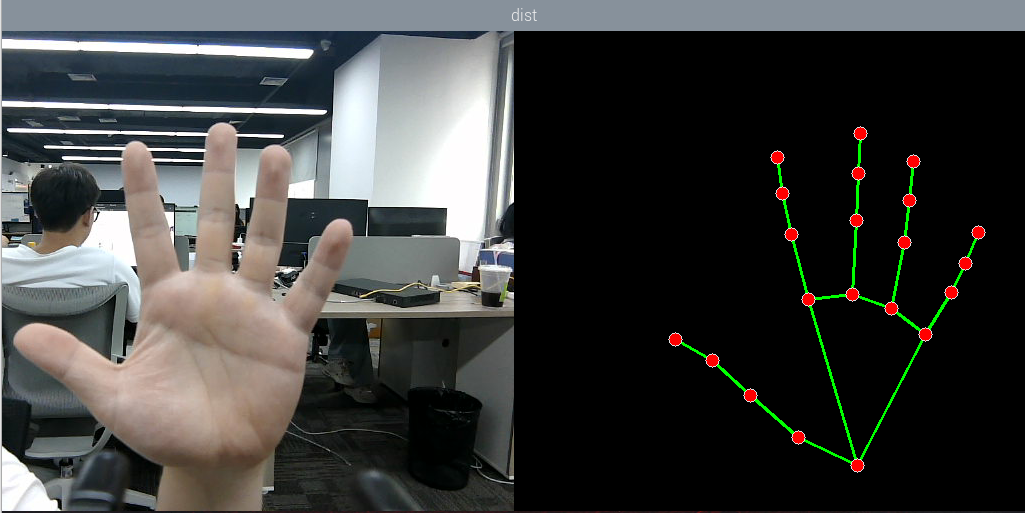
This lesson implements the functions of acquiring the color image and using the mediapipe framework to detect hand joint points.
2. Case Demonstration
ros2 launch yahboomcar_bringup mediapipe_demo.launch.py demo:=HandDetectorAfter the program runs, as shown in the figure below, the detected hand joint points will be displayed on the right side of the image.
3. Core Source Code Analysis
Program code path:
xxxxxxxxxx~/yahboomcar_ros2_ws/yahboomcar_ws/src/common_demo/common_demo/mediapipe/01_HandDetector.py
xxxxxxxxxximport rclpyfrom rclpy.node import Nodeimport mediapipe as mpimport cv2 as cvimport numpy as npimport timeimport osfrom cv_bridge import CvBridgefrom sensor_msgs.msg import Imagefrom arm_msgs.msg import ArmJointsimport cv2Initialize the data and define the Publisher and Subscriber
xxxxxxxxxx def __init__(self,name, mode=False, maxHands=2, detectorCon=0.5, trackCon=0.5): super().__init__(name) #Parameter declaration and retrieval self.declare_parameter('rgb_topic','/ascamera_hp60c/camera_publisher/rgb0/image') rgb_topic=self.get_parameter("rgb_topic").get_parameter_value().string_value self.qos_profile = QoSProfile( reliability=QoSReliabilityPolicy.BEST_EFFORT, history=QoSHistoryPolicy.KEEP_LAST, depth=1 ) self.pTime=0 self.mpHand = mp.solutions.hands self.mpDraw = mp.solutions.drawing_utils self.hands = self.mpHand.Hands( static_image_mode=mode, max_num_hands=maxHands, min_detection_confidence=detectorCon, min_tracking_confidence=trackCon) self.lmDrawSpec = mp.solutions.drawing_utils.DrawingSpec(color=(0, 0, 255), thickness=-1, circle_radius=6) self.drawSpec = mp.solutions.drawing_utils.DrawingSpec(color=(0, 255, 0), thickness=2, circle_radius=2) #create a publisher self.rgb_bridge = CvBridge() self.sub_rgb = self.create_subscription(Image,rgb_topic,self.get_RGBImageCallBack,self.qos_profile)Color image callback function
x def get_RGBImageCallBack(self,msg):
rgb_image = self.rgb_bridge.imgmsg_to_cv2(msg, "bgr8") frame, img = self.pubHandsPoint(rgb_image, draw=False) dist = self.frame_combine(frame, img) cTime = time.time() if self.pTime == 0: fps = 0 else: fps = 1 / (cTime - self.pTime) self.pTime = cTime text = "FPS : " + str(int(fps)) cv.putText(dist, text, (20, 30), cv.FONT_HERSHEY_SIMPLEX, 0.9, (0, 0, 255), 1) key = cv2.waitKey(1) cv.imshow('dist', dist)pubHandsPoint function:
xxxxxxxxxxdef frame_combine(slef,frame, src): #Determine whether the image has 3 channels, that is, an RGB image if len(frame.shape) == 3: #Obtain the sizes of the two images and stitch them together frameH, frameW = frame.shape[:2] srcH, srcW = src.shape[:2] dst = np.zeros((max(frameH, srcH), frameW + srcW, 3), np.uint8) dst[:, :frameW] = frame[:, :] dst[:, frameW:] = src[:, :] else: src = cv.cvtColor(src, cv.COLOR_BGR2GRAY) frameH, frameW = frame.shape[:2] imgH, imgW = src.shape[:2] dst = np.zeros((frameH, frameW + imgW), np.uint8) dst[:, :frameW] = frame[:, :] dst[:, frameW:] = src[:, :] return dstframe_combine image merging function: