Welcome to ROSMASTER M1 PRO repository
3.Embodied Intelligent Robot System Architecture
Multi-Agent Embodied Architecture
Multi-Agent Embodied Architecture1. Course Content2. Introduction to multi_brains3. Dual-Model Inference Architecture3.1 Advantages of Dual-Model Inference3.1.1 Decoupling of Task Decision and Action Conversion3.1.2 Improving the Success Rate of Long-Flow Tasks3.2 Decision-Layer AI3.3 Execution-Layer AI4 . Task Cycle5. Historical Context6. Map Mapping7. Action Function Library
1. Course Content
Understand the multi_brains multi-agent embodied framework of the ROSMASTER-M1 Pro.
2. Introduction to multi_brains
multi_brains is an embodied intelligence framework developed in-house by Yahboom Intelligent that is compatible with general-purpose AI large models. It avoids the issues of VLA models and end-to-end models, which require dedicated hardware, local computing power support, and long data collection and training time. By merely integrating the general-purpose AI models of cloud model providers, the edge robot can gain powerful embodied intelligence capabilities.
multi_brains expands training samples through the RAG knowledge base, allowing the robot to quickly adapt to different scenario tasks. It can be deployed on the vast majority of small-scale host devices, placing the massive model inference in the cloud or on a local server.
The core philosophy of multi_brains is to decouple the different stages of a task through multiple AI models in a layered manner. Its main features:
A smoother recording experience, with inertial tail-sound detection and an adjustable tail-sound detection duration.
A more flexible decision-making mechanism with task routing added, enabling the AI agent to autonomously choose between dual-model inference and single-model inference based on task difficulty, giving the AI higher autonomy and a better user experience.
An easily understandable visualized architecture flow. multi_brains builds visualized agents through Dify, and the operation and data flow of the AI agent can be observed in real time during debugging, allowing users to more intuitively understand the specific process of dual-model inference.
A fully localized RAG knowledge base, with no need to worry about sensitive data issues.
Seamless integration with most AI models worldwide. Through Dify's model supplier plugins, hundreds of AI models worldwide can be quickly and seamlessly integrated (if you need locally deployed models, local models can also be integrated).
Traceable historical records. By querying Dify's backend access history, users can query all the task instructions and the history of the steps the robot executed.
Personalized response reply voices; users can customize random response voices. Configure the built-in speech synthesis command, which is simple and easy to get started with.
A complete testing toolbox for quickly verifying core functional modules.
Simpler onboarding steps, with most operation steps streamlined and shortcut commands configured.
3. Dual-Model Inference Architecture
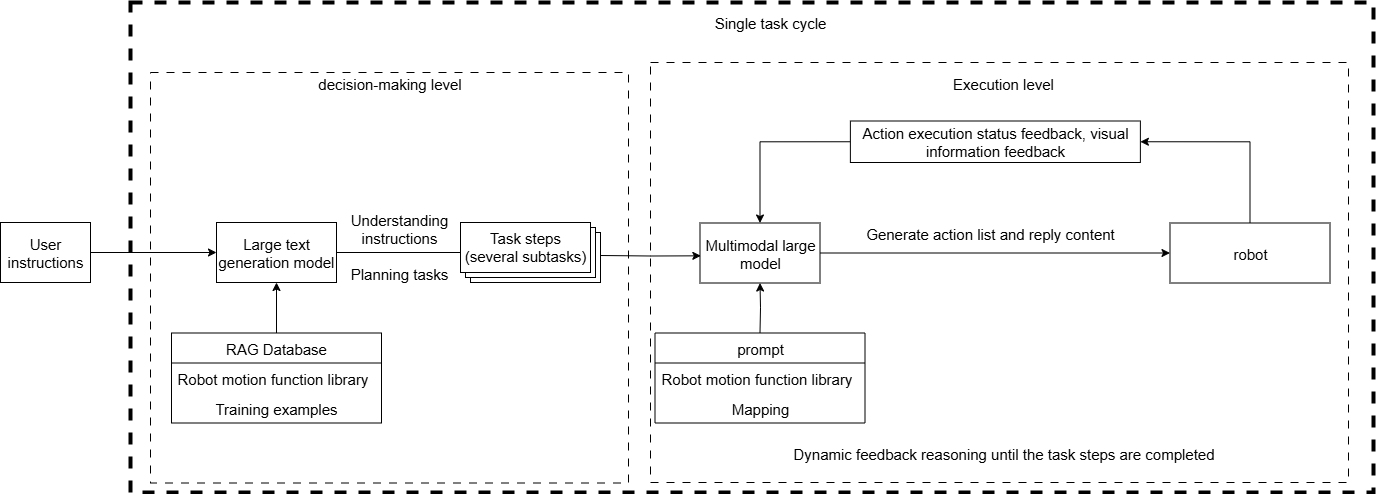
The design of dual-model inference and dynamic feedback reasoning provides stronger system robustness than a single-model architecture.
3.1 Advantages of Dual-Model Inference
3.1.1 Decoupling of Task Decision and Action Conversion
The decision-layer AI focuses on thinking, planning, and decomposing task instructions.
The execution-layer AI focuses on chat replies and converting task steps into JSON text.
3.1.2 Improving the Success Rate of Long-Flow Tasks
When reasoning with a single-model approach, "natural language understanding + environment perception + process decomposition + action function output" must be performed simultaneously, which tends to cause modality interference (language ambiguity or overlong instructions leading to comprehension errors). Dual-model processing handles the task in stages, enabling the decision layer to focus on task planning and the execution layer to focus on action execution.
3.2 Decision-Layer AI
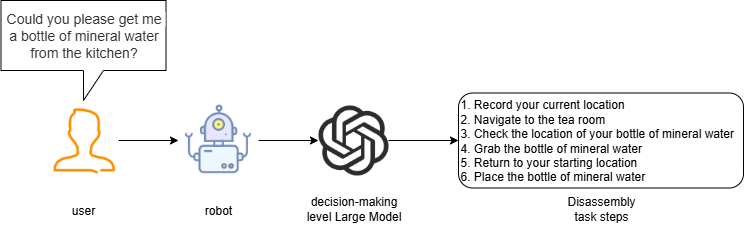
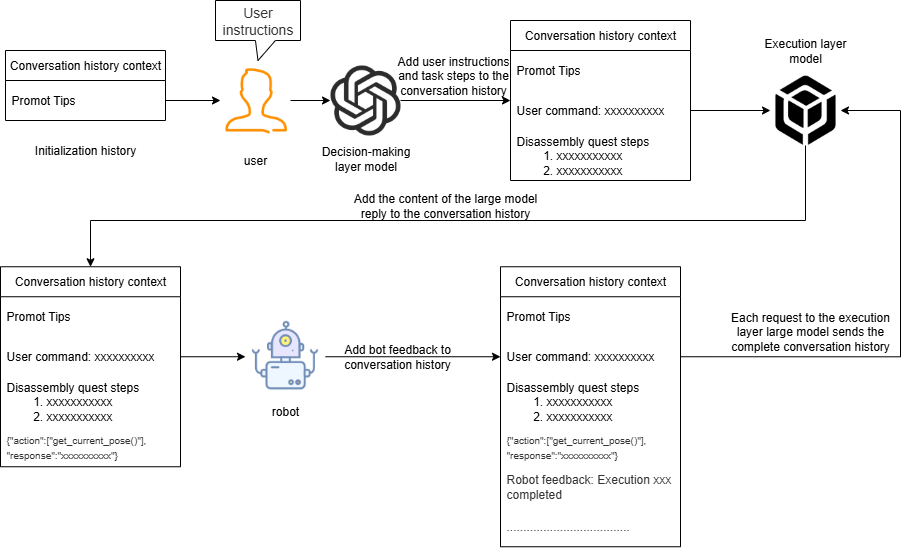
The decision-layer large model is mainly responsible for task planning. It can understand complex human instructions and decompose them into concrete task steps. For example, when it receives the instruction "Can you please get me a bottle of mineral water from the kitchen?", the large language model will decompose it into several tasks, as shown in the figure below.
3.3 Execution-Layer AI
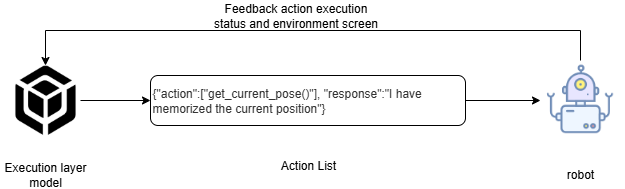
The execution-layer large model is mainly responsible for chat replies and converting task steps into JSON text. It continuously receives feedback (success/failure) and images from the results of the robot's action execution, and issues the next action instruction according to whether the executed action succeeded or failed.
The execution-layer large model acts as a supervisor that continuously monitors the progress of the robot in executing task steps, and, based on the result feedback and environment information after the robot executes an action, thinks and judges the next action to execute, until the task is successfully completed or is ended early due to special circumstances.
4 . Task Cycle
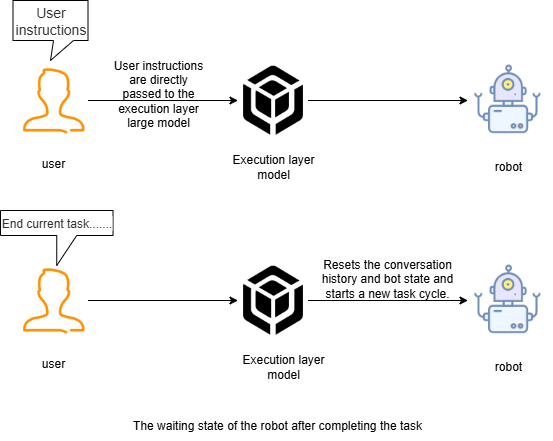
After the robot is woken up, a task cycle begins. All user instructions and robot feedback are in the AI model's historical context, which is equivalent to the robot's temporary memory, capable of "remembering" what happened before.
When the user asks to end the current task and let the robot retire and rest, the robot resets the AI model's historical context, which is equivalent to the robot "losing its memory" and forgetting what happened before.
5. Historical Context
The robot's conversation history is stored in the AI application variables of DIfy, with a default maximum of 50 rounds of conversation memory.
6. Map Mapping
The robot uses a grid map for navigation. If the robot needs to understand position areas in the real world, a mapping relationship must be established between the grid map and the real-world environment areas; this relationship is called map mapping.
Suppose we use the robot to generate a grid map through SLAM mapping in a factory environment, and the real factory has several artificially divided areas, as shown in the figure below.
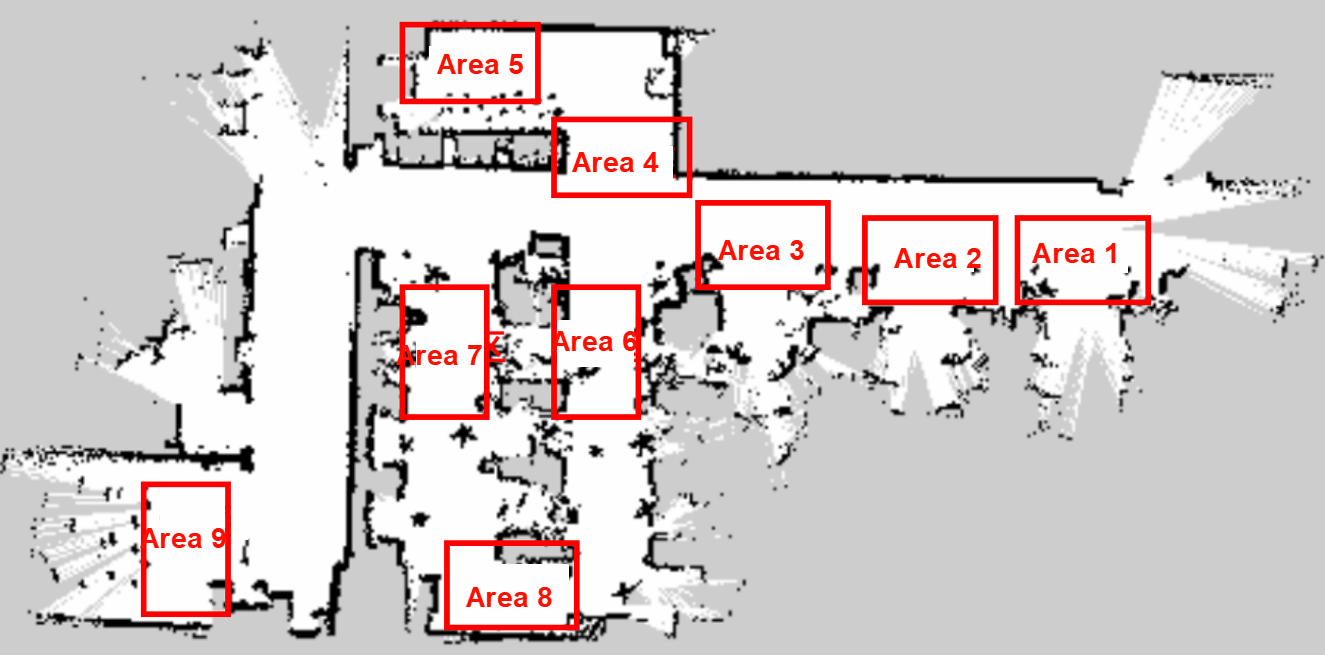
We establish a one-to-one correspondence between these real-world environment areas and letter symbols:
A: "Area 1", B: "Area 2", C: "Area 3", D: "Area 4", E: "Area 5", F: "Area 6", G: "Area 7", H: "Area 8", I: "Area 9"
Then, in the yaml file, the map coordinates are written for each letter symbol, for example:
A name'Area 1' position x4.4034953117370605 y0.4879316985607147 orientation x0.0 y0.0 z0.701498621044694 w0.7126708108744126When we ask the robot to go to a certain actual area, we only need the large model to convert it into the corresponding letter symbol, so that the robot can understand the location areas in the real environment.
7. Action Function Library
The API functions in the robot's action function library are the bridge through which the large model controls the robot to interact with the real world.
These API functions define the smallest actions that the physical robot can complete in the physical world.
The AI large model converts the actions to be executed into JSON text and sends it to the robot, and the robot then parses the JSON text and executes the corresponding action.
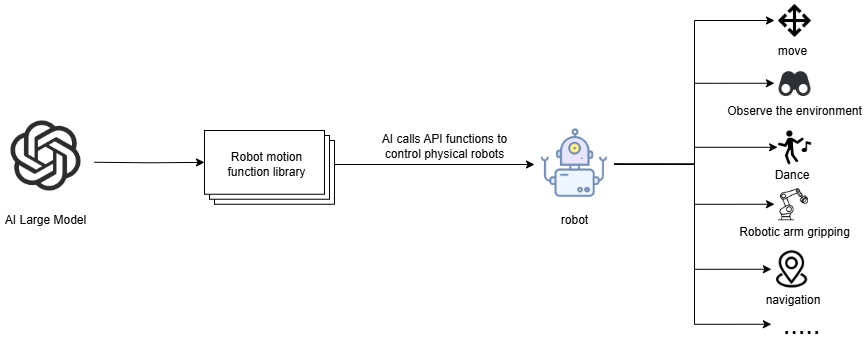
All the minimal action functions and their corresponding capabilities are shown in the table below:
| Function Name | Parameter | Function | Invocation Command |
|---|---|---|---|
| move(direction, value) | direction: movement direction (forward/backward/left/right/turn_left/turn_right), value: distance (meters) or angle (degrees) | Control the chassis through odometry to move in a straight line or turn in place | Move forward/backward x meters, translate left/right x meters, turn left/right x degrees |
| action_group(action_name) | action_name: action group name (arm_init/shake/nod/applaud/dance/drift/putdown) | Execute a preset fixed action group | Robotic arm reset, shake head, nod, applaud, dance, drift, put down object |
| RecordMapLocation(name, symbol) | name: place name, symbol: map mapping symbol | Record the robot's current pose in the global map to the map mapping file | Remember the current position as xxx |
| navigation(point_name) | point_name: target point name or symbol | Read the target point pose from the map mapping file and navigate there (including precise alignment on arrival) | Navigate to xxx, return to xxx |
| seewhat() | - | Capture the image of the robot's current view and upload it to the execution-layer large model | Observe the environment |
| getbbox(query) | query: textual description of the target object | Capture an image and use the vision model to detect the bounding box coordinates of the target object | Find the position of xxx, where is xxx |
| pick(x1, y1, x2, y2) | (x1, y1, x2, y2): the top-left and bottom-right coordinates of the target object's bounding box | Track, align, and grasp the object of the specified bounding box (requires nuwa camera) | Grasp xxx |
| GraspArUco(target_id) | target_id: AprilTag marker ID | Detect and grasp the AprilTag marker with the specified ID | Grasp/sort out AprilTag No. x |
| ArUcoRemoveHigh(target_high) | target_high: height (centimeters) | Detect and remove (grasp) the AprilTag marker higher than the specified height | Remove markers higher than x centimeters |
| GraspColor(color) | color: color (red/green/blue/yellow) | Detect and grasp the color block of the specified color (requires usb camera) | Grasp the red/green/blue/yellow block |
| track(x1_or_cmd, y1, x2, y2) | (x1, y1, x2, y2): the top-left and bottom-right coordinates of the target bounding box; or pass 'cancel' to stop | Make the robotic arm continuously track the object of the specified bounding box in the field of view; 'cancel' stops tracking | Track xx, cancel tracking |
| follow_line_clear(color) | color: color (red/green/blue/yellow) | Move along the patrol line of the specified color and clear the AprilTag marker obstacles on the path; the line ends when finished | Start line-following obstacle clearing, patrol and clear along the x-colored line |
| get_dist(query) | query: textual description of the target object | Detect the target and calculate the planar distance from the robot to the object (requires nuwa camera) | See how far away xx is |
| stop_feedback() | - | No-op; stop feeding back status to the execution-layer model | - |
| finish_task() | - | End the current task cycle and notify model_service to reset the session context | - |