Welcome to ROSMASTER M1 PRO repository
9.OpenClaw Visual Distance Measurement
OpenClaw Visual Distance Measurement
OpenClaw Visual Distance Measurement1. Course ContentLearning Objectives2. Preparation3. Case Demonstration4. Source Code AnalysisGetTargetDistParameter Description
1. Course Content
Learning Objectives
Master the
GetTargetDisttool invocation: Learn to describe a target object in natural language and obtain its relative distance from the robot car body through the MCP tool.Become familiar with the pose solution process: Understand the complete logic from extracting the bounding box center point, to calling the
GetTargetPoseservice, to finally calculating the Euclidean distance.
2. Preparation
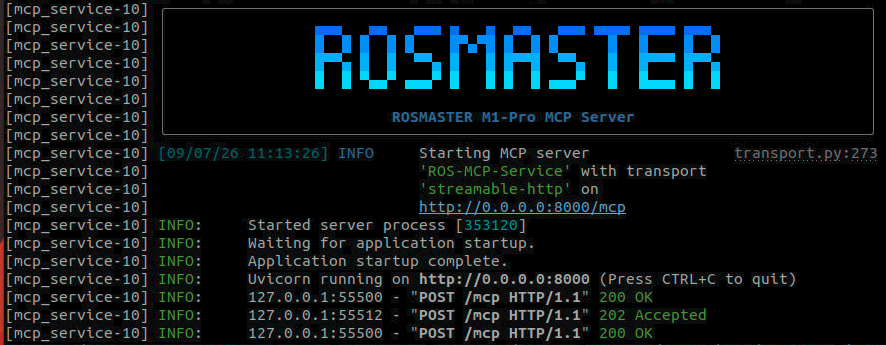
Start the MCP service. If you need voice replies, you must add the use_tts parameter:
use_tts:=true, otherwise it can be omitted.
ros2 launch yahboomcar_bringup mcp_service.launch.py use_camera:=true
3. Case Demonstration
Tip
You can write the command yourself according to your needs. The following is a case demonstration. Just choose any one of the interaction methods. The demonstration here uses the web-based WebChat as an example.
Through the
GetTargetDisttool, OpenClaw can automatically recognize the target in the frame according to the user's natural language description (such as "the red cup in front") and calculate its distance from the robot.
| Command | Parameter | Function |
|---|---|---|
| GetTargetDist | --query | Compute the distance between the target and the robot car body according to the object description |

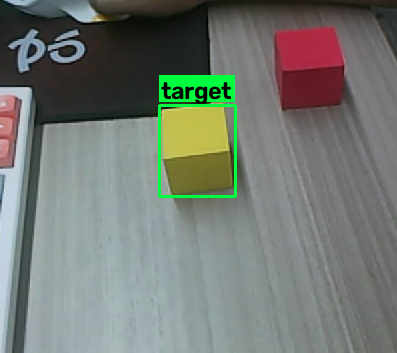
When the
GetTargetDisttool is called, the system automatically generates a verification image and marks the target object being measured in the image. The image save path is:
xxxxxxxxxx~/yahboomcar_ros2_ws/yahboomcar_ws/cache/verify_image.png
Similarly, when you need to debug and test the MCP tool, you can also call it through the CLI:
xxxxxxxxxxrobot_control call-tool GetTargetDist --query <object description>

4. Source Code Analysis
Source code path
xxxxxxxxxx~/yahboomcar_ros2_ws/yahboomcar_ws/src/multi_brains_pre/multi_brains_pre/action_controller.py
GetTargetDist
This function implements the visual distance measurement function based on natural language description.
x def GetTargetDist(self, query:str): '''Get the distance to the target object''' # 1. Call the target detection service to obtain the Bounding Box of the specified object res=self.GetBbox(query) if not res[0]: return [False, res[1]] # 2. Parse the bounding box string and calculate the center pixel coordinates of the target in the image import ast bounding_box = ast.literal_eval(res[1]) target_center_x = (bounding_box['x2'] + bounding_box['x1']) / 2 target_center_y = (bounding_box['y2'] + bounding_box['y1']) / 2
# 3. Check whether the pose solution service is available if not self.get_pose_client.wait_for_service(timeout_sec=8.0) : msg = "GetTargetPose service not available" self.get_logger().error(Fore.YELLOW + msg + Fore.RESET) return [False, msg] # 4. Call the GetTargetPose service to convert the pixel coordinates into a 3D pose in the robot coordinate system request = GetTargetPose.Request(x=float(target_center_x), y=float(target_center_y), radius=self.target_circle) result:GetTargetPose.Response = self.get_pose_client.call(request) if not result.success: error_msg=result.message self.get_logger().error(error_msg) return [False, error_msg] # 5. Calculate the horizontal Euclidean distance from the target point to the robot origin import math distance = round(math.sqrt((result.pose.position.x ** 2) + (result.pose.position.y ** 2)), 2) return [True, distance]Code Explanation:
GetTargetDist: Obtain the distance between the target object and the robot car body based on the natural language description.GetBbox(query): Call the target detection service to lock onto the bounding box (Bounding Box) of the target in the image according to the text description.ast.literal_eval(res[1]): Parse the bounding box string into a dictionary, containing the four pixel coordinatesx1,y1,x2,y2.target_center_x / target_center_y: Calculate the center pixel coordinates of the bounding box, used as the reference point for visual distance measurement.self.get_pose_client.wait_for_service(timeout_sec=8.0): Check whether the pose solution service is available; if it times out for 8 seconds, return failure.GetTargetPose.Request(x, y, radius=self.target_circle): Call the pose solution service to convert the center pixel coordinates into a 3D pose in the robot coordinate system;radiusis the radius of the sampling circular area.math.sqrt(x² + y²): Calculate the horizontal Euclidean distance from the target point to the robot origin, with the result kept to 2 decimal places.
Core Logic Description:
Semantic localization: First use the
GetBboxinterface to lock onto the target's position in the image according to the text descriptionquery.Coordinate conversion: Extract the center point
(center_x, center_y)of the Bounding Box, used as the reference point for visual distance measurement.Spatial solution: Through the
GetTargetPoseservice, combined with the camera's intrinsic and extrinsic calibration information, back-project the 2D pixel point into 3D space to obtain the target's displacement relative to the camera.Distance calculation: Finally use the Pythagorean theorem to calculate the straight-line distance of the target on the horizontal plane, providing data support for navigation or approach tasks.
Parameter Description
The following parameters are located in common.yaml and are related to the visual distance measurement function:
target_circle: The sampling radius of the circular area when obtaining the target point coordinates, unit: pixels. Centered on the target pixel point, sampling is performed within this radius to calculate the 3D pose. A larger value gives a wider sampling range but may introduce edge noise; a smaller value gives higher precision but is more sensitive to missing depth.