Welcome to ROSMASTER M1 PRO repository
11.Fingertip trajectory recognition
Fingertip Trajectory Recognition
Fingertip Trajectory Recognition1. Course Content2. Preparation3. Case Demonstration4. Core Source Code Analysis
1. Course Content
This lesson implements acquiring the color image and using the mediapipe framework to detect fingertips, starting and stopping the recording of the fingertip's trajectory in the image through gestures. After recording ends, a trajectory image of the fingertip is generated and the trajectory is recognized.
2. Preparation
xxxxxxxxxxros2 launch yahboomcar_bringup mediapipe_demo.launch.py demo:=FingerTrajectory3. Case Demonstration
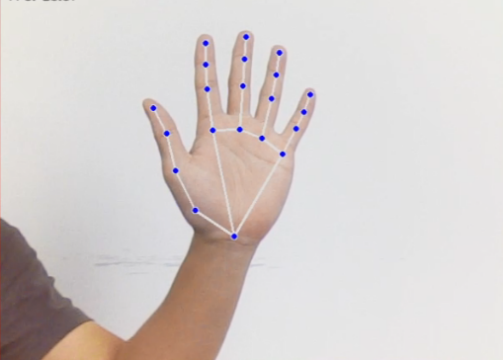
After the program runs, as shown in the figure below, place the palm flat in the camera view with the fingers spread and the palm facing the camera, similar to the number 5 gesture. The image will draw the joints of the entire palm. Adjust the position of the palm so that it is as close as possible to the upper-middle part of the screen.
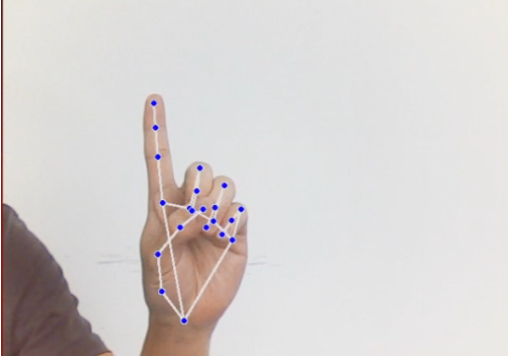
At this point, keep the index finger still and retract the other fingers, similar to the number 1 gesture.
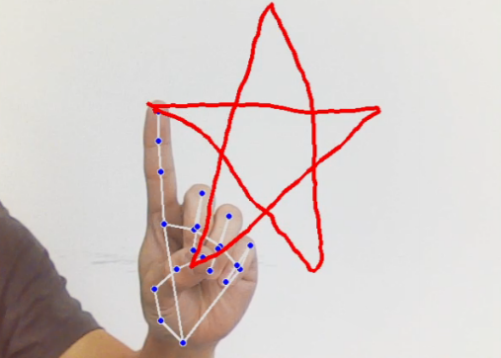
While keeping the gesture 1 pose unchanged, move the position of the finger. A red line appears on the screen, drawing the path of the index finger's movement.
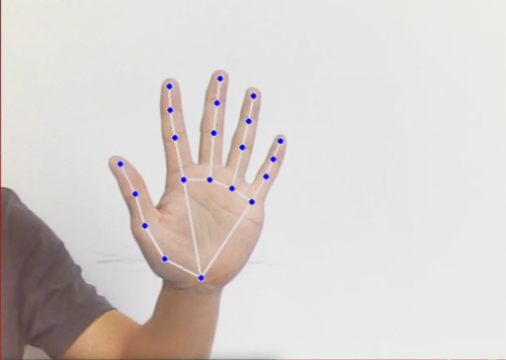
After the figure is drawn, open all fingers, similar to the number 5 gesture, and the drawn figure will be generated below.
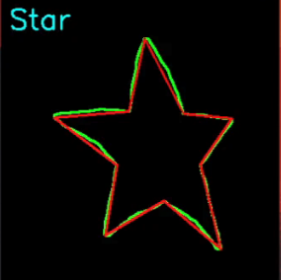
Note: The drawn figure needs to be closed, otherwise part of the content may be missing.
There are currently four recognizable trajectory figures: triangle, rectangle, circle, and five-pointed star.
4. Core Source Code Analysis
Program code path:
xxxxxxxxxx~/yahboomcar_ros2_ws/yahboomcar_ws/src/common_demo/common_demo/mediapipe/11_FingerTrajectory.py
Import the required library files,
xxxxxxxxxximport mathimport timeimport cv2 as cvimport numpy as npimport mediapipe as mpimport rclpyfrom rclpy.node import Nodefrom cv_bridge import CvBridgefrom sensor_msgs.msg import Imagefrom arm_msgs.msg import ArmJoints,ArmJointimport cv2import gcimport threadingimport enumInitialize the data and define the Publisher and Subscriber,
xxxxxxxxxxdef __init__(self,name): super().__init__(name) self.drawing = mp.solutions.drawing_utils self.timer = time.time() self.move_state = False self.state = State.NULL self.points = [] self.start_count = 0 self.no_finger_timestamp = time.time() self.gc_stamp = time.time() self.hand_detector = mp.solutions.hands.Hands( static_image_mode=False, max_num_hands=1, min_tracking_confidence=0.05, min_detection_confidence=0.6 ) self.rgb_bridge = CvBridge() #Define the topic for controlling the 6 servos and publish the detected pose self.TargetAngle_pub = self.create_publisher(ArmJoints, "arm6_joints", 10) self.init_joints = [90, 164, 18, 0, 90, 30] self.pubSix_Arm(self.init_joints) #Define the Subscriber for the color image topic self.sub_rgb = self.create_subscription(Image,"/camera/color/image_raw",self.get_RGBImageCallBack,100)Color image callback function,
xdef get_RGBImageCallBack(self,msg): rgb_image = self.rgb_bridge.imgmsg_to_cv2(msg, "bgr8") rgb_image = cv2.flip(rgb_image, 1) # Horizontal flip result_image = np.copy(rgb_image) if self.timer <= time.time() and self.state == State.RUNNING: self.state = State.NULL try: #Call the process function to detect the palm results = self.hand_detector.process(rgb_image) if self.state != State.RUNNING else None #Determine whether a palm is detected; if results is not 0, it means a palm has been detected if results is not None and results.multi_hand_landmarks: gesture = "none" index_finger_tip = [0, 0] # Record the current time for timeout handling self.no_finger_timestamp = time.time() #Iterate through the detection results for hand_landmarks in results.multi_hand_landmarks: self.drawing.draw_landmarks( result_image, hand_landmarks, mp.solutions.hands.HAND_CONNECTIONS) landmarks = get_hand_landmarks(rgb_image, hand_landmarks.landmark) #Call hand_angle to calculate the bending angle of each finger angle_list = (hand_angle(landmarks)) #Call the h_gesture function to determine the gesture made by the fingers gesture = (h_gesture(angle_list)) index_finger_tip = landmarks[8].tolist()
if self.state == State.NULL: # Detect the index finger extended alone with the other fingers in a fist if gesture == "one": self.start_count += 1 if self.start_count > 20: self.state = State.TRACKING self.points = [] else: self.start_count = 0
elif self.state == State.TRACKING: # Spread the five fingers to end drawing if gesture == "five": self.state = State.NULL # Generate a black-and-white trajectory image track_img = get_track_img(self.points)
contours = cv2.findContours(track_img, cv2.RETR_EXTERNAL, cv2.CHAIN_APPROX_NONE)[-2]
contour = get_area_max_contour(contours, 300) contour = contour[0] # Recognize the drawn figure based on the trajectory image # cv2.fillPoly draws and fills a polygon on the image track_img = cv2.fillPoly(track_img, [contour,], (255, 255, 255))
for _ in range(3): # Erosion function track_img = cv2.erode(track_img, cv2.getStructuringElement(cv2.MORPH_RECT, (5, 5)))
# Dilation function track_img = cv2.dilate(track_img, cv2.getStructuringElement(cv2.MORPH_RECT, (5, 5)))
contours = cv2.findContours(track_img, cv2.RETR_EXTERNAL, cv2.CHAIN_APPROX_NONE)[-2]
contour = get_area_max_contour(contours, 300)
contour = contour[0] h, w = track_img.shape[:2]
track_img = np.full([h, w, 3], 0, dtype=np.uint8) track_img = cv2.drawContours(track_img, [contour, ], -1, (0, 255, 0), 2)
# Perform polygon approximation on the image contour points approx = cv2.approxPolyDP(contour, 0.026 * cv2.arcLength(contour, True), True)
track_img = cv2.drawContours(track_img, [approx, ], -1, (0, 0, 255), 2)
graph_name = 'unknown' # Determine the figure based on the number of vertices of the contour envelope if len(approx) == 3: graph_name = 'Triangle' if len(approx) == 4 or len(approx) == 5: graph_name = 'Square' if 5 < len(approx) < 10: graph_name = 'Circle' if len(approx) == 10: graph_name = 'Star' cv2.putText(track_img, graph_name, (10, 40),cv2.FONT_HERSHEY_SIMPLEX, 1.2, (255, 255, 0), 2) cv2.imshow('track', track_img)
else: if len(self.points) > 0: if distance(self.points[-1], index_finger_tip) > 5: self.points.append(index_finger_tip) else: self.points.append(index_finger_tip)
draw_points(result_image, self.points) else: pass else: if self.state == State.TRACKING: if time.time() - self.no_finger_timestamp > 2: self.state = State.NULL self.points = []
except BaseException as e: print(e) #result_image = cv2.cvtColor(result_image, cv2.COLOR_RGB2BGR) cv2.imshow('image', result_image) key = cv2.waitKey(1) # Press the spacebar to clear the recorded trajectory if key == ord(' '): self.points = [] if time.time() > self.gc_stamp: self.gc_stamp = time.time() + 1 gc.collect()hand_angle function, calculates the bending angle of each finger
xxxxxxxxxxdef hand_angle(landmarks): angle_list = [] # thumb angle_ = vector_2d_angle(landmarks[3] - landmarks[4], landmarks[0] - landmarks[2]) angle_list.append(angle_) # index angle_ = vector_2d_angle(landmarks[0] - landmarks[6], landmarks[7] - landmarks[8]) angle_list.append(angle_) # middle angle_ = vector_2d_angle(landmarks[0] - landmarks[10], landmarks[11] - landmarks[12]) angle_list.append(angle_) # ring angle_ = vector_2d_angle(landmarks[0] - landmarks[14], landmarks[15] - landmarks[16]) angle_list.append(angle_) # pink angle_ = vector_2d_angle(landmarks[0] - landmarks[18], landmarks[19] - landmarks[20]) angle_list.append(angle_) angle_list = [abs(a) for a in angle_list] return angle_listh_gesture function, determines the gesture made by the fingers through 2D features
xxxxxxxxxxdef h_gesture(angle_list): thr_angle, thr_angle_thumb, thr_angle_s = 65.0, 53.0, 49.0 if (angle_list[0] < thr_angle_s) and (angle_list[1] < thr_angle_s) and (angle_list[2] < thr_angle_s) and ( angle_list[3] < thr_angle_s) and (angle_list[4] < thr_angle_s): gesture_str = "five" elif (angle_list[0] > 5) and (angle_list[1] < thr_angle_s) and (angle_list[2] > thr_angle) and ( angle_list[3] > thr_angle) and (angle_list[4] > thr_angle): gesture_str = "one" else: gesture_str = "none" return gesture_strget_track_img function, generates the trajectory image,
def get_track_img(points): points = np.array(points).astype(dtype=np.int32) x_min, y_min = np.min(points, axis=0).tolist() x_max, y_max = np.max(points, axis=0).tolist() track_img = np.full([y_max - y_min + 100, x_max - x_min + 100, 1], 0, dtype=np.uint8) points = points - [x_min, y_min] points = points + [50, 50] draw_points(track_img, points, 1, (255, 255, 255)) return track_img