Welcome to ROSMASTER M1 PRO repository
1.OpenClaw Target Tracking
OpenClaw Target Tracking
OpenClaw Target Tracking1. Course ContentCourse OverviewLearning Objectives2. Preparation3. Target Tracking Case4. Source Code Analysis4.1 TargetTrack() — Entry point for starting/canceling tracking4.2 IBVS_tracker.py Tracking Server5. Parameter Debugging6. Common Problems and Solutions
1. Course Content
Course Overview
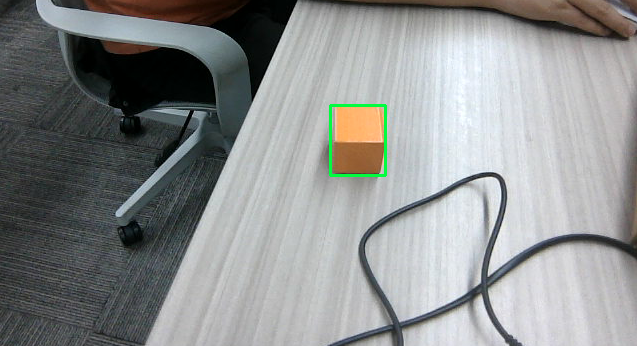
OpenClaw target tracking is a core function of the robot's visual servo control. It tracks the target object in real time through the camera and controls the robotic arm joints to adjust the camera's viewing angle, so that the target always stays in the center of the frame.
The target tracking function relies on the preceding GetBbox (object detection) to obtain the initial ROI bounding box, and then starts a tracking thread to continuously correct the joint angles of the robotic arm.
Learning Objectives
Master the operation method for starting and canceling target tracking through OpenClaw.
2. Preparation
Start the MCP service. If you need voice replies, you must add the use_tts parameter:
use_tts:=true, otherwise it can be omitted.
ros2 launch yahboomcar_bringup mcp_service.launch.py use_camera:=true
3. Target Tracking Case
Choose any one of the ways to interact with OpenClaw. The demonstration below uses WebChat.
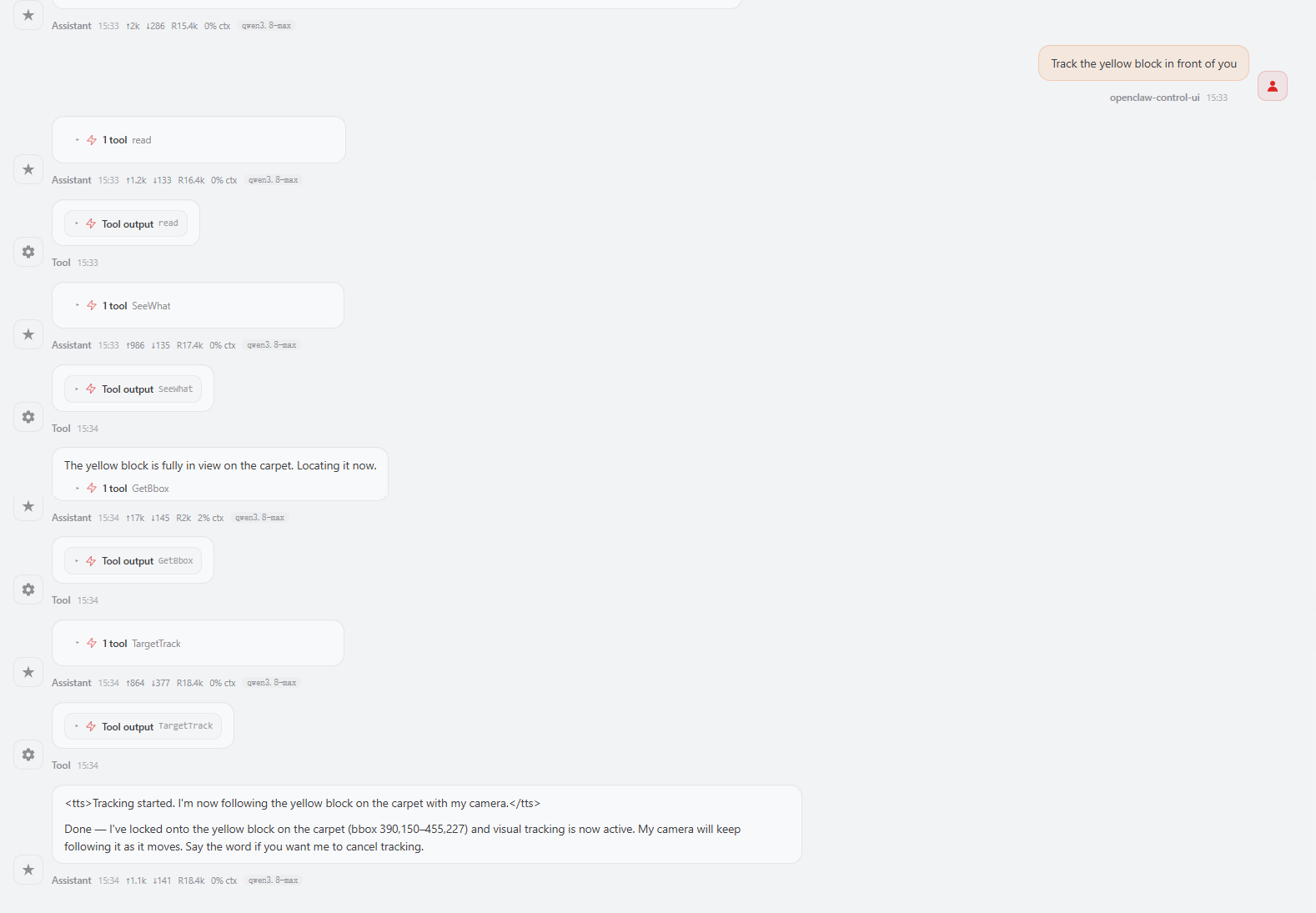
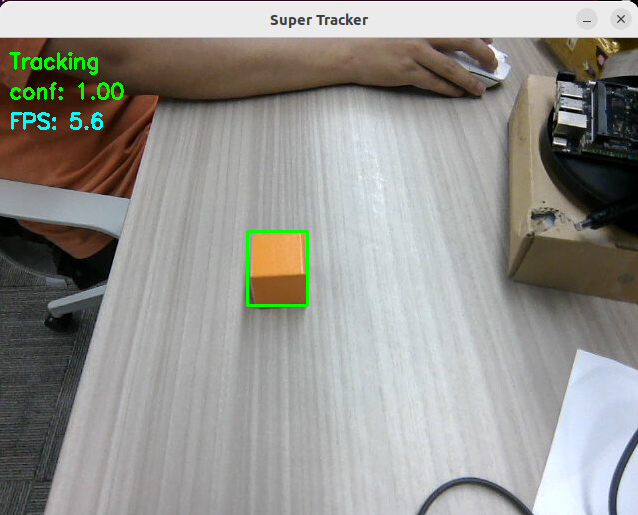
Move the target object, and the robotic arm will adjust its joint angles to keep the camera always pointed at the target object.
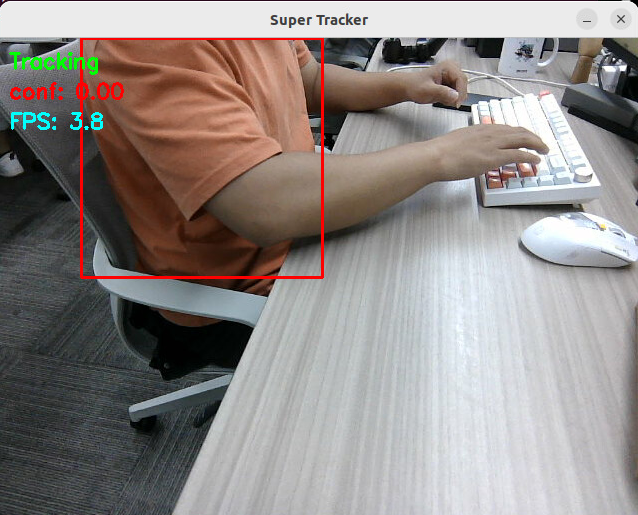
If the target's confidence is too low or the target is lost from view, the robotic arm will stop moving.
When the target reappears in view, the tracker will automatically search for the target. Once the confidence is greater than 0.1, the robotic arm will re-enter the tracking state.
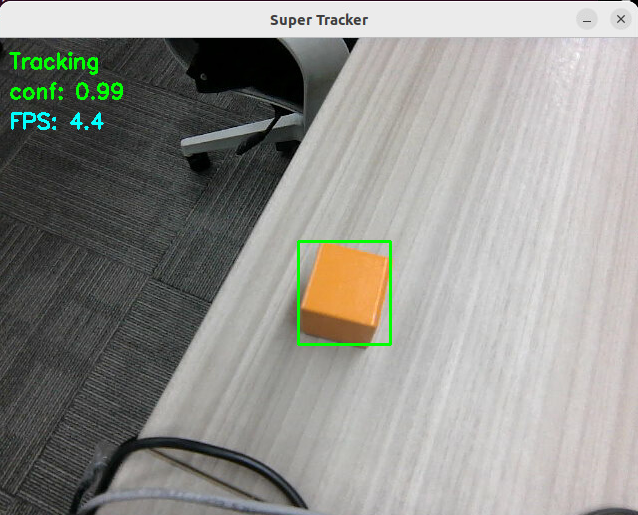
When you need to stop tracking the target, you can give OpenClaw the instruction again.
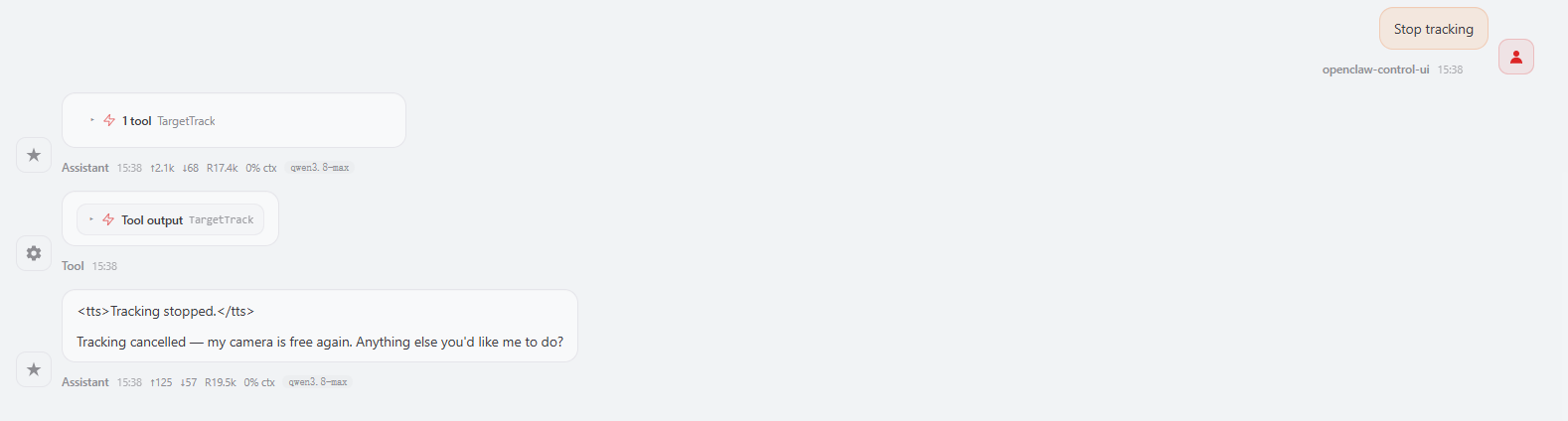
The MCP server will print a log indicating that the tracking state for the target has been released.

Important
In [OpenClaw Arm Tracking And Grasping], OpenClaw must first track the target before it can grasp it.
4. Source Code Analysis
Source code path
xxxxxxxxxx~/yahboomcar_ros2_ws/yahboomcar_ws/src/multi_brains_pre/multi_brains_pre/action_controller.py
The following is an explanation of the source code of the core target tracking functions in the ActionController class (TargetTrack and the internal functions it calls).
4.1 TargetTrack() — Entry point for starting/canceling tracking
x def TargetTrack(self, x1_or_cmd, y1:int=None, x2:int=None, y2:int=None): '''Track the target object by its bounding box, use 'cancel' to stop tracking''' # Cancel tracking mode if isinstance(x1_or_cmd, str) and str(x1_or_cmd).strip().strip("'\"") == "cancel": #step 1: stop arm tracking first (visual_track service) if self.visual_track_client.wait_for_service(timeout_sec=5.0): response: SetBool.Response = self.visual_track_client.call(SetBool.Request(data=False)) if not response.success: self.get_logger().warn(f"Failed to stop arm tracking: {response.message}") else: self.get_logger().warn("visual_track service not available, skip stopping arm tracking")
#step 2: cancel tracking target if not self.cancel_track_client.wait_for_service(timeout_sec=5.0): self.get_logger().error("CancelTrack service not available") return [False, "CancelTrack service not available"] self.cancel_track_client.call(CancelTrack.Request()) self.get_logger().info("Tracking cancelled")
#step 3: reset arm to initial pose self._reset_joints() self.InitArmPose() return [True, "Tracking cancelled and arm reset"]
# Start tracking mode: x1_or_cmd must be a numeric bounding box coordinate try: x1: int = int(str(x1_or_cmd).strip().strip("'\"")) except (TypeError, ValueError): error_msg = f"Invalid command for TargetTrack: '{x1_or_cmd}'. Use x1,y1,x2,y2 to start or 'cancel' to stop tracking." self.get_logger().error(error_msg) return [False, error_msg] if None in (y1, x2, y2): self.get_logger().error("TargetTrack: x1, y1, x2, y2 are all required to start tracking") return [False, "Missing bounding box parameters"] try: y1, x2, y2 = int(str(y1)), int(str(x2)), int(str(y2)) except (TypeError, ValueError): error_msg = f"TargetTrack: invalid bounding box values x1={x1}, y1={y1}, x2={x2}, y2={y2}, must be integers" self.get_logger().error(error_msg) return [False, error_msg]
#step 1: request start_track service to initialize the tracking target if not self.start_track_client.wait_for_service(timeout_sec=5.0): self.get_logger().error("StartTrack service not available") return [False, "Tracking service not available"] response: StartTrack.Response = self.start_track_client.call( StartTrack.Request(x1=x1, y1=y1, x2=x2, y2=y2)) if not response.success: self.get_logger().error("Failed to initialize tracking target") return [False, "Failed to initialize tracking target"] time.sleep(1.0)
#step 2: request visual_track service to make the arm track the target if not self.visual_track_client.wait_for_service(timeout_sec=5.0): self.cancel_track_client.call(CancelTrack.Request()) self.get_logger().error("visual_track service not available") return [False, "visual_track service not available"] response: SetBool.Response = self.visual_track_client.call(SetBool.Request(data=True)) if not response.success: self.cancel_track_client.call(CancelTrack.Request()) self.get_logger().error(f"Failed to start arm tracking: {response.message}") return [False, f"Failed to start arm tracking: {response.message}"] self.get_logger().info("Tracking started, arm is tracking the target") return [True, "Tracking started"]Code Explanation:
Cancel tracking: If the passed-in parameter is the string
"cancel", execute in sequence: stop the gaze thread → cancel the tracking service → restore the robotic arm to its initial pose.Start tracking: Call
start_track_client(a ROS2 service client) to start the target tracking service, passing in the target ROI bounding box coordinates(x1,y1,x2,y2).Background thread: Start an independent thread
_gaze_track_loopto continuously perform visual servo control, without affecting the main thread's response to other instructions.Parameter validation: The start mode requires complete coordinate parameters; a missing coordinate returns an error.
4.2 IBVS_tracker.py Tracking Server
Code Explanation:
_visual_track_callback: The callback function of thevisual_trackservice, which receives aSetBoolrequest and controls the start and stop of tracking.request.data == Truebranch: If tracking is already in progress, return success directly; otherwise, call_get_joints()to check the availability of the robotic arm service. If it passes, set_tracking_enabledto True and start the daemon thread_track_loopto perform continuous tracking.request.data == Falsebranch: Call_stop_tracking()to stop tracking and release joint resources._stop_tracking: The core logic for stopping tracking. It sets_tracking_enabledto False to notify the tracking thread to exit, waits for the thread to finish throughjoin(timeout=2.0), and finally calls_reset_joints()to restore the robotic arm to its initial pose._track_loop: The main loop of visual servo tracking, running continuously at about 4Hz in an independent daemon thread._get_bbox(): Gets the bbox result of the target detection in the current frame.box[2]is the confidence; when it is lower than 0.08, skip this round of tracking.error_x / error_y: Computes the pixel offset between the target center point and the image center (320, 240).gaze_threshold: The offset threshold. When the offsets in both the x and y directions are less than the threshold, the target is considered centered and no adjustment is needed._gaze_control(error_x, error_y): Adjusts the robotic arm joint angles according to the pixel offset, so that the target returns to the center of the frame.
xxxxxxxxxx    def _visual_track_callback(self, request: SetBool.Request, response: SetBool.Response):        '''Service callback: enable/disable arm-only tracking (no chassis movement)'''        if request.data:            if self._tracking_enabled:                response.success = True                response.message = "Arm tracking is already running"                return response            if not self._get_joints():                response.success = False                response.message = "Arm service not available"                return response            self._tracking_enabled = True            self._track_thread = threading.Thread(target=self._track_loop, daemon=True)            self._track_thread.start()            self.get_logger().info("visual_track enabled, arm starts tracking target")            response.success = True            response.message = "Arm tracking started"        else:            self._stop_tracking()            self.get_logger().info("visual_track disabled, arm stops tracking target")            response.success = True            response.message = "Arm tracking stopped"        return response
    def _stop_tracking(self):        '''Stop the arm-only tracking loop and release joint resources'''        self._tracking_enabled = False        if self._track_thread is not None and self._track_thread.is_alive():            self._track_thread.join(timeout=2.0)        self._track_thread = None        self._reset_joints()
    def _track_loop(self):        '''Arm-only tracking loop: gaze follows the target without chassis movement'''        while rclpy.ok() and self._tracking_enabled:            box = self._get_bbox()            if box[2] < 0.08:                self.get_logger().debug("bbox confidence too low, skipping tracking")                time.sleep(0.2)                continue
            error_x = box[0] - 320            error_y = box[1] - 240            if abs(error_x) <= self.gaze_threshold and abs(error_y) <= self.gaze_threshold:                self.get_logger().debug("Target centered in view, holding gaze")            else:                self._gaze_control(error_x, error_y)            time.sleep(0.25)
5. Parameter Debugging
Parameter file path:
xxxxxxxxxx~/yahboomcar_ros2_ws/yahboomcar_ws/src/yahboomcar_bringup/param/common.yaml
Parameters related to the tracking function
xxxxxxxxxx...#gaze controlIBVS_tracker ros__parameters gaze_threshold50.0 gaze_step2 ...
| Parameter | Effect of increasing | Effect of decreasing |
|---|---|---|
gaze_threshold | Allows a larger offset and looser adjustment; below this value no adjustment is made | Requires more precise alignment and more frequent adjustment; too small a value may cause steady-state oscillation of the robotic arm |
gaze_step | Larger adjustment step | Smoother adjustment, but prone to overshoot |
6. Common Problems and Solutions
The target ROI box is inaccurate when tracking the target
Check whether the ROI box selection of the first frame is accurate when GetBbox selects the target object. For detailed steps, refer to 【OpenClaw Development】—【OpenClaw Multimodal Vision】—【Get Target Bounding Box Coordinates】
Verify that the image path is:
~/yahboomcar_ros2_ws/yahboomcar_ws/cache/verify_image.png