Welcome to ROSMASTER A1 PRO repository
2.Robot Handle Control
🎮 Robot Handle Control
1. Course Introduction
Control the A1 Pro robot chassis movement and robotic arm joint angles using a handle.
🎯 Course Objectives
Master the launch method for the handle control node
Familiarize yourself with the functional mapping of handle buttons and joysticks
Understand the methods for controlling the chassis and robotic arm with the handle
2. Preparation
2.1 Connecting the Handle
Insert the USB handle receiver into the A1 Pro's USB port and check if the handle is recognized by the system:
ls /dev/input/js*You should normally see the /dev/input/js0 device.

2.2 Starting Handle Control
Start the chassis driver + handle control with one command:
xxxxxxxxxxros2 launch yahboomcar_ctrl yahboomcar_joy_launch.py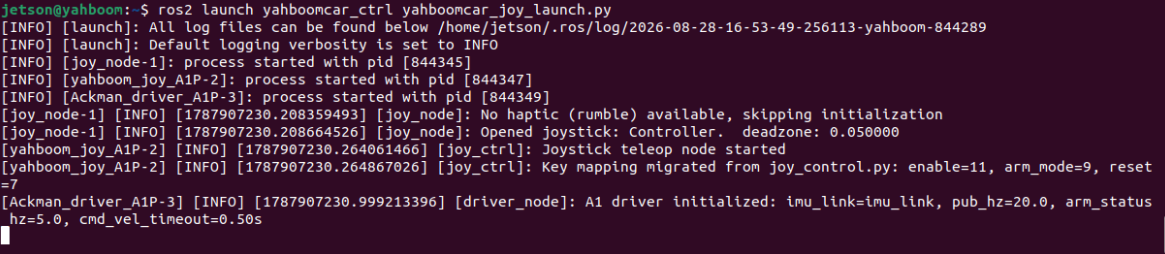
Note
This launch file will simultaneously start the joy_node (handle driver) and yahboom_joy_A1 (handle control logic) nodes.
3. Handle Button Operations
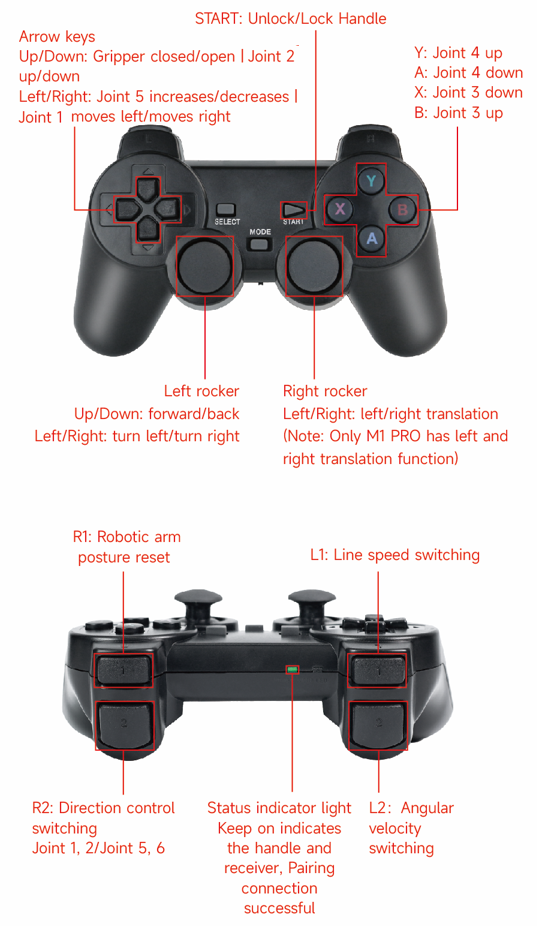
3.1 Chassis Motion Control
| Input | Function | Description |
|---|---|---|
| Left Stick Up/Down (Y-axis) | Forward / Backward | Analog control |
| Left Stick Left/Right (X-axis) | Turn Left / Right | Analog control |
Warning
The A1 Pro uses an Ackermann steering structure. When turning, you need to simultaneously push the forward/backward stick; turning left/right alone will not move the vehicle.
3.2 Speed Adjustment
| Button | Function |
|---|---|
| Button L1 | Toggle linear velocity gear |
| Button L2 | Toggle angular velocity gear |
3.3 Robotic Arm Control
The handle supports two robotic arm control modes, switched via Button 9:
Mode A (Default):
| Input | Function |
|---|---|
| D-pad Left/Right | Joint 1 rotation |
| D-pad Up/Down | Joint 2 rotation |
Mode B:
| Input | Function |
|---|---|
| D-pad Left/Right | Joint 5 rotation |
| D-pad Up/Down | Joint 6 rotation |
Universal Buttons:
| Button | Function |
|---|---|
| Button X | Joint 3 increase |
| Button B | Joint 3 decrease |
| Button Y | Joint 4 increase |
| Button A | Joint 4 decrease |
| Button SELECT | Reset robotic arm to initial pose |
3.4 Enable/Disable Switch
| Button | Function |
|---|---|
| Button (START) | Enable/disable handle control |
Caution
The handle is disabled by default; on first use, press START to activate control.
4. Source Code Reference
Source code path:
xxxxxxxxxx~/yahboomcar_ros2_ws/yahboomcar_ws/src/yahboomcar_ctrl/yahboomcar_ctrl/yahboom_joy_A1P.py#rdk~/yahboomcar_ros2_ws/yahboomcar_ws/src/yahboomcar_ctrl/yahboomcar_ctrl/yahboom_joy_A1p.pyThe handle node subscribes to the /joy topic to receive button and joystick states, then publishes to /cmd_vel (chassis) and /arm_joint (robotic arm) topics after dead zone filtering and velocity mapping.