Welcome to ROSMASTER A1 PRO repository
15.Medipipe Gesture Control Robotic arm Cction Group
Gesture Control Robotic Arm Action Group
Gesture Control Robotic Arm Action Group1. Course Content2. Program Startup2.1 Start the Camera and Robotic Arm Driver Environment2.2 Start the Gesture Control Robotic Arm Action Group Node3. Hands-on Demonstration and Interaction Workflow4. Core Code Analysis4.1 Node Initialization and Interface Creation4.2 Space Bar Trigger and Gesture Branch Resolution
1. Course Content
This lesson implements acquiring real-time color images, using the MediaPipe deep learning framework to recognize and classify hand keypoints, and when a specific gesture is detected, driving the A1Pro robotic arm to execute preset action groups (such as dancing, waving a greeting, nodding, swaying, applauding, etc.).
2. Program Startup
2.1 Start the Camera and Robotic Arm Driver Environment
In Terminal 1, enter the following command to start the robot camera and the low-level robotic arm communication services:
xxxxxxxxxxros2 launch dofbot_pro_driver A1pro_camera_arm.launch.pyNote
This all-in-one script automatically launches the image stream publishing node according to the currently installed camera model (USB monocular camera or Nuwa 3D depth camera), and loads the low-level robotic arm bus servo driver and kinematics services.
2.2 Start the Gesture Control Robotic Arm Action Group Node
In Terminal 2, enter the following command to start the gesture action recognition and execution program:
xxxxxxxxxxros2 run yahboomcar_mediapipe 15_GestureMoving3. Hands-on Demonstration and Interaction Workflow
After the program starts, the robotic arm automatically and smoothly rises to the preset patrol posture:
[90°, 150°, 12°, 20°, 90°, 0°];The image window pops up and displays the real-time video image. The recognizable gestures and their triggered actions are as follows:
Yes gesture: the robotic arm "dances" according to the set tempo, and returns to the home position after completion;
OK gesture: the robotic arm shakes its head left and right to wave, and returns to the home position after completion;
Thumb-down gesture (clenched fist with the thumb pointing downward): the robotic arm presents a lowered/downward posture, and returns to the home position after completion;
Number 1 gesture (only the index finger extended): the robotic arm nods to greet, and returns to the home position after completion;
Rock gesture (index finger and pinky straightened, the rest bent): the robotic arm extends upward and sways left and right, and returns to the home position after completion;
Number 5 gesture (all five fingers spread out): the gripper and wrist of the robotic arm are linked to "applaud", and returns to the home position after completion.
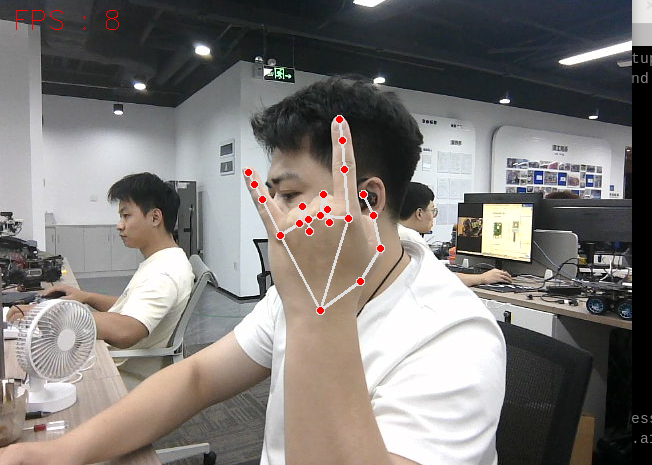
Tip
After making the gesture in the camera image, press the space bar (SPACE) in the image window, and the robotic arm will start recognizing the gesture and trigger the corresponding action group. After each action is executed, if you need to trigger it again, make the gesture again and press the space bar again. Press the Q key in the image window or Ctrl+C in the terminal to exit the program.
4. Core Code Analysis
Source code path: yahboomcar_ws/src/yahboomcar_mediapipe/yahboomcar_mediapipe/15_GestureMoving.py
4.1 Node Initialization and Interface Creation
The node imports the dedicated control message interface dofbot_pro_interface of the A1Pro robotic arm, and automatically supports the image topics of both the USB camera and the Nuwa depth camera:
xxxxxxxxxximport rclpyfrom rclpy.node import Nodefrom sensor_msgs.msg import Imagefrom cv_bridge import CvBridgefrom dofbot_pro_interface.msg import ArmJoints, ArmJointfrom dofbot_pro_driver.media_library import HandDetector
class GestureMovingNode(Node):    def __init__(self):        super().__init__('gesture_moving_node')                # Initial joint angles [base, shoulder, elbow, wrist pitch, wrist rotation, gripper]        self.init_joints = [90, 150, 12, 20, 90, 0]        self.bridge = CvBridge()        self.hand_detector = HandDetector()                # Create the single-joint and multi-joint Publishers of the robotic arm        self.pub_single_joint = self.create_publisher(ArmJoint, "arm_joint", 10)        self.pub_six_joints = self.create_publisher(ArmJoints, "arm6_joints", 10)                # Automatically determine the camera type and subscribe to the RGB image        camera_type = os.getenv('CAMERA_TYPE', 'nuwa')        topic_name = '/ascamera_hp60c/camera_publisher/rgb0/image' if camera_type == 'nuwa' else '/usb_cam/image_raw'        self.sub_rgb = self.create_subscription(Image, topic_name, self.get_RGBImageCallBack, 1)
4.2 Space Bar Trigger and Gesture Branch Resolution
In the image main loop, the space key (ASCII 32) is detected to trigger an asynchronous thread to execute the action group, avoiding blocking the image display and rendering:
xxxxxxxxxxdef process(self, frame):    frame, lmList, bbox = self.hand_detector.findHands(frame)    key = cv2.waitKey(10)    # Press the space bar to trigger the action    if key == 32 and not self.is_arm_moving:        self.move_enabled = True
    if len(lmList) != 0 and self.move_enabled and not self.is_arm_moving:        self.move_enabled = False        threading.Thread(target=self.execute_gesture_action, args=(lmList,)).start()
Classify the gesture according to the detected feature keypoints, and publish the target joint angles:
xdef execute_gesture_action(self, lmList): self.is_arm_moving = True fingers = self.hand_detector.fingersUp(lmList) gesture = self.hand_detector.get_gesture(lmList)
if gesture == "Yes": self.dance() # Dance action group elif gesture == "OK": self.wave() # Wave action group elif gesture == "Thumb_down": self.bow() # Bow action group elif sum(fingers) == 1: self.arm_nod() # Nod action group elif fingers[1] == 1 and fingers[4] == 1 and sum(fingers) == 2: self.sway() # Rock gesture sway action group elif sum(fingers) == 5: self.arm_applaud() # Applaud action group
self.init_pose() # Smoothly return to the home position after the action is completed self.is_arm_moving = False