Welcome to ROSMASTER A1 PRO repository
7.YOLOv26 + DeepSORT Tracking
YOLOv26 Object Tracking (Vision + LiDAR Following)
This program integrates YOLOv26 deep learning object tracking with LiDAR forward ranging clustering technology to achieve highly stable target tracking and following. The system uses vision algorithms to compute the lateral offset angle of the target center relative to the field of view for heading adjustment, and combines real-time LiDAR distance measurements to precisely control forward/backward motion. It also supports graphical mouse target selection and dynamic parameter re-identification.
1、Enable Optimal Board Performance
1.1、Enable Jetson Clocks
Enabling Jetson Clocks ensures that all CPU and GPU cores run at maximum frequency, improving neural network inference speed and real-time frame rate: (Not required on RDK and Raspberry Pi boards)
sudo jetson_clocks2、Program Launch and Interaction Guide
2.1、Start the Low-Level Hardware Drivers (Chassis, LiDAR, and Camera)
In the first terminal, start the base nodes for the chassis and LiDAR:
xxxxxxxxxxros2 launch dofbot_pro_driver A1pro_camera_arm.launch.pyNote: Depending on the camera type used:
- If using the Nuwa depth camera, the factory default environment variable
CAMERA_TYPE=nuwais used, and the node automatically subscribes to/ascamera_hp60c/camera_publisher/rgb0/image;- If using a USB camera, you can first start the USB camera node with
ros2 launch usb_cam camera.launch.py, and the program will automatically adapt and subscribe to/usb_cam/image_raw.
2.2、Start the Tracking Main Program
In the second terminal, run the tracking node:
xxxxxxxxxxros2 run yahboomcar_depth yolov26_trackYou can also pass custom runtime parameters at startup (for example, setting the following keep distance to 1.0 meter and the confidence threshold to 0.5):
xxxxxxxxxxros2 run yahboomcar_depth yolov26_track --ros-args -p keep_dist:=1.0 -p conf:=0.5After the program starts, the following operations are performed automatically:
- Safe reset of the manipulator: a reset command is published to
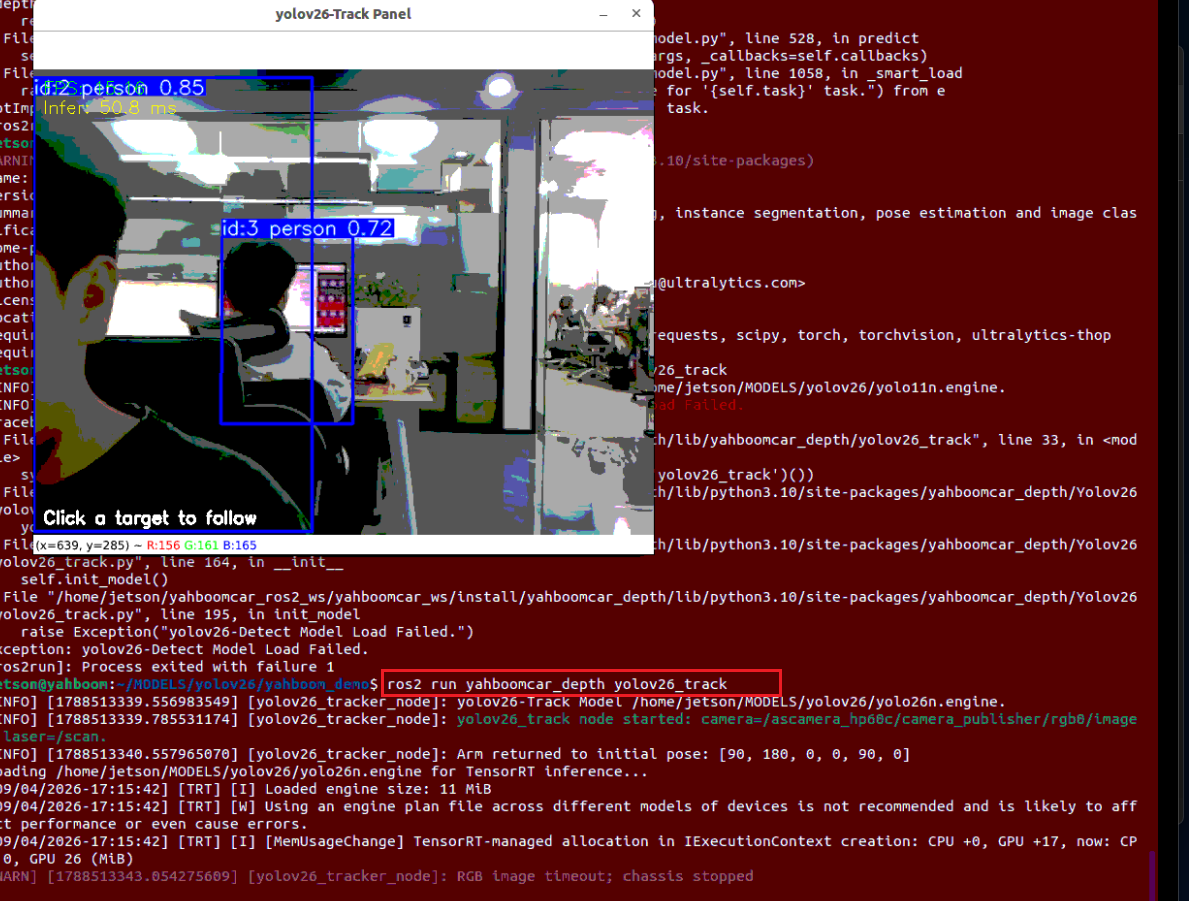
arm6_jointsto return the 6-DOF manipulator to its initial safe pose(90, 180, 0, 0, 90, 0), preventing it from blocking the camera's forward view; - A visualization tracking window pops up: a real-time interactive window titled
yolov26-Track Panelis shown, in which every detected object is annotated with a bounding box, a class label, and a unique tracking ID:
2.3、Target Locking and Interaction
The system provides several flexible methods for target locking and control:
Method 1: Mouse-Click Target Selection (Easiest, Recommended)
- Directly in the popped-up
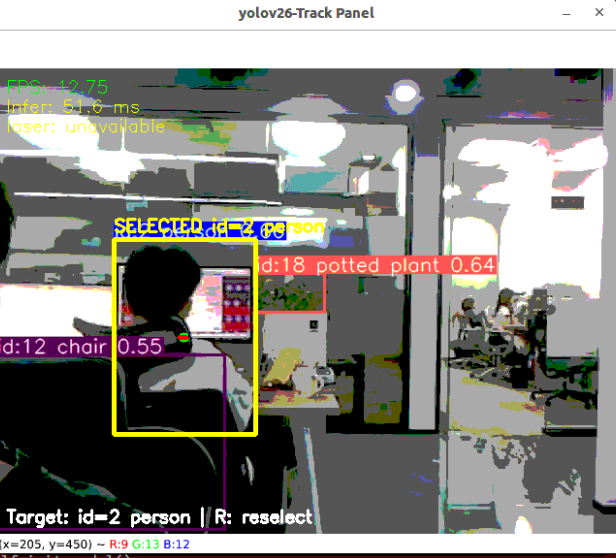
yolov26-Track Panelwindow, left-click the bounding box region of the target object to follow; - After the target is selected, its box switches to a highlighted yellow bounding box and displays
SELECTED id=<ID> <class_name>; - The historical motion trajectory line and the stable center point of the target are drawn in real time on the frame;
- The terminal prints a prompt in sync:
Target selected: id=..., class=...; - The car then automatically enters closed-loop following!
Method 2: Keyboard Shortcut to Clear Selection (Re-Select Target)
- When you need to change the tracking target or stop the following car, press the
rorRkey on the keyboard while the image display window is active; - The current tracking target is cleared immediately, the car automatically publishes zero velocity to stop, and the status bar reverts to
Click a target to follow; you can then click a new target to start tracking again.
Method 3: ROS 2 Dynamic Parameter Configuration (Command-Line Tuning)
In the third terminal, you can dynamically adjust the following parameters through the ROS 2 parameter system without restarting the program:
x# 1. Dynamically specify the tracking ID (set to -1 to clear the tracking)ros2 param set /yolov26_tracker_node track_id 2# 2. Dynamically modify the keep distance (e.g., adjust to 0.8 meter)ros2 param set /yolov26_tracker_node keep_dist 0.8# 3. Dynamically modify the detection confidence thresholdros2 param set /yolov26_tracker_node conf 0.63、Core Source Code Analysis
The source file is located at:
xxxxxxxxxx~/yahboomcar_ros2_ws/yahboomcar_ws/src/yahboomcar_depth/yahboomcar_depth/Yolov26/yolov26_track.py
3.1、Node Initialization and Safe Manipulator Pose Reset
At startup, the program automatically adapts to the camera Topic, the LiDAR Topic, and the hardware model files, and sets up a timer to automatically reset the manipulator to its initial safe pose:
xxxxxxxxxxINITIAL_ARM_POSE = (90, 180, 0, 0, 90, 0)ARM_MOVE_TIME_MS = 1500TRACK_WINDOW_NAME = "yolov26-Track Panel"class YOLO_TRACKER(Node): def __init__(self, name): super().__init__(name) # 1. Camera Topic adaptation camera_type = os.getenv('CAMERA_TYPE', 'nuwa').strip().lower() default_rgb_topic = ( '/usb_cam/image_raw' if camera_type == 'usb' else '/ascamera_hp60c/camera_publisher/rgb0/image' ) self.declare_parameter('rgb_topic', default_rgb_topic) self.declare_parameter('laser_topic', '/scan') self.declare_parameter('keep_dist', 1.0) # Expected following distance (m) # 2. Manipulator auto-reset publisher and one-shot timer self.arm_pose_pub = self.create_publisher(ArmJoints, 'arm6_joints', 10) self.arm_init_timer = self.create_timer(1.0, self.reset_arm_pose) # 3. Initialize the interaction window and the mouse click callback cv2.namedWindow(TRACK_WINDOW_NAME, cv2.WINDOW_AUTOSIZE) cv2.setMouseCallback(TRACK_WINDOW_NAME, self.on_mouse) def reset_arm_pose(self): '''Move the 6 servos of the manipulator back to the reset initial pose to avoid blocking the forward view''' msg = ArmJoints() msg.joint1, msg.joint2, msg.joint3 = INITIAL_ARM_POSE[:3] msg.joint4, msg.joint5, msg.joint6 = INITIAL_ARM_POSE[3:] msg.time = ARM_MOVE_TIME_MS self.arm_pose_pub.publish(msg) self.arm_init_timer.cancel()3.2、Mouse Interaction and Intelligent Target Reacquisition Mechanism (Reacquire Target)
The user can lock the target simply by left-clicking with the mouse on the frame. When the target's track_id is temporarily broken or changed due to turning or occlusion, the algorithm has a built-in powerful reacquisition mechanism that comprehensively evaluates the intersection-over-union (IoU), the spatial center displacement, and the class confidence to automatically reacquire the target:
xxxxxxxxxxdef on_mouse(self, event, x, y, flags, param): '''Select the target directly by left-clicking inside the target detection box''' if event != cv2.EVENT_LBUTTONDOWN: return for detection in reversed(self.latest_detections): x1, y1, x2, y2 = detection.xyxy if x1 <= x <= x2 and y1 <= y <= y2: self.set_target_detection(detection) returndef try_reacquire_target(self, detections, image_width, image_height): '''When the target is lost or its ID changes, re-find the target based on a weighted combination of IoU and center distance''' candidates = [d for d in detections if d.class_id == self.selected_class_id] if not candidates: return None # Score candidates by combining bounding-box IoU overlap with the Euclidean distance of the spatial center to pick the best match ...3.3、Forward LiDAR Continuous Point Cloud Clustering (Laser Clustering)
To accurately obtain the actual distance to the target object, the program filters the /scan LiDAR point cloud within a specific forward sector (by default ±20° around the front direction), removes isolated noise points through continuous clustering and median filtering, and outputs a stable obstacle distance:
xxxxxxxxxxdef find_laser_target(self, scan_data): '''Extract continuous obstacle point cloud clusters within the specified forward sector angle''' sector_angle = min(90.0, max(1.0, abs(float(self.laser_sector_angle)))) forward_angle = float(self.laser_forward_angle) # Filter valid radar points within the forward sector range and sort them by angle ... # Continuous clustering algorithm identifies target clusters and extracts the median distance targets = [ (sum(p[0] for p in cluster)/len(cluster), float(median(p[1] for p in cluster))) for cluster in clusters ] # First-order low-pass filtering smooths the distance output to prevent numerical jitter return min(targets, key=lambda t: t[1])3.4、Dual Closed-Loop Motion Control and Safety Watchdog
The motion control logic of the car is computed uniformly by the move_control function:
- Angular velocity (
angular.z): the pixel deviationangular_errorof the target center point along the horizontal direction of the image is computed and fed to the angular velocity PID controller to compute the car's steering speed, ensuring that the target stays centered in the frame; - Linear velocity (
linear.x): after the angular alignment is within tolerance, the differencedist_errorbetween the LiDAR-measured distance and the expected keep distancekeep_dist, combined with the deadbanddistance_deadband, is fed to the distance PID controller to smoothly drive the car forward or backward; - Side fine-tuning reverse (Side Reposition): when the distance is already satisfied but the lateral offset angle is too large, the car automatically reverses at a gentle speed to open up space for rotational alignment;
- Safety watchdog (
safety_watchdog): when the camera frame is not updated for more than 0.6 seconds, the watchdog automatically publishes zero velocity to stop the car, ensuring robot safety.
xxxxxxxxxxdef move_control(self, distance, point_x, image_width): speed = Twist() width = max(1.0, float(image_width)) # 1. Compute the lateral pixel deviation of the vision center angular_error = (float(point_x) - width * 0.5) * (640.0 / width) # 2. Compute the LiDAR distance error dist_error = None if distance is None else float(distance) - float(self.keep_dist) # 3. Heading alignment closed-loop control if abs(angular_error) > float(self.angular_pixel_tolerance): speed.angular.z = self.angular_controller.pid_control(angular_error) # 4. Distance tracking closed-loop control (triggered when the angle is roughly aligned) if dist_error is not None and abs(angular_error) <= float(self.linear_alignment_tolerance_px): if abs(dist_error) > float(self.distance_deadband): speed.linear.x = self.dist_controller.pid_control(dist_error) self.cmd_vel_pub.publish(speed)4、Core Tunable Parameter Summary Table
The following table lists the core parameters within the node that support dynamic adjustment and their functional descriptions:
| Parameter | Default Value | Description |
|---|---|---|
track_id | -1 | Current locked tracking ID; -1 means no target selected |
keep_dist | 1.0 | Desired physical distance to keep from the tracked target (unit: meter) |
conf | 0.5 | YOLO object detection confidence threshold |
iou | 0.3 | Non-Maximum Suppression (NMS) IoU threshold |
laser_sector_angle | 20.0 | Half-sector angle of the LiDAR forward detection (range: ±20 degrees) |
distance_deadband | 0.05 | Distance tracking deadband threshold (meters), preventing small distance fluctuations from causing frequent car jittering |
max_linear_speed | 0.35 | Maximum forward/reverse linear speed limit of the car (m/s) |
max_angular_speed | 0.3 | Maximum rotational angular speed limit of the car (rad/s) |
allow_reverse | True | Whether to allow automatic reverse to keep distance when the target approaches |
Kp / Kd | 0.5 / 0.0 | Proportional and derivative gains of the distance tracking PID |
Kp_1 / Kd_1 | -0.1 / -0.3 | Proportional and derivative gains of the heading alignment PID |