Welcome to ROSMASTER A1 PRO repository
9.Finger Control
Finger Control
1. Content Description
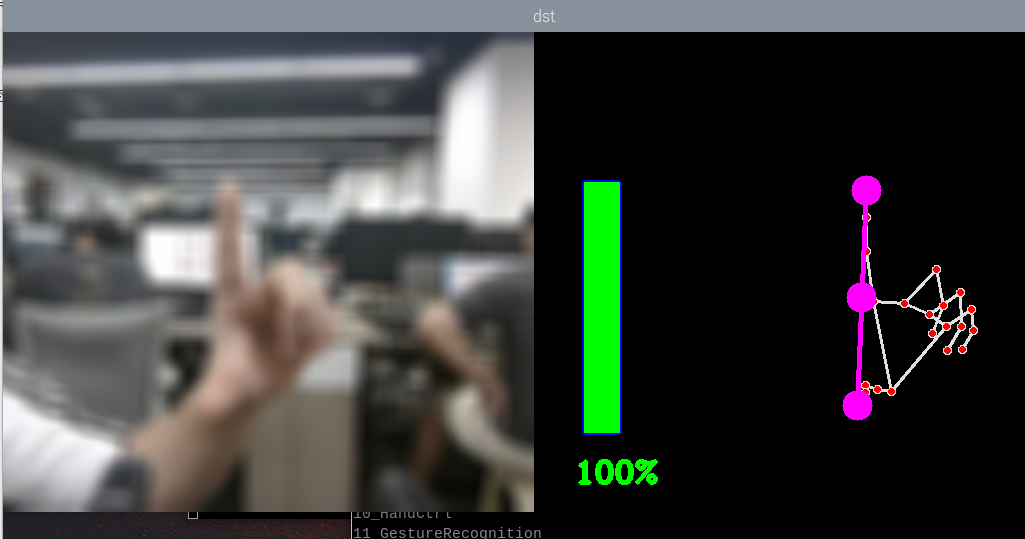
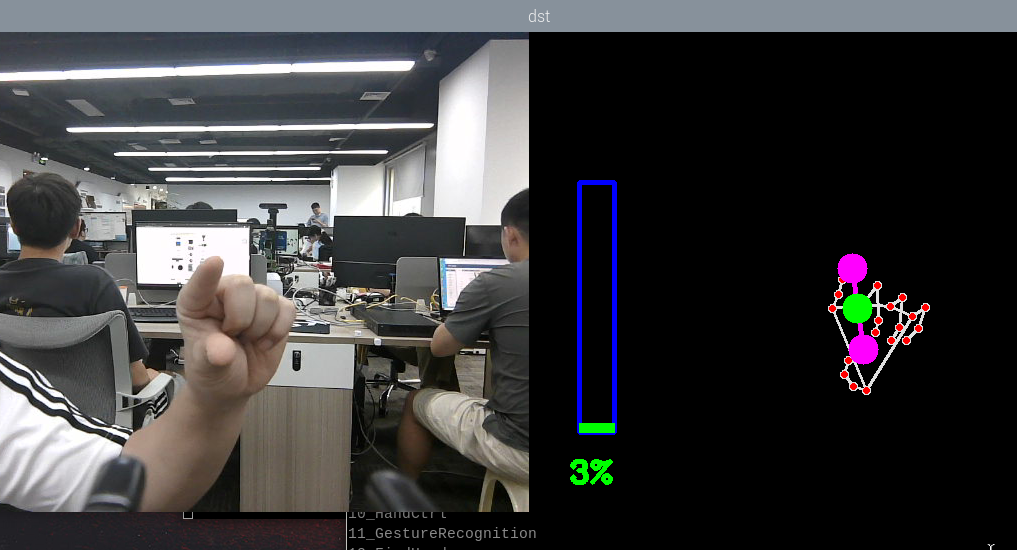
This lesson implements acquiring the color image and using the MediaPipe framework to detect fingers, then calculates the size of the angle formed by the thumb tip, the wrist joint, and the index finger tip to change the image processing effect. This lesson uses the Raspberry Pi 5 as an example.
For the Raspberry Pi 5 mainboard, you need to open a terminal on the host machine, then enter the command to access the Docker container, and enter the commands mentioned in this lesson inside the terminal after entering the Docker container. For the tutorial on entering the Docker container from the host, please refer to 【Robot Configuration and Operation Guide】, section 【3.Enter Docker (For Raspberry Pi)】 in this product tutorial.
For the Orin and RDK mainboards, simply open a terminal and enter the commands mentioned in this lesson.
2. Program Startup
The Raspberry Pi PI5 controller needs to enter the Docker container first; RDK X5 and Orin controllers do not need to.
To enter the Docker container (for steps, refer to 【Docker Course】 --- 【4. Docker Startup Script】),
All the docker terminals for the commands below need to enter the same Docker container before executing (for steps, refer to 【Docker Course】 --- 【3.Docker Submission and Multi-Terminal Access】)
First, enter the following command in the terminal to start the robot camera and low-level driver environment:
xxxxxxxxxxros2 launch dofbot_pro_driver A1pro_camera_arm.launch.pyNote
This command is the official all-in-one startup script for the A1Pro, which automatically launches the image stream node according to the camera hardware configuration (USB monocular camera or Nuwa 3D depth camera) and loads the low-level drivers. If you only need to start the camera stream separately, you can also run ros2 launch usb_cam camera.launch.py (USB camera) or ros2 launch ascamera hp60c.launch.py (Nuwa camera).
After the camera is started successfully, open another terminal and enter the following command in the terminal to start the finger control program:
xxxxxxxxxxros2 run yahboomcar_mediapipe 09_HandCtrl# Control the robotic arm to look forwardros2 topic pub /arm6_joints dofbot_pro_interface/msg/ArmJoints "{joint1: 90, joint2: 180, joint3: 0, joint4: 0, joint5: 90, joint6: 0, time: 1000}" --once
After the program runs, press the F key to switch the image processing effect, and then change the distance between the thumb and the index finger to change the angle size, thereby controlling the image processing effect:
3. Core Code Analysis
Program code path:
Raspberry Pi 5 mainboard
The program code is located in the running Docker. The path in the Docker is
/root/yahboomcar_ros2_ws/yahboomcar_ws/src/yahboomcar_mediapipe/yahboomcar_mediapipe/09_FingerCtrl.pyOrin mainboard
The program code path is
/home/jetson/yahboomcar_ros2_ws/yahboomcar_ws/src/yahboomcar_mediapipe/yahboomcar_mediapipe/09_FingerCtrl.pyRDK mainboard
The program code path is
/home/sunrise/yahboomcar_ros2_ws/yahboomcar_ws/src/yahboomcar_mediapipe/yahboomcar_mediapipe/09_FingerCtrl.py
Import the required library files:
xxxxxxxxxximport mathimport timeimport cv2 as cvimport numpy as npimport mediapipe as mpimport rclpyfrom rclpy.node import Nodefrom cv_bridge import CvBridgefrom sensor_msgs.msg import Imagefrom arm_msgs.msg import ArmJointsimport cv2Initialize the data and define the Publisher and Subscriber:
xdef __init__(self): super().__init__('hand_effects_node') # Define the image processing effect list self.effect = ["color", "thresh", "blur", "hue", "enhance"] self.volBar = 400 self.pTime = self.cTime = self.volPer = self.value = self.index = 0 # Use the class in the mediapipe library to define a hand object self.mpHand = mp.solutions.hands self.mpDraw = mp.solutions.drawing_utils self.hands = self.mpHand.Hands( static_image_mode=False, max_num_hands=2, min_detection_confidence=0.5, min_tracking_confidence=0.5 ) # Define the attributes of the joint connection lines, which will be used in the subsequent joint connection function self.lmDrawSpec = mp.solutions.drawing_utils.DrawingSpec(color=(0, 0, 255), thickness=-1, circle_radius=15) self.drawSpec = mp.solutions.drawing_utils.DrawingSpec(color=(0, 255, 0), thickness=10, circle_radius=10) self.bridge = CvBridge()
# Define the Subscriber for the color image topic camera_type = os.getenv('CAMERA_TYPE', 'usb') topic_name = '/ascamera_hp60c/camera_publisher/rgb0/image' if camera_type == 'nuwa' else '/usb_cam/image_raw'
self.subscription = self.create_subscription( Image, topic_name, self.image_callback, 10)Color image callback function:
xxxxxxxxxxdef image_callback(self,msg):    # Convert the color image message data into image data using CvBridge    frame = self.bridge.imgmsg_to_cv2(msg, desired_encoding='bgr8')    action = cv.waitKey(1) & 0xFF    # Call the function to detect the palm and draw the hand joint connection diagram    img = self.hand_detector.findHands(frame)    # Call findPosition to obtain the coordinate list of the finger joints    lmList = self.hand_detector.findPosition(frame, draw=False)    if len(lmList) != 0:        # Calculate the angle        angle =  self.calc_angle(4, 0, 8)        x1, y1 = lmList[4][1], lmList[4][2]        x2, y2 = lmList[8][1], lmList[8][2]        cx, cy = (x1 + x2) // 2, (y1 + y2) // 2        cv.circle(img, (x1, y1), 15, (255, 0, 255), cv.FILLED)        cv.circle(img, (x2, y2), 15, (255, 0, 255), cv.FILLED)        cv.line(img, (x1, y1), (x2, y2), (255, 0, 255), 3)        cv.circle(img, (cx, cy), 15, (255, 0, 255), cv.FILLED)        if angle <= 10: cv.circle(img, (cx, cy), 15, (0, 255, 0), cv.FILLED)        # Calculate        self.volBar = np.interp(angle, [0, 70], [400, 150])        self.volPer = np.interp(angle, [0, 70], [0, 100])        self.value = np.interp(angle, [0, 70], [0, 255])        # print("angle: {},value: {}".format(angle, value))    # Perform the threshold binarization operation. Values greater than the threshold value are represented by 255, and values less than the threshold value are represented by 0    if self.effect[self.index]=="thresh":        gray = cv.cvtColor(frame, cv.COLOR_BGR2GRAY)        frame = cv.threshold(gray, self.value, 255, cv.THRESH_BINARY)[1]    # Perform Gaussian filtering; (21, 21) indicates that the length and width of the Gaussian matrix are both 21, and the standard deviation is the value    elif self.effect[self.index]=="blur":        frame = cv.GaussianBlur(frame, (21, 21), np.interp(self.value, [0, 255], [0, 11]))    # Color space conversion, HSV converted to BGR    elif self.effect[self.index]=="hue":        frame = cv.cvtColor(frame, cv.COLOR_BGR2HSV)        frame[:, :, 0] += int(self.value)        frame = cv.cvtColor(frame, cv.COLOR_HSV2BGR)    # Adjust the contrast    elif self.effect[self.index]=="enhance":        enh_val = self.value / 40        clahe = cv.createCLAHE(clipLimit=enh_val, tileGridSize=(8, 8))        lab = cv.cvtColor(frame, cv.COLOR_BGR2LAB)        lab[:, :, 0] = clahe.apply(lab[:, :, 0])        frame = cv.cvtColor(lab, cv.COLOR_LAB2BGR)    # Press the F key to switch the processing effect    if action == ord('f'):        self.index += 1        if self.index >= len(self.effect): self.index = 0
    cv.rectangle(img, (50, 150), (85, 400), (255, 0, 0), 3)    cv.rectangle(img, (50, int(self.volBar)), (85, 400), (0, 255, 0), cv.FILLED)    cv.putText(img, f'{int(self.volPer)}%', (40, 450), cv.FONT_HERSHEY_COMPLEX, 1, (0, 255, 0), 3)    # Merge the images    dst = self.hand_detector.frame_combine(frame, img)    cv.imshow('dst', dst)
The findPosition function obtains the id of each joint and the xy coordinates of each joint:
xxxxxxxxxxdef findPosition(self, frame, draw=True): # Create a detection list to store the detection result self.lmList = [] if self.results.multi_hand_landmarks: # Iterate through the detection results and add the detection results to the self.lmList list, which represents the id of each detected hand joint and the xy coordinates of the joint for id, lm in enumerate(self.results.multi_hand_landmarks[0].landmark): # print(id,lm) h, w, c = frame.shape cx, cy = int(lm.x * w), int(lm.y * h) # print(id, lm.x, lm.y, lm.z) self.lmList.append([id, cx, cy]) if draw: cv.circle(frame, (cx, cy), 15, (0, 0, 255), cv.FILLED) return self.lmListAs shown in the figure below, the ID of each finger joint:
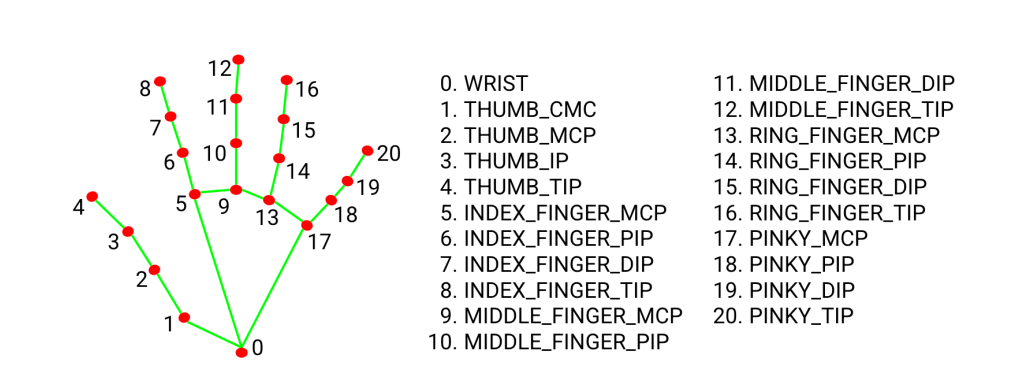
The calc_angle function calculates the angle; here it calculates the angle formed by the thumb tip, the wrist joint, and the index finger tip:
def calc_angle(self, pt1, pt2, pt3): point1 = self.lmList[pt1][1], self.lmList[pt1][2] point2 = self.lmList[pt2][1], self.lmList[pt2][2] point3 = self.lmList[pt3][1], self.lmList[pt3][2] a = self.get_dist(point1, point2) b = self.get_dist(point2, point3) c = self.get_dist(point1, point3) try: radian = math.acos((math.pow(a, 2) + math.pow(b, 2) - math.pow(c, 2)) / (2 * a * b)) angle = radian / math.pi * 180 except: angle = 0 return abs(angle)