Welcome to ROSMASTER A1 PRO repository
10.Palm Target Positioning
Palm Target Positioning
1. Content Description
This lesson implements acquiring the color image and using the MediaPipe framework to detect the palm, and output the palm coordinate, which can subsequently be combined with the robot chassis or the robotic arm to track palm movement. This section requires entering commands in the terminal, where the terminal is opened according to the mainboard type. This lesson uses the Raspberry Pi 5 as an example.
For the Raspberry Pi 5 mainboard, you need to open a terminal on the host machine, then enter the command to access the Docker container, and enter the commands mentioned in this lesson inside the terminal after entering the Docker container. For the tutorial on entering the Docker container from the host, please refer to 【Robot Configuration and Operation Guide】, section 【3.Enter Docker (For Raspberry Pi)】 in this product tutorial.
For the Orin and RDK mainboards, simply open a terminal and enter the commands mentioned in this lesson.
2. Program Startup
The Raspberry Pi PI5 controller needs to enter the Docker container first; RDK X5 and Orin controllers do not need to.
To enter the Docker container (for steps, refer to 【Docker Course】 --- 【4. Docker Startup Script】),
All the docker terminals for the commands below need to enter the same Docker container before executing (for steps, refer to 【Docker Course】 --- 【3.Docker Submission and Multi-Terminal Access】)
First, enter the following command in the terminal to start the robot camera and low-level driver environment:
ros2 launch dofbot_pro_driver A1pro_camera_arm.launch.pyNote
This command is the official all-in-one startup script for the A1Pro, which automatically launches the image stream node according to the camera hardware configuration (USB monocular camera or Nuwa 3D depth camera) and loads the low-level drivers. If you only need to start the camera stream separately, you can also run ros2 launch usb_cam camera.launch.py (USB camera) or ros2 launch ascamera hp60c.launch.py (Nuwa camera).
After the camera is started successfully, open another terminal and enter the following command in the terminal to start the palm positioning program:
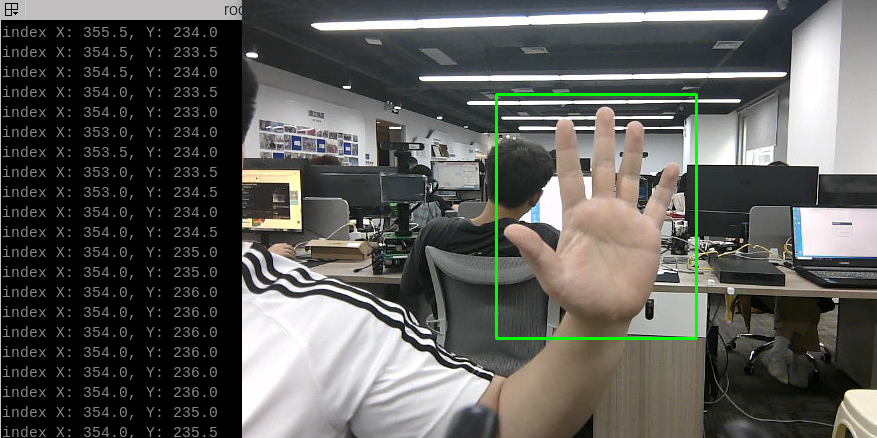
xxxxxxxxxxros2 run yahboomcar_mediapipe 11_FindHand# Control the robotic arm to look forwardros2 topic pub /arm6_joints dofbot_pro_interface/msg/ArmJoints "{joint1: 90, joint2: 180, joint3: 0, joint4: 0, joint5: 90, joint6: 0, time: 1000}" --onceAfter the program starts, as shown in the figure below, when a palm is detected, the palm will be marked with a green box in the image, and the center coordinates of the palm will be output in the terminal:
3. Core Code Analysis
Program code path:
Raspberry Pi 5 mainboard
The program code is located in the running Docker. The path in the Docker is
/root/yahboomcar_ros2_ws/yahboomcar_ws/src/yahboomcar_mediapipe/yahboomcar_mediapipe/11_FindHand.pyOrin mainboard
The program code path is
/home/jetson/yahboomcar_ros2_ws/yahboomcar_ws/src/yahboomcar_mediapipe/yahboomcar_mediapipe/11_FindHand.pyRDK mainboard
The program code path is
/home/sunrise/yahboomcar_ros2_ws/yahboomcar_ws/src/yahboomcar_mediapipe/yahboomcar_mediapipe/11_FindHand.py
Import the required library files:
xxxxxxxxxximport threadingimport numpy as npimport timeimport osimport sysimport cv2 as cvimport rclpyfrom rclpy.node import Nodefrom sensor_msgs.msg import Imagefrom std_msgs.msg import Boolfrom geometry_msgs.msg import Twistfrom cv_bridge import CvBridgesys.path.append('/home/jetson/yahboomcar_ros2_ws/yahboomcar_ws/src/yahboomcar_mediapipe/yahboomcar_mediapipe')from media_library import *Initialize the data and define the Publisher and Subscriber:
xef __init__(self): super().__init__('hand_ctrl_arm_node') # Call the media_library library to create an object of the HandDetector class self.hand_detector = HandDetector() #create a publisher self.bridge = CvBridge() # Define the Subscriber for the color image topic camera_type = os.getenv('CAMERA_TYPE', 'usb') topic_name = '/ascamera_hp60c/camera_publisher/rgb0/image' if camera_type == 'nuwa' else '/usb_cam/image_raw'
self.subscription = self.create_subscription( Image, topic_name, self.image_callback, 10)Color image callback function:
xxxxxxxxxxdef image_callback(self, msg): # Convert the color image message data into image data using CvBridge frame = self.bridge.imgmsg_to_cv2(msg, desired_encoding='bgr8') # Pass the obtained image into the process function for palm detection frame = self.process(frame) cv.imshow('frame', frame)The process function:
xxxxxxxxxxdef process(self, frame): # Call the method of the object to perform palm detection, returning the detected image, the lmList list, and the bbox list frame, lmList, bbox = self.hand_detector.findHands(frame) # If the lmList list is not empty, a palm has been detected if len(lmList) != 0: threading.Thread(target=self.find_hand_threading, args=(lmList, bbox)).start() return frameThe find_hand_threading function:
xxxxxxxxxxdef find_hand_threading(self, lmList, bbox): fingers = self.hand_detector.fingersUp(lmList) angle = self.hand_detector.ThumbTOforefinger(lmList) value = np.interp(angle, [0, 70], [185, 20]) # Obtain the xy coordinates of the palm; bbox stores the xy coordinates of the upper left and lower right corners of the palm indexX = (bbox[0] + bbox[2]) / 2 indexY = (bbox[1] + bbox[3]) / 2 print("index X: %.1f, Y: %.1f" % (indexX, indexY))The definition of the MediaPipe recognition classes can be found in the media_library library, and the location of this library is under the directory of the yahboomcar_mediapipe function package:
Raspberry Pi 5 mainboard
The path in the Docker is /root/yahboomcar_ros2_ws/yahboomcar_ws/src/yahboomcar_mediapipe/yahboomcar_mediapipe/media_library.py
Orin mainboard
The program code path is /home/jetson/yahboomcar_ros2_ws/yahboomcar_ws/src/yahboomcar_mediapipe/yahboomcar_mediapipe/media_library.py
RDK X5 mainboard
The program code path is /home/sunrise/yahboomcar_ros2_ws/yahboomcar_ws/src/yahboomcar_mediapipe/yahboomcar_mediapipe/media_library.py
In this library, we make use of the native MediaPipe library and extend it to define many classes. Each class defines different functions, and we only need to pass in the parameters when needed. For example, in the HandDetector class we define the following functions:
findHands: Find the palm
fingersUp: Fingers straightened upward
ThumbTOforefinger: Detect the angle between the thumb and the index finger
get_gesture: Detect the gesture