Welcome to ROSMASTER A1 PRO repository
13.Gesture Grabbing and Releasing Objects
Gesture Grabbing and Releasing Objects
Gesture Grabbing and Releasing Objects1. Course Content2. Program Startup2.1 Start the Camera and Robotic Arm Driver Environment2.2 Start the Gesture Grabbing and Releasing Objects Program3. Hands-on Demonstration and Interaction Workflow4. Core Code Analysis4.1 Node Initialization and Multi-camera Topic Adaptation4.2 Five-consecutive-frame Anti-shake Determination and Action Multithreading Decoupling4.3 Time-sequence Planning of the Grab and Place Action Group
1. Course Content
This lesson implements using the MediaPipe gesture recognition algorithm to classify and recognize the gestures made by the user, and accordingly directs the A1Pro robotic arm to complete the automated loading/unloading actions of "diving forward to grab" and "precise side placement".
2. Program Startup
2.1 Start the Camera and Robotic Arm Driver Environment
In Terminal 1, enter the following command to start the robot camera and low-level driver environment:
xxxxxxxxxxros2 launch dofbot_pro_driver A1pro_camera_arm.launch.pyNote
This all-in-one script automatically launches the image stream publishing node according to the currently installed camera model (USB monocular camera or Nuwa 3D depth camera), and loads the low-level robotic arm bus servo driver and kinematics services.
2.2 Start the Gesture Grabbing and Releasing Objects Program
In Terminal 2, enter the following command to start the gesture-controlled picking and placing material node:
xxxxxxxxxxros2 run yahboomcar_mediapipe 16_GestureGrasp3. Hands-on Demonstration and Interaction Workflow
After the program starts, the robotic arm first moves to the high-position standby posture
[90°, 164°, 18°, 0°, 90°, 30°];The camera image pops up, and the two core action gestures supported by the system are as follows:
Yes gesture: the robotic arm automatically dives to the material point directly in front, the gripper closes to firmly grasp the object, and lifts to return to the home position;
OK gesture (thumb and index finger touching to form a circle): the robotic arm carries the gripped material to the left placement area, the gripper opens to release the object, and lifts to return to the home position.
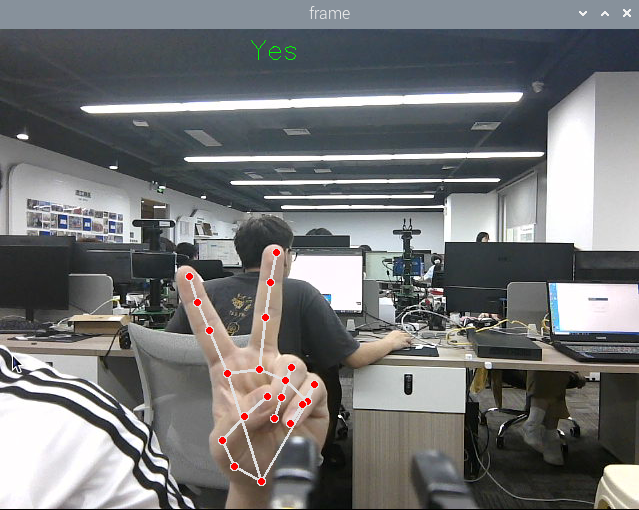
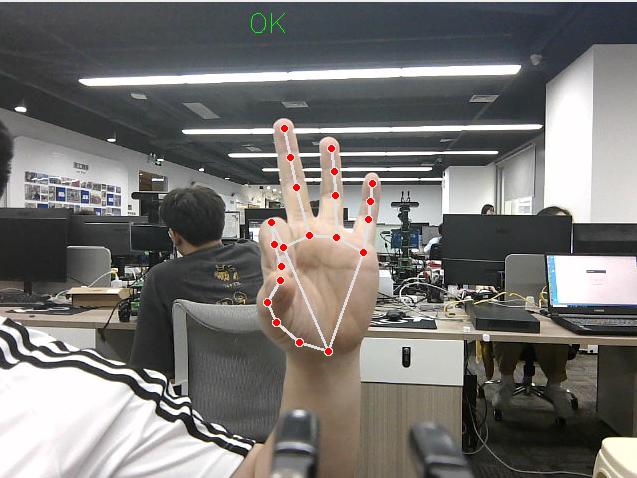
Tip
To prevent accidental triggering, the program is built in with a stability counting filter of 5 consecutive frames (Count >= 5). Please stably hold the gesture in the image for about 0.5 seconds. After the trigger log is printed in the terminal, the robotic arm will smoothly execute the corresponding handling action. You can press Ctrl+C in the terminal or Q in the image window to exit.
4. Core Code Analysis
Source code path: yahboomcar_ws/src/yahboomcar_mediapipe/yahboomcar_mediapipe/16_GestureGrasp.py
4.1 Node Initialization and Multi-camera Topic Adaptation
ximport rclpyfrom rclpy.node import Nodefrom sensor_msgs.msg import Imagefrom cv_bridge import CvBridgefrom dofbot_pro_interface.msg import ArmJoints, ArmJointfrom dofbot_pro_driver.media_library import HandDetector
class Hand(Node): def __init__(self, name): super().__init__(name) self.hand_detector = HandDetector() self.rgb_bridge = CvBridge() # Publishers for the 6-axis and single-joint control of the robotic arm self.TargetAngle_pub = self.create_publisher(ArmJoints, "arm6_joints", 10) self.pub_SingleTargetAngle = self.create_publisher(ArmJoint, "arm_joint", 10) # Automatically determine the camera type and subscribe to the RGB image camera_type = os.getenv('CAMERA_TYPE', 'nuwa') topic_name = '/ascamera_hp60c/camera_publisher/rgb0/image' if camera_type == 'nuwa' else '/usb_cam/image_raw' self.sub_rgb = self.create_subscription(Image, topic_name, self.get_RGBImageCallBack, 1)4.2 Five-consecutive-frame Anti-shake Determination and Action Multithreading Decoupling
To prevent the robotic arm action from blocking image rendering, after a stable gesture is recognized, a Daemon child thread is started to asynchronously execute the robotic arm time-sequence control:
xxxxxxxxxxdef get_RGBImageCallBack(self, msg): rgb_image = self.rgb_bridge.imgmsg_to_cv2(msg, "bgr8") frame, lmList, _ = self.hand_detector.findHands(rgb_image) if len(lmList) != 0: gesture = self.hand_detector.get_gesture(lmList) # Yes gesture, 5-frame anti-shake counting if gesture == 'Yes': self.Count_One += 1 if self.Count_One >= 5 and not self.move_state: self.move_state = True self.Count_One = 0 threading.Thread(target=self.arm_ctrl_threading, args=(gesture,), daemon=True).start() # OK gesture, 5-frame anti-shake counting elif gesture == 'OK': self.Count_Five += 1 if self.Count_Five >= 5 and not self.move_state: self.move_state = True self.Count_Five = 0 threading.Thread(target=self.arm_ctrl_threading, args=(gesture,), daemon=True).start()4.3 Time-sequence Planning of the Grab and Place Action Group
def arm_ctrl_threading(self, gesture): # OK gesture: carry to the left placement area and release the material if gesture == 'OK': move_joints = [163, 111, 0, 53, 90, 135] self.pubSix_Arm(move_joints) time.sleep(2.0) self.pubSingleArm(6, 30) # Open the gripper to 30° to release the material time.sleep(2.0) self.pubSix_Arm(self.init_joints) # Yes gesture: dive forward to the work area to grab the material elif gesture == 'Yes': self.pubSingleArm(6, 30) # Open the gripper in advance time.sleep(2.0) move_joints = [90, 15, 65, 20, 90, 30] # Dive posture self.pubSix_Arm(move_joints) time.sleep(2.0) self.pubSingleArm(6, 135) # Close the gripper to firmly grip the material time.sleep(2.0) self.pubSix_Arm(self.init_joints) # Lift and return to the home position self.move_state = False