yahboom
HomeTutorialsProduct
Solution
Blog
Online Store
About Us
EN/中文
Store
ROSMASTER A1 PRO📖
00.Configuration and Operation Guide
  • 0. Unboxing and Review
  • 1.Assembly Videos
  • 2.User Manual
  • 3.Enter Docker (For Raspberry Pi)
  • 4.A1Pro Front Wheel Servo Calibration
  • 5.USB Camera Calibration
  • 6.Depth Camera Calibration
  • 7.FAQ
  • 8.Desktop Configuration Center and Remote Control Guide
01.Chassis Control Course
  • 1.Robot Information Publishing
  • 2.Robot Handle Control
  • 3.Robot Keyboard Control
  • 4.Linear Velocity Calibration
  • 5.Angular Velocity Calibration
  • 6.Robot URDF Model
  • 7.Robot EKF State Estimation
02.Lidar Course
  • 1.Lidar Introduction and Use
  • 2.Lidar Obstacle Avoidance
  • 3.Lidar Following
  • 4.Lidar Patrol
  • 5.GMapping-SLAM Mapping
  • 6.Cartographer-SLAM Mapping
  • 7.Slam-Toolbox Mapping
  • 8.Lifelong Mode Mapping
  • 9.Navigation2 Single Point Navigation
  • 10.Navigation2 Multi Point Navigation
  • 11.Cartographer Relocalization Navigation
  • 12.Slam-Toolbox Localization Navigation
  • 13.Synchronous Mapping And Navigation
  • 14.Aruco Visual Relocalization Navigation
  • 15.Mobile App Mapping And Navigation
  • 16.AprilTag Transport
  • 17.Color Block Transport
03.USB Camera-Depth Camera Course
  • 1.USB Camera Introduction
  • 2.USB Camera Intrinsic Calibration
  • 3.Nuwa-HP60C Camera Introduction (Depth Camera Only)
  • 4.Depth Camera Distance Measurement (Depth Camera Only)
  • 5.Depth Pseudo Color Image (Depth Camera Only)
  • 6.Block Volume Calculation (Depth Camera Only)
  • 7.Edge Detection (Depth Camera Only)
  • 8.RTAB-Map SLAM Mapping (Depth Camera Only)
  • 9.RTAB-Map Navigation (Depth Camera Only)
04.Robotic Arm and 3D Space Gripping Course
  • 0.Robotic Arm Basic Usage
  • 1.Robotic Arm Kinematics
  • 2.Robotic Arm Chassis Coordination Control
  • 3.AprilTag ID Sorting
  • 4.AprilTag Height Anomaly Sorting
  • 5.AprilTag Tracking and Grasping
  • 6.Color Block Sorting
  • 7.Color Block Height Anomaly Sorting
  • 8.Color Block Tracking and Grasping
  • 9.Wood Block Shape Sorting
  • 10.KCF Tracking and Grasping Objects
  • 11.Mediapipe Gesture ID Sorting AprilTag
  • 12.Mediapipe Gesture Height Sorting AprilTag
  • 13.Desktop Tracking and Grasping AprilTag
  • 14.3D Spatial Tracking AprilTag
  • 15.Line Following Obstacle Clearing
  • 16.Transformer Model Tracking Algorithm
05.Road Network Planning and Navigation
  • 1.Introduction To Road Network Planning
  • 2.Road Network Annotation
  • 3.Planning And Navigation Between Waypoints
  • 4.Road Network Navigation In Any Pose
  • 5.Path Re-planning
06.OpenClaw Basic Course
  • 1.Introduction to OpenClaw
  • 2.OpenClaw Core Concepts
  • 3.OpenClaw API-KEY Configuration
  • 4.OpenClaw Switch Models
  • 5.OpenClaw System Prompt Words
  • 6.OpenClaw Common CLI Commands
07.OpenClaw Interaction Method
  • 1.OpenClaw Webchat Interaction
  • 2.OpenClaw Tui Interaction
  • 3.OpenClaw Voice Dialogue Interaction
  • 4.OpenClaw WhatsApp Interaction
08.OpenClaw Development
  • 1.OpenClaw Connecting to Robot MCP Service
  • 2.Robot CLI Command Tool
  • 3.robot-control plugin tool
  • 4.reply-bridge plugin tool
  • 5.OpenClaw Multimodal Vision
  • 6.OpenClaw Chassis Control
  • 7.OpenClaw Robotic Arm Control
  • 8.OpenClaw Skills Development
  • 9.OpenClaw Scheduled Tasks
  • 10.OpenClaw Multi-Agent Intelligent Agent
  • 11.OpenClaw Active Interaction
  • 12.OpenClaw Vector Memory
09.OpenClaw Embodied Intelligent Application
  • 1.OpenClaw Target Tracking
  • 2.OpenClaw Arm Tracking And Grasping
  • 3.OpenClaw Arm Fixed-point Placement
  • 4.OpenClaw Waste Sorting
  • 5.OpenClaw SLAM Mapping And Navigation
  • 6.OpenClaw Navigation Transport
  • 7.OpenClaw AprilTag Grasping
  • 8.OpenClaw Color Line Patrol
  • 9.OpenClaw Visual Distance Measurement
10.OpenClaw Scenario Sandbox
  • 1.Map Description and Prop Placement
  • 2.Build Sand Table Map
  • 3.Visual Relocation Markers
  • 4.Map Mapping Markers
  • 5.OpenClaw Scenario Sandbox Comprehensive Case
11.AI Model Basics
  • 1.AI Large Model Types and Principles
  • 2.RAG Retrieval Enhancement and Model Training Samples
  • 3.Embodied Intelligent Robot System Architecture
  • 4.Embodied Intelligent Functions Core Source Code
12.AI Model Development
  • 1.Register a Model Service Provider Aaccount
  • 2.Configuring API-KEY
  • 3.Introduction to Dify
  • 4.Basic Dify Features
  • 5.AI Large Model Development - chatbot
  • 6.Deploy the RAG Knowledge Base
  • 7.RAG Knowledge Base + chatbot
  • 8.AI Agent Workflow
  • 9.Custom Wake-up Response
13.AI Model - Text Version
  • 1.Semantic Understand and Command Follow
  • 2.Multimodal Visual Understand
  • 3.Multimodal Visual Understand + Robotic Arm Gripping
  • 4.Multimodal Visual Understand+SLAM Navigation
  • 5.Robotic Arm Gripping+Multimodal Visual Understand+SLAM Navigation
  • 6.Intention Estimation
14.AI Model - Voice Version
  • 1.Semantic Understand and Command Follow
  • 2.Multimodal Visual Understand
  • 3. Multimodal Large Model+Robotic Arm Gripping
  • 4.Multimodal Visual Understand+SLAM Navigation
  • 5.Robotic Arm Gripping+Multimodal Visual Understand+SLAM Navigation
  • 6.Intention Estimation
15.Mediapipe Visual Course
  • 1.Hand Detection
  • 2.Posture Detection
  • 3.Overall Detection
  • 4.Facial Landmark Detection
  • 5.Face Detection
  • 6.Face Special Effects
  • 7.3D Object Recognition
  • 8.Brush
  • 9.Finger Control
  • 10.Palm Target Positioning
  • 11.Fingertip Trajectory Recognition
  • 12.Fingertip Gesture Control Cobotic Arm
  • 13.Gesture Grabbing and Releasing Objects
  • 14.Finger Control Robotic Arm
  • 15.Medipipe Gesture Control Robotic arm Cction Group
16.MoveIt2 Simulation Course
  • 1.MovelT2 Configuration
  • 2.MovelT2 Simulation-Reality Linkage
  • 3.Random Movement
  • 4.Forward Kinematics Design
  • 5.Inverse Kinematics Design
  • 6.Cartesian Path
  • 7.Scene Design
  • 8.Trajectory Planning
  • 9.Collision Detection
  • 10.3D Perception Obstacle‑Avoidance
17.Multi-vehicle Course
  • 1.Multi-vehicle Control
  • 2.Multi-vehicle Navigation
  • 3.Multi-vehicle Formation
18.YOLO26 Development
  • 1.CLI Use
  • 2.Object Detection
  • 3.Instance Segmentation
  • 4.Pose Estimation
  • 5.Image Classification
  • 6.Oriented Object Detection
  • 7.YOLOv26 + DeepSORT Tracking
  • 8.Monocular Depth Estimation
19.Control Board STM32 Driver Course
  • 0.Notes (Must Read)
  • 1.About Expansion Board
  • 2.STM32 Development Environment
  • 3.Button Control
  • 4.FreeRTOS Application
  • 5.Serial Communication
  • 6.SBUS Model Aircraft Remote Control
  • 7.CAN Bus Communication
  • 8.RGB Colorful Light Bar
  • 9.Timer Interrupt to Control PWM Servo
  • 10.Control Serial Port Servos
  • 11.Nine-axis Attitude Sensor to Obtain Data
  • 12.Control Motor
  • 13.Timer Captures the Encoder Data
  • 14.1 Kinematic Analysis of Mecanum Wheel
  • 14.2 Kinematic Analysis of Ackerman
  • 14.3 Kinematic Analysis of 4WD
  • 15.PID Control Robot Movement
20.Docker Course
  • 1.Docker Introduction and Installation
  • 2.Docker Basic Commands
  • 3.Docker Submission and Multi-Terminal Access
  • 4. Docker Startup Script
  • 5.Docker-Vscode Environment Construction
21.Image Processing Basics Course
  • 1. Introduction to Open Source CV
  • 2. Image reading and display
  • 3. Image writing
  • 4. Image quality
  • 5. Pixel Operation
  • 6. Image zoom
  • 7. Image cutting
  • 8. Image translation
  • 9. Image Mirroring
  • 10. Affine Transformation
  • 11. Image Rotation
  • 12. Perspective Transformation
  • 13. Grayscale processing
  • 14. Image Binarization
  • 15. Edge Detection
  • 16. Line drawing
  • 17. Rectangle and circle drawing
  • 18. Drawing text and pictures
22.Linux System Course
  • 1.Introduction to Linux system
  • 2.Ubuntu file system
  • 3.Ubuntu common commands
  • 4.Ubuntu common editors
  • 5.Ubuntu software operation commands
  • 6.Virtual machine installation
  • 7.SSH remote control
  • 8.VNC remote control
  • 9.Transfer files remotely
  • 10.Driver library and communication
  • 11.Static IP and hotspot mode
  • 12.Bind device ID
  • 13.Capacity expansion and resource allocation
  • 14.Update system software sources
  • 15.Set root user password
  • 16.sudo free password
  • 17.Connect to WiFi network
  • 18.View system version
  • 19.Customized service management
  • 20.Back up system image
23.ROS2 Basic Course
  • 1.Introduction to ROS2
  • 2.ROS2 install Humble
  • 3.ROS2 development environment
  • 4.ROS2 workspace
  • 5.ROS2 function package
  • 6.ROS2 node
  • 7.ROS2 topic communication
  • 8.ROS2 service communication
  • 9.ROS2 action communication
  • 10.ROS2 custom interface message
  • 11.ROS2 parameter service case
  • 12.ROS2 meta-function package
  • 13.ROS2 distributed communication
  • 14.ROS2 DDS
  • 15.ROS2 time related API
  • 16.ROS2 common command tools
  • 17.ROS2 rviz2 use
  • 18.ROS2 rqt toolbox
  • 19.ROS2 Launch startup file configuration
  • 20.ROS2 recording and playback tool
  • 21.ROS2 URDF model
  • 22.ROS2 Gazebo simulation platform
  • 23.ROS2 TF2 coordinate transformation
24.Main Control Course
Jetson Orin Nano_NX
  • 1.Jetson Orin board introduction
  • 2.Restore the factory image system
  • 3.Backup SSD system
  • 4.SSD expansion
  • 5.Network configuration
  • 6.SSH remote login
  • 7.VNC remote control
  • 8.Remote file transfer
  • 9.Jtop tool
  • 10.Exchange space expansion
Raspberry Pi
  • 1. Introduction to Raspberry PI 5
  • 2. Raspberry PI system installation and backup
  • 3. Powering the Raspberry PI 5
  • 4. Startup of Raspberry PI 5
  • 5. Update and upgrade operating system
  • 6. Introduction to raspi-config tool
  • 7. config.txt file description
  • 8. Network Configuration
  • 9. remote access
  • 10. Transfer files remotely
  • 11. Set display resolution and rotation
  • 12. Set screen to sleep
  • 13. Play audio and video
  • 14. Using USB camera
  • 15. Using MIPI camera
  • 16. Get real-time temperature of Raspberry Pi
RDKX5
  • 1.Introduction to RDK X5 board
  • 2.Write system file
  • 3.Hardware interface description
  • 4.Install case and other accessories
  • 5.Network configuration
  • 6.Remote login
  • 7.Update system
  • 8.srpi-config user guide
  • 9.config. txt configuration file
  • 10.Self-startup setting
  • 11.RDK exclusive command usage
  • 12.Linux command usage
  • 13.GPIO readwrite operation
  • 14.Image classification algorithm
  • 15.Use USB camera
  • 16.Use MIPI camera
  • 17.Binocular camera depth algorithm
  • 18. Controlling RGB Cooling Fans
Download
  • SystemFile
  • Code
  • 3D_Model_File
  • Software_Tools
  • Hardware_Info
  • Introduction_Manual
  • Script_File
  • Dify AI Agent
Download ZIP

Welcome to ROSMASTER A1 PRO repository

5.Depth Pseudo Color Image (Depth Camera Only)

🌈 Depth Pseudo Color Image Rendering (Depth to Color)

1. Course Content

By subscribing to the raw single-channel depth data from the Angstrong Nuwa-HP60C depth camera (/ascamera_hp60c/camera_publisher/depth0/image_raw), use OpenCV's colormap algorithm to perform pseudo-color rendering on the continuous depth space, generating a heatmap that intuitively reflects the depth of objects.

Important

This course is only applicable to users with the Angstrong Nuwa-HP60C Depth Camera version.


2. Preparation and Running

This case requires opening 2 terminals to start the camera driver and pseudo-color rendering node respectively:

2.1 Start Camera Low-level Driver

Run in Terminal 1:

ros2 launch ascamera hp60c.launch.py
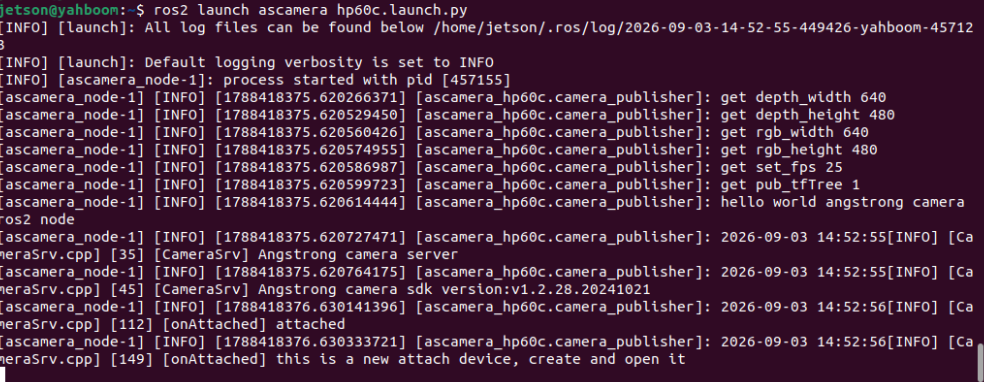
image-20260903145306038

2.2 Start Pseudo Color Image Rendering Node

Run in Terminal 2:

xxxxxxxxxx
ros2 run yahboomcar_depth depth_to_color
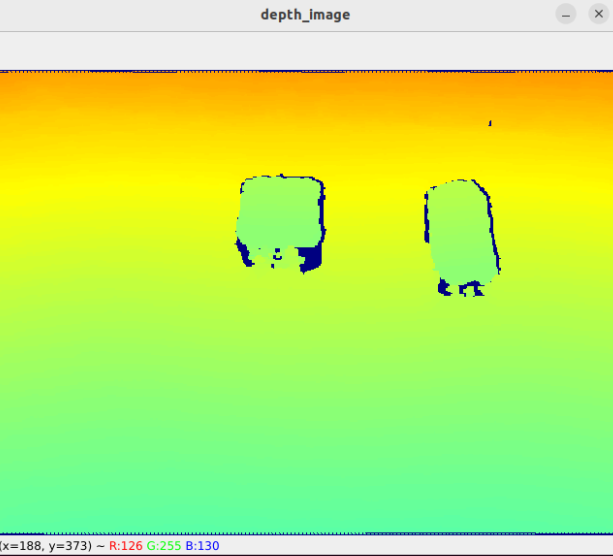
image-20260903145328865

3. Core Source Code Analysis

Source Code Path:

xxxxxxxxxx
$HOME/yahboomcar_ros2_ws/yahboomcar_ws/src/yahboomcar_depth/yahboomcar_depth/Basic/depth_to_color.py
​x
class DepthToColor(Node):
    def __init__(self):
        super().__init__('depth_to_color')
        # 1. Subscribe to Nuwa depth image topic (16UC1 / 32FC1 millimeter unit)
        self.sub = self.create_subscription(
            Image, '/ascamera_hp60c/camera_publisher/depth0/image_raw', self.topic, 10)
        self.window_name = 'depth_image'
        self.depth_bridge = CvBridge()

    def topic(self, msg):
        # 2. Convert ROS depth image to 32-bit single-precision floating point matrix
        depth_image_orin = self.depth_bridge.imgmsg_to_cv2(msg, '32FC1')
        
        # 3. Linear grayscale stretch and convert to 8-bit single-channel image (alpha adjusts contrast scaling)
        depth_scaled = cv.convertScaleAbs(depth_image_orin, alpha=0.45)
        
        # 4. Apply JET classic scientific pseudo-color mapping (red for near, blue for far)
        depth_to_color_image = cv.applyColorMap(depth_scaled, cv.COLORMAP_JET)
        
        # 5. Render and display
        cv.imshow(self.window_name, depth_to_color_image)
        cv.waitKey(1)

3.1 OpenCV Common Colormap Description

cv.applyColorMap supports multiple classic pseudo-color palettes:

Colormap MacroColor Gradient StyleApplicable Scenario
cv.COLORMAP_JETBlue → Cyan → Yellow → Red (classic heatmap)3D depth camera depth visualization (default)
cv.COLORMAP_VIRIDISBlue-purple → Green → Yellow (modern perceptually uniform colormap)Scientific visualization and high contrast imaging
cv.COLORMAP_HOTBlack → Red → Yellow → WhiteThermal imaging and high dynamic temperature mapping
cv.COLORMAP_BONEBlack → Blue-gray → WhiteSimilar to X-ray grayscale medical style
cv.COLORMAP_RAINBOWRed → Orange → Yellow → Green → Blue → PurpleRainbow color multi-band high contrast differentiation
Depth Camera Distance Measurement (Depth Camera Only)
Block Volume Calculation (Depth Camera Only)

COMPANY

  • About us
  • Team Style
  • Blog

LEARNING & EXPLORATION

  • Tutorials
  • Edge AI hardware
  • Educational robots
  • Embedded intelligent hardware

WHERE TO BUY

  • Yahboom Online Store
  • Amazon
  • Alibaba
  • AliExpress
  • Mercado

TECHNOLOGY SUPPORT

  • Email: support@yahboom.com

BE A DISTRIBUTOR

  • Email: sales@yahboom.com
QR Code

Copyright © 2017-2026 Yahboom. All Rights Reserved.

EN/中文